

Script error in a chm file when printing to PDF
Hi,
Did a quick search to see if this question has been posted and answered before in a RoboHelp forum. I'm sure Peter Grainge, the RoboHelp guru, will know the answer.
I'm having scripting problems trying to print a .chm file on my computer. Not all .chms on my computer have the problem. Only this particular one that a developer gave to me that he produced from Sandcastle. I want to print the entire .chm contents to PDF.
When I click Print on the .chm toolbar and choose "Print the selected topic" in the Print topics dialog box,
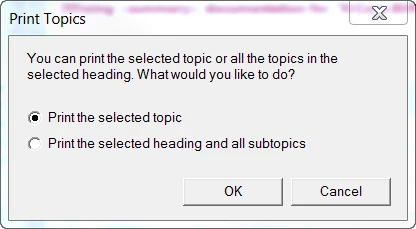
All works as expected. I can choose the Adobe PDF printer as my printer and create a PDF.
However, if I try to print by selecting Print the selected heading and all subtopics
I get a ton of scripting errors, like this one:

Is this something I can fix on my side or does the developer need to change settings in Sandcastle? I thought it might be the hhctrl.ocx Active X control on my machine, but it exists on my machine and seems to be registered.
I know this a RoboHelp forum, but I figured this is a general enough problem that has occurred many times in RH.


 AdChoices