
Inspiring
November 11, 2011
Question

Script error when viewing two specific topics from application

  • November 11, 2011
  • 2 replies
  • 1024 views

We are connecting a web help project to an application. We are getting the following rather non-descript scrip error when launching two of the help toics from the application.
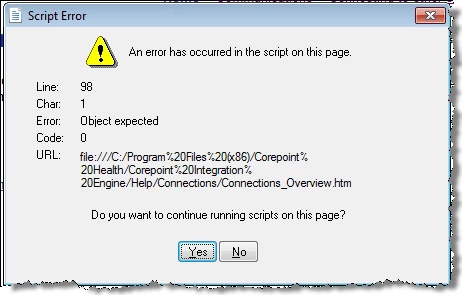
Continued strange behavior is that we do not get this error if we launch the index_csh file from Window's explorer and navigate to the topic or launch the topic itself by clicking on the file itself. Any ideas? We have hooked up a .chm file in the past.

This topic has been closed for replies.

2 replies

NDRHelpAuthor
Inspiring
November 14, 2011

Additional information - maybe this will help spark someone's thoughts! I noticed today that the topics where I am getting the script errors all have glossary hotspots in them. So, we are calling the webhelp from an application and on the ones where there are glossary hotspots, we get the error message. I do not get the error message when I open the help file via windows explorer.

Captiv8r
Legend
November 14, 2011

Hi there

Do the errors disappear if you remove the hotspots?

You said:

So, we are calling the webhelp from an application and on the ones where there are glossary hotspots, we get the error message. I do not get the error message when I open the help file via windows explorer.

So you are saying the WebHelp is stored locally? Is the application the WebHelp supports stored locally too?

Does the same thing happen if you insert an expanding DHTML hotspot?

Cheers... Rick

Helpful and Handy Links

RoboHelp Wish Form/Bug Reporting Form

Begin learning RoboHelp HTML 7, 8 or 9 within the day!

Adobe Certified RoboHelp HTML Training

SorcerStone Blog

RoboHelp eBooks

NDRHelpAuthor
Inspiring
November 15, 2011

Thanks for your response Rick. The help files and software are installed locally. More investigation has produced additional information. So, what is happening is that the expanding text is not working. In the application I was getting a script error but in explorer it wasn't erroing but the expanding text link did not work. The developer has changed the code that calls the help so I am now getting the same behavior no matter how I view it. So, I am no longer getting the script error but the expanding text does not work.

The odd thing is that the project works fine when I compile it on my authoring machine using the command line compile or GUI compile but when it is compiled on our software build machine, via the command line compile, it is not working. Upon further investigation we have discovered that the ehlpdhmt.js file is missing in the compiled project done on the software build machine. When the developer copied this file into the webhelp directory on the build machine, the glossary hot spot links work.

Any idea why this file would not be included in the webhelp directory created by RoboHelp on the software build compile machine during the command line compile? It is the same project pulled from source control and put on the build machine so there are no differences in the project itself. I'm trying to figure out if something in the environment is causing this or what. It actually has this undesirable behavior on the software build machine and my developer's machine of not including the ehlpdhmt.js file in the compiled web help file. So, I don't know why my authoring environment seems to behaving nicely but these two othere environments are not.

I appreciate any ideas you can provide me with. We don't want to manually copy the file in - we want it to just be part of the webhelp directory upon compile.

Thanks,

Nita


Willam van Weelden
Inspiring
November 11, 2011

Hi,

What is the code on and around line 98 in the topics that produce the error?

Greet,

Willam

NDRHelpAuthor
Inspiring
November 11, 2011

Cool question William! Unfortunately, in the help topic there are only about 60 lines of code. This makes me wonder even more about this error.