
Inspiring
May 18, 2016
Answered

Script error (whtopic.js) when opening a topic that contains an embedded video (iFrame)

  • May 18, 2016
  • 1 reply
  • 830 views

Hello!

Facts first: RoboHelp HTML 11.0.4.291 / SSL=WebHelp / Windows 8.1 / IE 11.0.9600.18283. And I have searched this forum (and the whole WWW, actually) for an answer, but to no avail.

And: English is not my mother tongue and I'm working with the German version of RoboHelp; I hope you'll understand my problem anyway. 😉

I'm working with a project that contains Map IDs for context sensitive opening of topics. All of a sudden, we seem to have a problem when a context sensitive topic is being opened, but only, when this topic contains an embedded video (iFrame), which is linked to our channel on YouTube (when I delete the embedded video, the error does not pop up anymore, so the reason for this problem has to be the video). I'm getting a script error regarding the file whtopic.js, but this script error is not really helpful, because it only shows 0 for line, character and code (see Image below):
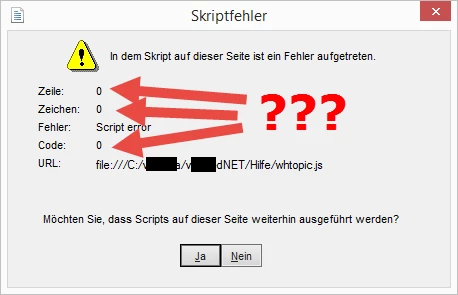
When I click Yes in this error message, the topic is shown correctly and I can play the embedded video, but the navigation pane is not shown. I have to click Show in the top left corner, then everything seems to be ok.

Has anybody got an idea, what's causing this problem? And how can I avoid this script error message? If I cannot solve this, I think I'll delete all the embedded videos and just provide a link to the video on YouTube.

Your help is much appreciated.

Thank you and greetings from Switzerland,

Kurt

This topic has been closed for replies.
Correct answer Kurt V.

Hi Kurt,

I've tried it locally, but I can't reproduce the issue. It just seems to work on my end, even with CSH.

Would it be possible for you to share the project with me? Perhaps I'm doing something different from what you are doing in the project. You can contact me at contact [at] wvanweelden [dot] eu.


Even though I sent two html files to Willam, he cannot reproduce this error.

I therefore close this thread, although it has unfortunately not been resolved.

@Willam: thanks very much for your support!

1 reply

Willam van Weelden
Inspiring
May 21, 2016

Does this also occur if you place the help on a web server? Or only when placing it locally?

Also, how did you embed the video? Did you take the embed code from YouTube?

Kurt V.Author
Inspiring
May 23, 2016

Good morning Willam

This only seems to happen when I place it locally (I also have it on a webserver, and when I open the topic there (manually, not via context-sensitivity), everything is fine.

And yes, I took the embed code from YouTube.

I hope you'll find the solution!

Greetings,

Kurt

Willam van Weelden
Inspiring
May 30, 2016

Hi Kurt,

I've tried it locally, but I can't reproduce the issue. It just seems to work on my end, even with CSH.

Would it be possible for you to share the project with me? Perhaps I'm doing something different from what you are doing in the project. You can contact me at contact [at] wvanweelden [dot] eu.