
Participating Frequently
May 24, 2017
Question

Scroll Bar has disappeared in Search Results, IE

  • May 24, 2017
  • 1 reply
  • 557 views

I'm using RH 2015. I'm generating WebHelp Pro as my primary layout. I have indicated "Show Total Number of Search Results".

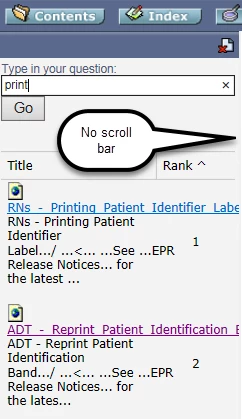
When reviewing my Search items in IE, it only lists a few of the search result items and no scroll bar to see the rest (see image).
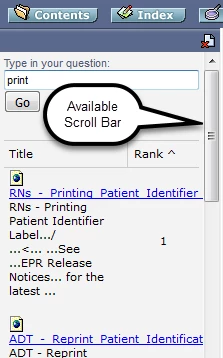
However, when I look at the Search item in Chrome or Firefox, the scroll bar is visible, enabling a user to look through all results (see image).
Why is this happening and how can I fix this? Our user base primarily used IE (various versions).

Help!

This topic has been closed for replies.

1 reply

Peter Grainge
Community Expert
Community Expert
May 24, 2017

Do you have RoboHelp Server installed on the server you are publishing to?

WebHelp Pro requires RoboHelp Server. If you don't have that, you need to use WebHelp.

Also do you have all the updates applied?


See www.grainge.org for RoboHelp and Authoring information

@petergrainge

Use the menu (bottom right) to mark the Best Answer or Highlight particularly useful replies. Found the answer elsewhere? Share it here.
Letizia_RAuthor
Participating Frequently
May 24, 2017

Yes, it’s posted to a server.

Letizia

Peter Grainge
Community Expert
Community Expert
May 24, 2017

Yes but does that server have RoboHelp Server installed? It's another piece

of software required by WebHelp Pro.

Without that, you need WebHelp, not the Pro output.

Use the menu (bottom right) to mark the Best Answer or Highlight particularly useful replies. Found the answer elsewhere? Share it here.