Inspiring
January 13, 2025
Answered

Search and Replace not working to clean up Source view

  • January 13, 2025
  • 3 replies
  • 230 views

RH 2022.5.28


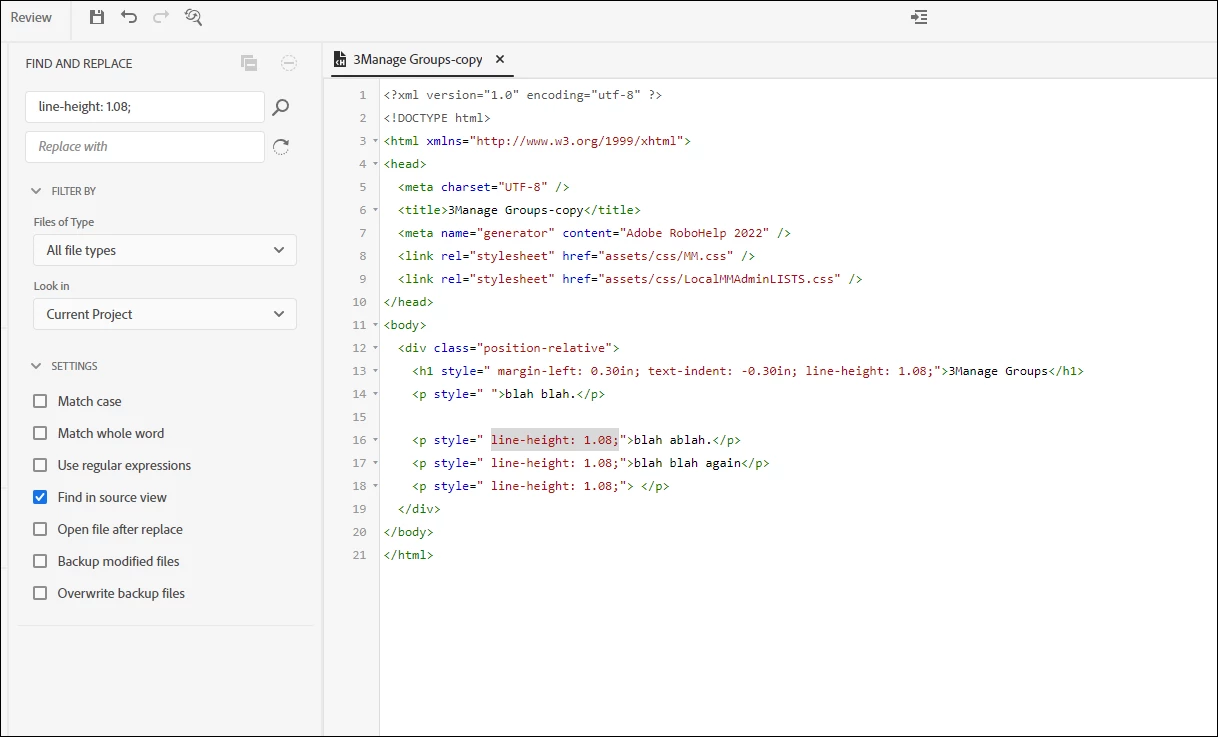
I've cleaned up a lot of word files to import into RH and I can live with it. Line spacing issues are a problem. I have to manually go into each file and delete the code "line-height: 1.08;" to get the spacing I have set up in my RH css file.

How do I get global Search and Replace to work instead of having to go into each Topic's source code and make the deletions there?


Thanks  in advance!


Below are my settings for the S&R, and I've tried other combinations, but nothing works.


    Correct answer frameexpert

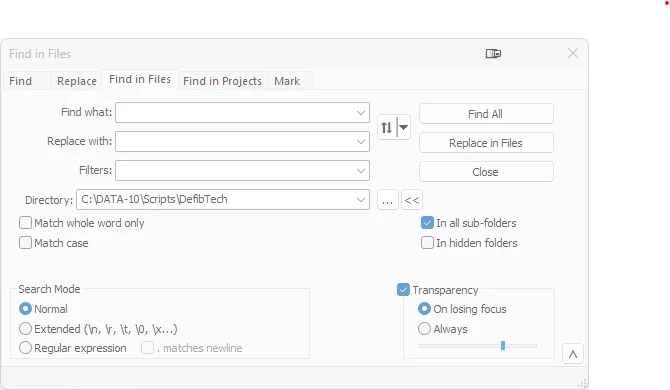
    Notepad++ (free, open source text editor) has a Find in Files feature that will allow you to process a whole folder of files at once. I strongly suggest backing up your files first.


    3 replies

    davidk99046111
    Inspiring
    January 15, 2025

    notepad++ or visual studio in you are on a mac.  Both allow you to import an entire folder(s) containing your topics.  the find and replace for all files works great.  The built in search for RH is very buggy - dont even bother.    

    Peter Grainge
    Community Expert
    Community Expert
    January 13, 2025

    Back up your project first rather than use Backup Modified Files, that creates duplicate files in the project that can create issues.


    The Find part is <p style=" line-height: 1.08;">


    The Replace is <p>


    Change Files of Type to Topics

    ________________________________________________________

    My site www.grainge.org includes many free Authoring and RoboHelp resources that may be of help.


    Use menu (bottom right) to mark as Best Answer or to Highlight particularly useful replies. Found the answer elsewhere? Share it here.
    Peter Grainge
    Community Expert
    Community Expert
    January 13, 2025

    @frameexpert just beat me to it but you can now make the change in RoboHelp and limit it to Topics.

    ________________________________________________________

    My site www.grainge.org includes many free Authoring and RoboHelp resources that may be of help.


    Use menu (bottom right) to mark as Best Answer or to Highlight particularly useful replies. Found the answer elsewhere? Share it here.
    frameexpert
    Community Expert
    frameexpertCommunity ExpertCorrect answer
    Community Expert
    January 13, 2025

    Notepad++ (free, open source text editor) has a Find in Files feature that will allow you to process a whole folder of files at once. I strongly suggest backing up your files first.