
November 7, 2013
Question

Search does not function well when 'Show results that include all search words' is selected

  • November 7, 2013
  • 3 replies
  • 553 views

Hi,

I am using RoboHelp 10 and have generated output in HTML5 format. Everything works fine as expected including Search.

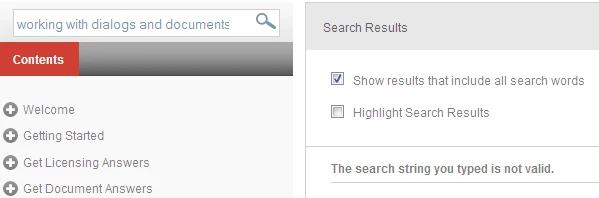
However, in some cases when i select the check box 'Show results that include all search words'. Search does not provide me the results.

We are typing the exact string present in TOC and still displays that there are no search results.

Please find screenshot attached. Is there any limitation that the string should contain only limited No. of characters?

Thanks in advance!

Santosh.
This topic has been closed for replies.

3 replies

Dimitri Desmyter
Participant
June 27, 2014

I have noticed similar behaviour with webhelp pro output from Robohelp 10.

Actually, the behaviour is that when you include certain prepositions (of, about, ...) or articles (a, the, an) in your search, there are no results.

Only when you remove those trigger words from your search, results suddenly appear. Other work arounds are to place your search between quotes or clear the Show results that include all search words check box.


However, no idea why this happens. I would be grateful for a solution (or an explanation).

surbhi_maheshwari9120543
Inspiring
July 11, 2014

This is happening due to the stop list in robohelp project settings. These words like if, of , about etc are present in the default list. Whenever search is done with option "show results that include all search words", if any word is present in stop list then no search results are shown.

And that is the reason why you are not able to search.

You have two options either to remove these words from the searched string or from the stop list.

Stop list is present at File>>Project Settings>>advanced>>stop list.

In stop list you can add the words which you don't want to be searched in the final output.

Hope it helps.

Thanks,

Willam van Weelden
Inspiring
November 9, 2013

What does the URL of the page show? I’m not aware of any forbidden characters, but perhaps there’s a quick somewhere.

Greet,

Willam

November 11, 2013

Hi William,

The URL is:http://acdtest.aia.org:800/!SSL!/Multiscreen_HTML5/desktop/searchresults.htm?rhsearch=Working%20with%20Dialogs%20and%20Documents

My search string is: Working with Dialogs and Documents

However, the search functions fine if I un-check Show results that include all search words check-box.

Santosh.

Jeff_Coatsworth
Community Expert
Community Expert
November 7, 2013

Does it work if you create plain WebHelp (vs. HTML5 webhelp)? If so, then you might want to poke around in the Multi-screen HTML5 forum.