
March 1, 2011
Question

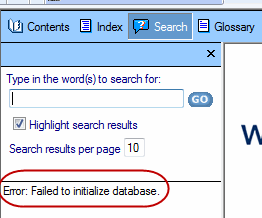
Search Error: Failed to initialize database

  • March 1, 2011
  • 6 replies
  • 16048 views

I have been using RH HTML version 8.02 for several months. Recently, after compiling, the Search results do not work. The Search tab shows Error: Failed to initialize database. This occurs when I compile locally and to the server. Running MJ's Diagnostics did not fix the problem.

Thanks.

Bill
This topic has been closed for replies.

6 replies

Inspiring
June 19, 2019

I am experiencing what may or may not be the same issue. I detected a problem with the search in a project I generated using RH 2019 Classic (Version 14.0.5.001).  The search sometimes returns the expected results and sometimes does not.  I sometimes get the message "No topics found" when I know topics exist that contain the search terms I am looking for.  The issue does not appear to be browser related.  When the search does not work, I get the same results in both IE and Chrome.

I deleted the .cpd file and regenerated the project.  I got the same results as before.

I have both RH 2019 Classic and RH 2015.  I decided to regenerate the project in RH 2015 (in case the issue was the result of using a different version of the software). When I generated the project and clicked the Search tab, the browser displayed the "Error: Failed to initialize database." message.  That's when I did the forum search and found this post.

Since I am not certain my problem is the same one identified in this post, I have not yet tried all the options listed in this post.  What I have done is delete the .cpd file and the files in the /!ssl!/ output folder for this project before regenerating the output files using both RH 2019 Classic and RH 2015.  To eliminate the possibility that I was seeing cached results, I also cleared cached files from IE and Chrome.

I did not uninstall/reinstall either version of the software; this action would require contacting the IT team, so I haven't tried it yet.

I never used .chm files, so this issue is not the result of a conversion from .chm files.  This project is also a standalone project, so there is no parent-child project relationship.

Thoughts?  Thanks!

Community Expert
June 20, 2019

First, check if you have the latest updates installed and see if that fixes the issue. I couldn't see any relevant fixes in the release notes, but you never know.

There is an issue with RH2019 New affecting phrase searches, but as far as I know that isn't a problem in RH2019 Classic (and I haven't tried with RH2015).

RH-3153

To check, you'd have to inspect the html to see if an html tag begins or ends part way through the phrase in the topic. It wouldn't necessarily be visible when just viewing the topic as normal.

Participant
April 27, 2016

I don't suppose anyone has a solution for this issue in RoboHelp 2015 that does not involve MSXML 4.0? My IT department does not allow end-of-lifed software like MSXML 4.0 on my machine. I upgraded from RH 11 to 2015 specifically to try to resolve this issue, but that appears to have been fruitless. Thanks!

Willam van Weelden
Inspiring
April 28, 2016

How did you install RoboHelp? I believe that when you run the installer on your computer (not auto install), the MSXML 4.0 gets installed as well. So not perfect, but it may get it to work.

You can submit a bug with Adobe to ask them to solve this in a new version: Home

Other than that, telling IT that you need this software to be able to do your job is the only option I can think of.

Participant
April 28, 2016

Thanks for responding, William. My IT department continuously seeks and removes MSXML 4.0, so a re-install only buys me a day or two of full functionality before it gets removed

I did go ahead and submit a bug to Adobe. If that fails, I suppose I'll either plead with IT for mercy or ask them to buy me a new help-system solution.

Known Participant
November 4, 2015

I experienced the same problem with RoboHelp 2015. Uninstalling and reinstalling RoboHelp did not resolve the problem; however, installing MSXML 4.0 Service Pack 2 and MSXML 4.0 Service Pack 3 Parser did solve the problem. Interestingly enough, MSXML 6.0 was installed on my laptop when I was experiencing this problem.

Known Participant
July 2, 2015

I had this problem in RH9 and 11. Here is what I did to fix it (Ashish at the Adobe Help Desk provided the names for the MSXML files to load...and a lot of troubleshooting as well. :-)).

1. Delete the .cpd file from the offending (affected) RoboHelp project folder.

2. If using RH11, ensure that RH11 is patched through 11.0.4.

3. Install the following Microsoft updates on your computer (the "KB" numbers are important. There are many updates with the same name, but different "KB" numbers):

-- MSXML 4.0 Service Pack 2 (KB954430)

-- MSXML 4.0 Service Pack 2 (KB973688)

-- MSXML 4.0 Service Pack 3 Parser (KB2758694)

4. Reboot your machine (even if it doesn't ask you to).

5. Regenerate your project.

Doing this worked for broken search functions in both my RH9 and RH11 projects.

Inspiring
October 6, 2015

lagonkd skrev:

I had this problem in RH9 and 11. Here is what I did to fix it (Ashish at the Adobe Help Desk provided the names for the MSXML files to load...and a lot of troubleshooting as well. :-)).

1. Delete the .cpd file from the offending (affected) RoboHelp project folder.

2. If using RH11, ensure that RH11 is patched through 11.0.4.

3. Install the following Microsoft updates on your computer (the "KB" numbers are important. There are many updates with the same name, but different "KB" numbers):

-- MSXML 4.0 Service Pack 2 (KB954430)

-- MSXML 4.0 Service Pack 2 (KB973688)

-- MSXML 4.0 Service Pack 3 Parser (KB2758694)

4. Reboot your machine (even if it doesn't ask you to).

5. Regenerate your project.

Doing this worked for broken search functions in both my RH9 and RH11 projects.

This solves the issue. I had about given up and exercised everything but woodoo. Your steps Work like a charm for Webhelp in RH11. Thanks Iagonkd!

Cheers,

Erik

Known Participant
April 12, 2016

Yeay!  Glad I could help!

Known Participant
May 4, 2011

Working in RH9 on Windows 7 in a merged project with WebHelp output, one of multiple child projects also displayed the Error: Failed to initial

ize database message in the child project's version of webhelp output.

In the master project > !SSL! > webhelp, opening index.htm and conducting a search on a term specific to the child project resulted in a failure to identify the content. This, despite the fact that the same term was active in the index and the topic was displayed in the workspace window of the help screen.

After multiple failures to resolved issue, the following solution worked.

1. Deleted .cpd.

2. Deleted all project folder > child project > !SSL! > output folders (i.e., deleted WebHelp, deleted Microsoft_HTML_Help, etc.)

3. Opened child project xpj.

4. Generated WebHelp and published.

5. Opened master project > !SSL! > webhelp. Clicked index.htm.

Voila' ! Success.

All honors belong to my manager who tried it first with one of my backups. I tried it with the current project and found it worked.

I might add that I was initially struck by the fact that the child project's webhelp files didn't include an index_1.htm file (while the other child projects' webhelp files did. Conversely, the problem child project webhelp included an index.opf and an OdinOption_IndexOnPpf.xml file not present in other child projects' webhelp files.

In the regenerated webhelp, the child project's own webhelp still lacks the index_1.htm, but doesn't display the opf and xml files referred to above. Meanwhile, the master project's > !SSL! > webhelp > mergedProjects > child project folder does now include the  index_1.htm. It doesn't hold the opf and xml files referred to above.

Hope this helps someone.

Participating Frequently
May 21, 2012

Using RH9.  A very recent fresh install on a WIN7 PC.

I am experiencing the same issue of generating Webhelp > Opening in IE8, and the search function does not work.  Instead I get the "Error: Failed to initialize database."  There is no master/child project.  It is a rather small project.  I am an experienced RH user, but previously we have used the CHM and printed output only. 

I tried the answer of deleting the CPD and the output directories, but no luck.

What other setting can be involved here? 

Thanks,

kb

Participant
June 8, 2012

I'm having exactly the same thing happening.  The search works fine in a CHM but fails in any other format (AIR, WebHelp,WebHelp Pro, etc.).  I found a thread that indicated this problem was related to having Chrome installed so I tried uninstalling it.  That didn't help either.  We really need to get this resolved or I will have to continue using CHM for the help files we are creating. 

Participating Frequently
March 2, 2011

To nail down the issue, can you please share the following information.

1) Is your table of contents loading correctly?

2) Is it a browser specific issue? Which browser are you using?

3) Go the <Output Folder>\whxdata folder. Please verify that following files are valid xml files

  • whfts.xml
  • topictableindex.xml
  • topictable_n.xml(where n= 0,1,2,3...)
  • packageindex.xml
  • package_n.xml(where n= 0,1,2,3...)
March 2, 2011

Please see my responses in brackets next to the questions. Thanks.

Jeff_Coatsworth
Community Expert
Community Expert
March 2, 2011

Better try that again - nothing came through in your post.