


Known Participant
Apr 14, 2015 5:32 PM UTC
Question

Search for WebHelp in Robohelp 11 Not Functioning Correctly

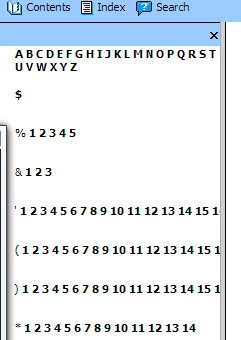
I just generated WebHelp using RoboHelp 11. I have the latest patch (11.04.291) installed. Unfortunately, the seach tab displays garbage as shown in the following screenshot. This occurs in both Chrome and IE. Is there a fix available for this condition? Thanks in advance.
This topic is closed to new replies. Start a new post to keep the conversation going.

6 replies

HarmaE
Participant
Apr 29, 2015 1:26 PM UTC

When I had this problem last week, the solution was to go to the WebHelp Settings (the dialog box that pops up before generating the WebHelp) > Navigation and check DHTML > Pure HTML as your Preferred Format, instead of Pure HTML. Perhaps this will solve your issue too.

Translate
Jeff_Coatsworth
Community Expert
Community Expert
Apr 14, 2015 6:08 PM UTC

Did you enable JS in your browser? Did you select Section 508 in your SSL recipe?

Translate
Known Participant
Apr 14, 2015 6:13 PM UTC

Thanks for replying Jeff. Yes, javascript is enabled AND Section 508 is specified.


Translate
Jeff_Coatsworth
Community Expert
Community Expert
Apr 14, 2015 6:28 PM UTC

It’s the Section 508 part that’s to blame I suspect…

Translate