Christos_K
Participant
August 25, 2015
Answered

Search function with multiple languages in web output yielding results in all languages

  • August 25, 2015
  • 1 reply
  • 427 views

I have an issue where the search function in my web output with multiple languages yields results in all languages. For example, if the user enters a word that might appear in all outputs regardless of the language, the results will display all the HTML pages for every language where it appears.

Is there a way to configure the web output so that if the user is viewing the English content, only the English HTML pages are displayed when using the search function?

Thanks,

Chris

Correct answer Captiv8r

Are you completely patched up in RH10? There may have been a bug that allowed leakage across DUCC


Hi there

Personally, I'm doubtful that a patch would resolve the issue. Perhaps it will, and it's certainly worth trying, but don't be too shocked if you find you need to apply the service release and nothing changes.

My own experience (as well as my gut) is whispering in my ear (or abdomen) that the most likely issue here is simple settings you configure before and during generating.

I've not seen any mention of the version of RoboHelp you are using here, so I'll use version 11 as it's most likely the most common version in use at the moment. And if you have 10 or 9 or even 2015 Release, the steps should be nearly identical.

When you look at the Single Source Layout settings, expand your Content Categories and select one. Note that for each of these, you have an ability to choose a Conditional Build Expression.
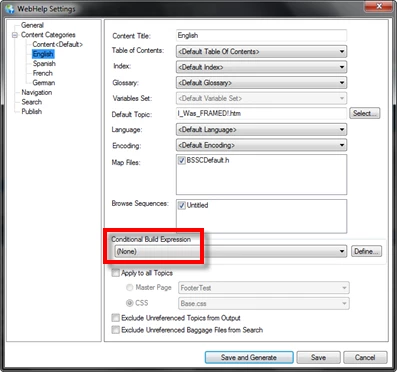
I point this out because if a conditional build expression causes items to not be included in the output, the items also should not appear in the search.

My thought here is that you need to carefully configure some Conditional Build Tags, then associate the tags with the topics that do not apply for each category. So, for English topics, create and associate a tag named "English". Same for other languages. Then when you prepare to generate, examine each category, click that Define button and exclude the languages that don't apply. So if you have four languages, perhaps English, Spanish, French  and German, and your category is for English, you would create a Build Expression that looks like this:
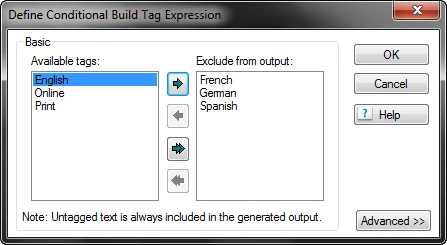
Give that a go and see how you fare.

Cheers... Rick

1 reply

Captiv8r
Legend
August 25, 2015

Hi Chris

What version of RoboHelp do you use? Recent versions offer up an ability called "Content Categories" whereby multiple iterations of your WebHelp are produced. This sounds like what you may be after. Each language would have its own unique WebHelp output.

Cheers... Rick

Christos_K
Participant
August 26, 2015

Hi Rick,

Thanks a lot for your response!

I'm using RoboHelp 10 and I actually used the "Content Categories" to produce the different versions of my WebHelp and each iteration has been configured for its own language.

Even though multiple iterations were created with individual and unique language configurations, I still run into this issue where the Search function does not only search in the iteration the user is using, but searches all of them.

Could this be a limitation of the search function where output has multiple iterations?

Thanks!

Jeff_Coatsworth
Community Expert
Community Expert
August 26, 2015

Are you completely patched up in RH10? There may have been a bug that allowed leakage across DUCC
