


Known Participant
Sep 19, 2014 5:16 PM UTC
Question

Search in WebHelp Generated with RoboHelp 9 Produces Gibberish

I used RoboHelp 9 to generate WebHelp. I applied Adobe's IE10 Patch for "Existing WebHelp created with RoboHelp 9" and the "IE10 patch for RoboHelp 9 installation" provided by William van Weelden. My Search results appear as gibberish (see below example). However, when I click on a number, a help topic appears. Weird huh? Any suggestions for a fix oh wise sages? Thanks in advance.
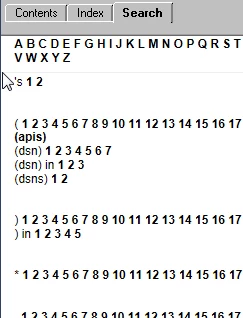
0 1 2 3 4 5 6 7 8 9 10 11 12

.5

/1 2 3

00b 1 2 3

00d

0100b 1 2 3

0100d

01s00 1 2

01s07 1 2

01s09 1 2

08p01

0b 1 2 3

0d

This topic is closed to new replies. Start a new post to keep the conversation going.

28 replies

Captiv8r
Legend
Sep 19, 2014 7:37 PM UTC

Hi there

What you shared isn't really "gibberish", although it probably looks that way to you.

What you are seeing is the "Pure HTML" or the "Section 508" type of output. It could be that you elected to use the Section 508 (and that means no skinning is involved) or the browser is reporting to the WebHelp JavaScript that it's not DHTML capable. And if that's the case, it falls back to Pure HTML.

Cheers... Rick

Translate
Known Participant
Sep 19, 2014 7:42 PM UTC

Not so Rick. I do not have Section 508 Compliant Output selected. I have DHTML>Pure HTML set as the preferred format.

Translate
Jeff_Coatsworth
Community Expert
Community Expert
Sep 19, 2014 7:49 PM UTC

Are you viewing the help on a web server or a LAN server (or local c:\ drive)?

Translate
Jeff_Coatsworth
Community Expert
Community Expert
Sep 19, 2014 5:34 PM UTC

What browser(s) have you tried & do they all act the same?

Translate
Known Participant
Sep 19, 2014 5:43 PM UTC

Does not work in IE10.

Works fine with Firefox.

None of the WebHelp works in Chrome, only the display of the title page.

Translate