
February 1, 2011
Question

Search not working in AIRHelp from AIR HTML container

  • February 1, 2011
  • 2 replies
  • 1492 views

Hi,

I'm working on an Adobe AIR application, and investigating integration AIRHelp into our app.  I found that deploying two separate air apps to be cumbersome to the user, so I'm looking at using AIRHelp in browser based mode, and then opening the url using the mx.controls.HTML control.  The browser based AIR Help launches ok, however, the print button and the search input doesn't work correctly.  Has anyone had this issue?  (However, when I run it from Chrome or IE, it's fine.)
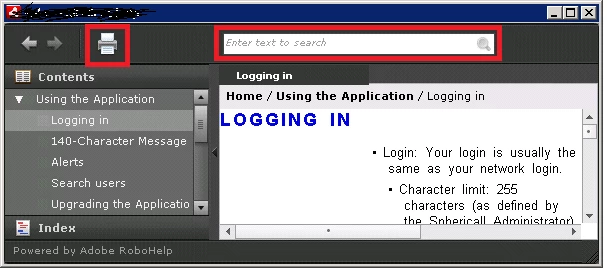
RED areas don't work.

My Flex code:

var helpUrl:String = "http://myserver/BrowserBasedHelp/xxx.htm";

var window:Window = new Window();

var html:HTML = new HTML();

html.location = helpUrl;

html.percentHeight = 100;

html.percentWidth = 100;

window.addChild(html);

window.title = "Client help";

window.width = 800;

window.height = 600;

window.showStatusBar = false;

window.open();

Thanks in advance,

-Tom

Message was edited by: Peter Grainge "based based" amended to "browser based"

    This topic has been closed for replies.

    2 replies

    Praful_Jain
    Participating Frequently
    February 2, 2011

    Hi,

    Browser based help is not designed to run inside a HTML control in a AIR application. having said that, you can do the following to make the search working for your case.

    I am pasting a sample code which will allow the search for browser based help to work.

    private function onCreationCompleteHTML(event:Event):void
    {
        var html:HTML=event.target as HTML;
        if (html != null && html.htmlLoader!=null)
        {
            var szUserAgent:String=html.htmlLoader.userAgent;
            szUserAgent=szUserAgent.replace("AdobeAIR", "");
            html.htmlLoader.userAgent=szUserAgent;
        }
    }

    private function launchHelpWindow():void
    {
        var helpUrl:String = "http://myserver/BrowserBasedHelp/xxx.htm";
        var window:Window=new Window();
        var html:HTML=new HTML();
        html.addEventListener(FlexEvent.CREATION_COMPLETE, onCreationCompleteHTML);
        html.location=helpUrl;
        html.percentHeight=100;
        html.percentWidth=100;
        window.addChild(html);
        window.title="Client help";
        window.width=800;
        window.height=600;
        window.showStatusBar=false;
        window.open();
    }

    This will solve the search issue you are facing, but print issue will still remain there.

    You can use the RoboHelp 9 skin editor, to make a print button icon similar to the background color and make it invisible. For that you need RoboHelp 9.

    Thanks

    Praful

    February 2, 2011

    Pratful_Jain,

    I tried it out and it looks like the search works!  Yeah, it doesn't seem like something that has been tested by Adobe, but it seems like it would be validate use case of AIR browser based help.  Why wouldn't someone want to use AIR Help from an AIR app?  As for the print button, I'm sure we can skin that out somehow.

    Thanks,

    -Tom

    Peter Grainge
    Community Expert
    Community Expert
    February 2, 2011

    As the AIR app has to be installed, it would seem more likely that desktop AIR help would be used, rather than browser based AIR help.


    See www.grainge.org for RoboHelp and Authoring tips

    @petergrainge

    Use the menu (bottom right) to mark the Best Answer or Highlight particularly useful replies. Found the answer elsewhere? Share it here.
    Peter Grainge
    Community Expert
    Community Expert
    February 2, 2011

    Tom

    I don't think you will get much help here on this one as it is really a developer question and most folks here are authors.

    There are some links on my site to developer information on Adobe's site for AIR help but I believe the information there is for desktop AIR help rather than browser based.


    See www.grainge.org for RoboHelp and Authoring tips

    @petergrainge

    Use the menu (bottom right) to mark the Best Answer or Highlight particularly useful replies. Found the answer elsewhere? Share it here.