
Inspiring
February 8, 2019
Question

Search Not Working when CHM Output

  • February 8, 2019
  • 1 reply
  • 1310 views

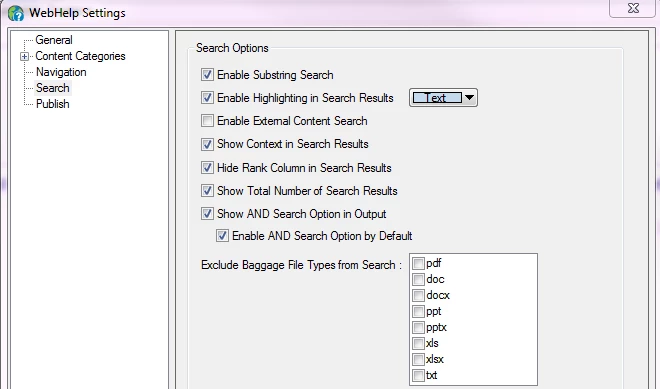
Asking question again. Recently updated to RoboHelp 2019. Primary Output is WebHelp. Search works perfectly. I then have to do Output of WebHelp to CHM because our software product running Help needs it in CHM. When I view CHM output, all the data is there, e.g. TOC, topics, etc. however, when I try to search nothing is retrieved. I'm having difficulty locating project settings for CHM output. I thought maybe it was issue with skin I used in RoboHelp 11, so I updated skin and still search only working in WebHelp output, not CHM. Below are my WebHelp Settings for Search
This topic has been closed for replies.

1 reply

Peter Grainge
Community Expert
Community Expert
February 8, 2019

It looks like you are talking about 2019 Classic, not the new UI version, correct?

I'm confused by why you are referring to WebHelp settings when the problem is with a CHM, also you talk about skins that are not native to the CHM output. Are you perhaps using the WebHelp to CHM converter script? You haven't mentioned it.

If that is what you are doing, then turn off the Enable Substring option before you generate, then try again.

If not, please clarify things for me.


See www.grainge.org for free RoboHelp and Authoring information.

@petergrainge

Use the menu (bottom right) to mark the Best Answer or Highlight particularly useful replies. Found the answer elsewhere? Share it here.
Inspiring
February 8, 2019

Yes I am using the WebHelp to CHM converter script. I will turn off Enable Substring and recompile.. Thanks