
Known Participant
February 27, 2014
Question

Search option slider buttons missing (RH11, IE10, responsive HTML)

  • February 27, 2014
  • 1 reply
  • 965 views

I am using RoboHelp 11, Internet Explorer 10. I generated a responsive HTML output using the default layout.

Problem: the slider buttons for the search options: "Highlight Search Results" and "Show results that include all search words" are missing. (see screenshot below)
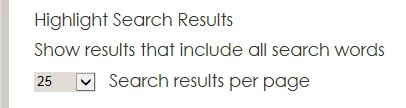
However, the slider buttons seem to show up when I use the "Government" layout.

(There doesn't seem to be responsive html forum, so I posted here.)

Thank you.

This topic has been closed for replies.

1 reply

Willam van Weelden
Inspiring
March 5, 2014

Did you make any changes to the layout prior to generating?

If you open the developer console (F12) and go to the console tab, do

you see any errors or warnings? My guess is that the browser can't find

the image.

Also, try this: Go to the layout in RoboHelp. Right click the default

layout and choose to add a new baggage file. Then select the slider

image as baggage file. Does that help?

Kind regards,

Willam

kennethc2Author
Known Participant
March 8, 2014

Thanks for the reply.

The only thing I changed was the @media statements in the layout css to reduce the minimum size for the desktop layout. (Is there an easier way to do that than directly editing the css?)

I didn't have time to fully try your suggestions. On quickly looking at the developer tools console, it only mentioned two unmatched bracket (>) errors, but I'm not sure that had anything to do with it. I also tried copying the image file into the output directory, but that didn't do anything.

I will take a closer look later next week and try your tips with the baggage file. I haven't been able to recreate the error anywhere else except on my work computer, so I may also just try to start over a project from scratch.

Willam van Weelden
Inspiring
March 12, 2014

To change the media queries, you need to go into the CSS. There is no

other way. (Also, the HTML5 editor MasterThemeSchema.xml file must be

updated, otherwise it won't recognize the updated media queries.)

First make sure that the slider image is available in the output. If

it's not, adding it as a baggage file will solve your problem.

Kind regards,

Willam