July 21, 2011
Question

Search page display errors

  • July 21, 2011
  • 1 reply
  • 503 views

I dont quite undersstand what is going on as I am new to Robohelp. I am using Robohelp 8 to generate webhelp file. I am consistantly running into 2 errors. The first is that after generating a layout every thing seems fine except for the search page it consistantly shows up as jumble of code.
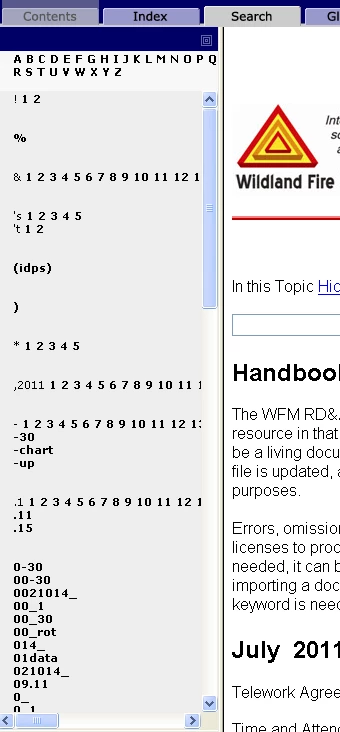
I dont know how to remedy this problem. Am I missing something?

The second problem which might be related is when I double click on the skin to edit it, this error message apears.

Thoughts?

This topic has been closed for replies.

1 reply

Captiv8r
Legend
July 21, 2011

Welcome to our community

The "jumbled code" implies that you are seeing the "Pure HTML" type of output. This may occur because you elected to use "Pure HTML" or it could be that your browser doesn't like JavaScript so the WebHelp fell back to this mode of presenting.

Where is your project located? Network or C drive? Is it source controlled? Do you have full admin rights to the content?

Cheers... Rick

Helpful and Handy Links

RoboHelp Wish Form/Bug Reporting Form

Begin learning RoboHelp HTML 7, 8 or 9 within the day!

Adobe Certified RoboHelp HTML Training

SorcerStone Blog

RoboHelp eBooks

July 21, 2011

Could it be possible to use "pure HTML " for only one of the pages? index, glossary and everything else is fine just the search. I checked it in IE and Mozilla. I have it located on the C drive. I dont know how to check if its source controlle, I am new to all this, but I would be glad to check if you can tell me how. I have full admin to everything as far as content goes.

Peter Grainge
Community Expert
Community Expert
July 22, 2011

Pure HTML is a setting you will find in the dialogs that you go through to create the help and it applies to the whole output. Why is Pure HTML so important to you? If the answer is that you don't know, then it probably doesn't matter what setting you use so try changing it.


See www.grainge.org for RoboHelp and Authoring tips

@petergrainge

Use the menu (bottom right) to mark the Best Answer or Highlight particularly useful replies. Found the answer elsewhere? Share it here.