Participant
November 30, 2023
Answered

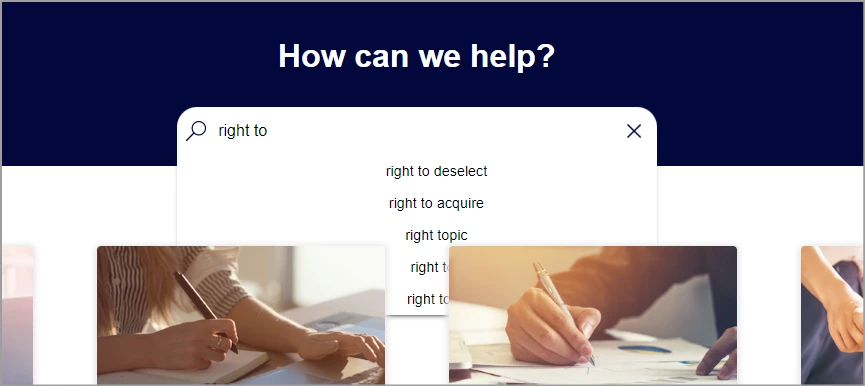
Search results display behind the TOC icons and can't be selected

  • November 30, 2023
  • 3 replies
  • 293 views

I published a Frameless project (using version 2022.3.93) but when using searching, the results display behind the TOC tiles.

To  make mattes worse you can only select the first 2 items on the search results.

See example below:


    This topic has been closed for replies.
    Correct answer Janet33956655mjft

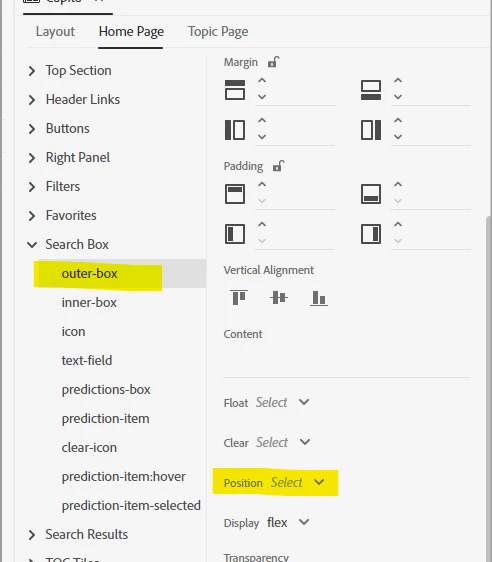
    Found the issue was the Position setting of the outer-box - it was set at Sticky. Once removed, all was OK.

    Thank you for your help.

    3 replies

    Peter Grainge
    Community Expert
    Community Expert
    December 1, 2023

    Wild guess. Go to the skin editor and look at the Layout settings for the tiles. Maybe something is setting them to something that is effectively always in front. Similarly the reverse for search results.

    ________________________________________________________

    My site www.grainge.org includes many free Authoring and RoboHelp resources that may be of help.


    Use menu (bottom right) to mark as Best Answer or to Highlight particularly useful replies. Found the answer elsewhere? Share it here.
    Janet33956655mjftAuthorCorrect answer
    Participant
    December 4, 2023

    Found the issue was the Position setting of the outer-box - it was set at Sticky. Once removed, all was OK.

    Thank you for your help.

    Peter Grainge
    Community Expert
    Community Expert
    November 30, 2023

    @Jeff_Coatsworth I think @Janet33956655mjft is saying she doesn't have another project rather than she doesn't have About RoboHelp in Documents > My RoboHelp Projects. Look there first.

    ________________________________________________________
    My site www.grainge.org includes many free Authoring and RoboHelp resources that may be of help.


    Use menu (bottom right) to mark as Best Answer or to Highlight particularly useful replies. Found the answer elsewhere? Share it here.
    Peter Grainge
    Community Expert
    Community Expert
    November 30, 2023

    Also check whether the issue arises with a standard skin. If it doesn't, then obviously check the differences.

    ________________________________________________________

    My site www.grainge.org includes many free Authoring and RoboHelp resources that may be of help.


    Use menu (bottom right) to mark as Best Answer or to Highlight particularly useful replies. Found the answer elsewhere? Share it here.
    Jeff_Coatsworth
    Community Expert
    Community Expert
    November 30, 2023

    Did you do any customizations to the preset? I've not heard of anyone getting that happening...
    Is it happening in the sample project?

    Participant
    November 30, 2023

    We use our own customised skin but have done for quite a while and I've been told by my colleagues that this issue only started 6 months or so ago.  

    I don't have a sample project to try it on.


    Jeff_Coatsworth
    Community Expert
    Community Expert
    November 30, 2023

    A copy of the sample project resides in your c:\project files\ install folder - copy it from there & put it in your Documents\My RH Projects folder to be able to actually play with it.
    I would test your project with a new unaltered preset & see if it behaves - if so, then some customization has messed you up along the way. Add them back one at a time to figure out the culprit.