


Inspiring
February 2, 2023
Answered

search results now underlines entire paragraph (in addition to yellow highlighting the term)

  • February 2, 2023
  • 3 replies
  • 318 views

With recent update (RH 2022.0.346), I've noticed search results not only highlights the term in yellow -- but annoyingly underlines the entire paragraph that the search term is in.
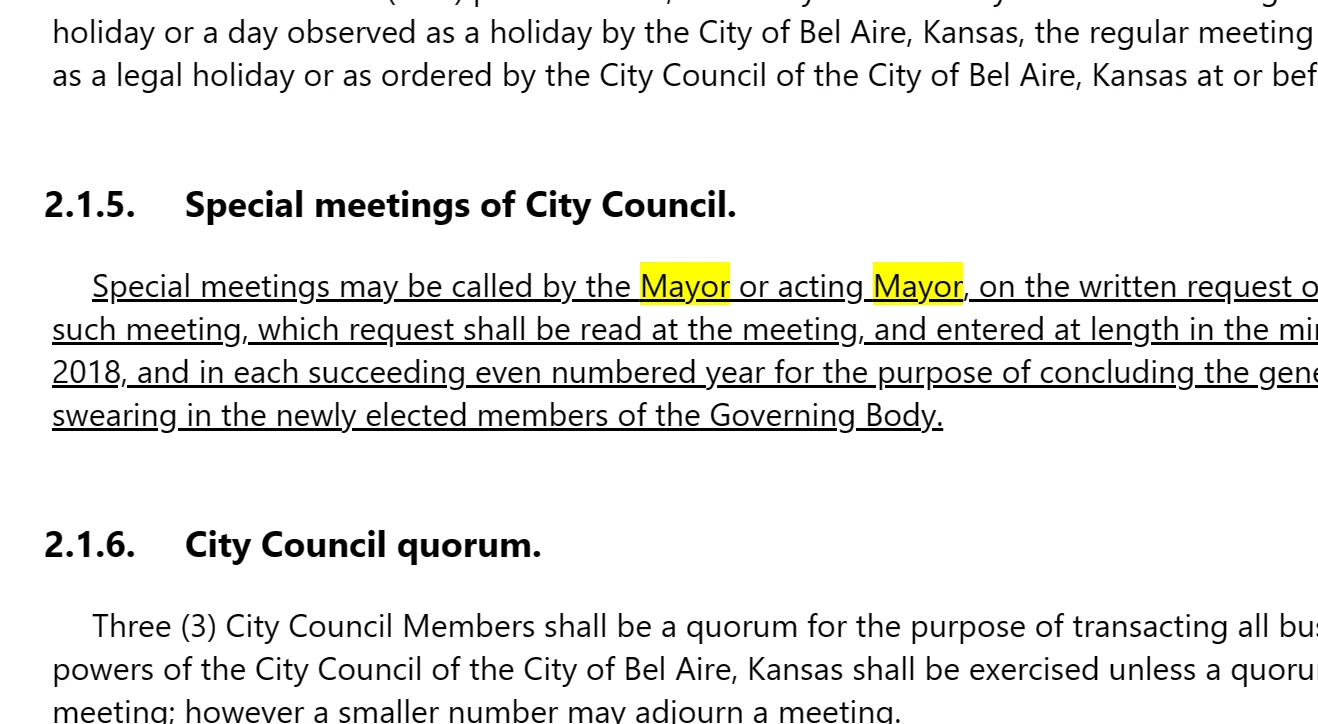
Anyone else experience this?  I assume this is a bug that needs to be fixed.

Thanks for any guidance.
    This topic has been closed for replies.
    Correct answer larryk33930191

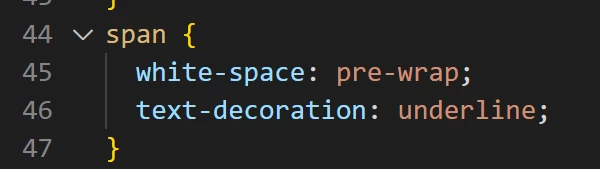
    Thank you Amebr. I found this in the CSS

    Deleting that line seems to have fixed it.

    Hopefully it was not needed for anything else!!


    3 replies

    Community Expert
    February 3, 2023

    I assume that was your topic stylesheet? The properties look rather like something used for code samples. So if you have those in your help, that's where I'd check for issues. I might be able to help suggest workarounds if you find it is needed.

    Community Expert
    February 3, 2023

    This could also happen if you've set the span tag in your topic stylesheet to be underlined (although if this was the case I'd actually expect you'd see a lot of randomly underlined text in your topics, for reasons I won't go into here).


    You should also be able to find out where the underline comes from using the Developer tools. Right-click on the underlined text and select Inspect (for Chrome - other browsers have the same functionality but the wording may be a bit different). The right-hand panel should show the style definition for the selected element.

    larryk33930191AuthorCorrect answer
    Inspiring
    February 3, 2023

    Thank you Amebr. I found this in the CSS

    Deleting that line seems to have fixed it.

    Hopefully it was not needed for anything else!!


    Jeff_Coatsworth
    Community Expert
    Community Expert
    February 2, 2023

    I don't recall anyone ever mentioning that happening in RH2022 - is it also happening in the sample project? If so, you should report it to the RH folks (the forum isn't the place to do that) at https://helpx.adobe.com/contact/enterprise-support.other.html#robohelp for your Adobe Support options. I'd recommend using the tcssup@adobe.com e-mail address as it reaches a team dedicated to Technical Communication Suite products including RoboHelp. Or by using the Tracker (https://tracker.adobe.com/) to create a bug. I'd go with the first route to start with.