


Inspiring
April 4, 2021
Answered

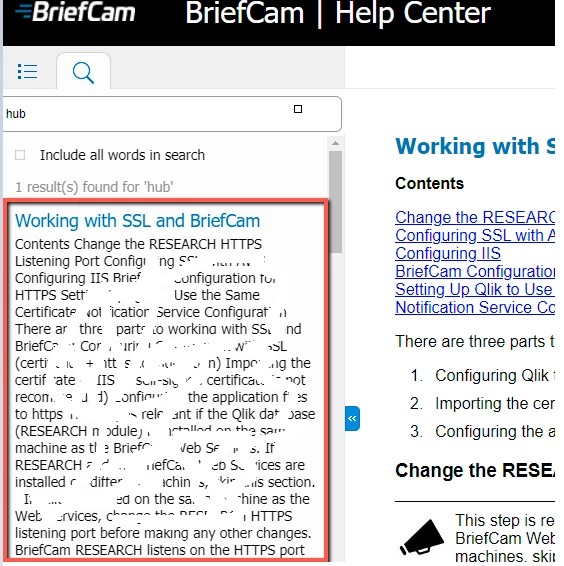
Search results showing all text from topic

  • April 4, 2021
  • 3 replies
  • 504 views

I'm using RoboHelp 2019.0.14 (not Classic). I'm generating to Responsive HTML5 using the Azure Blue layout.


In the search results, I am sometimes getting all of the text from the topic in the Search pane. Most of the time it only shows a row a two.


Here's an example (with some of the text whited out on purpose):
    This topic has been closed for replies.
    Correct answer debbies3920563

    Thanks for your reply Peter. I found the issue (and workaround). The issue was happening on any HTML page that had a link in it and the link had "http" in it. 

    For example, this sentence would replicate the bug: "For more information, see http://adobe.com/"

    If I changed it to: "For more information, click here", the search results came out okay.

    3 replies

    Peter Grainge
    Community Expert
    Community Expert
    October 5, 2021

    An image would lose the content from search.


    Try creating a new topic and pasting the content from the old topic. See if that stops it. If not try creating a new preset.

    ________________________________________________________
    See www.grainge.org for free Authoring and RoboHelp Information

    Use the menu (bottom right) to mark the Best Answer or Highlight particularly useful replies. Found the answer elsewhere? Share it here.
    Community Expert
    October 4, 2021

    I haven't got any suggestions, but you can report bugs here: https://tracker.adobe.com/

    Post the item number in the discussion so people can easily vote if they want the same functionality.

    Peter Grainge
    Community Expert
    Community Expert
    April 5, 2021

    Congratulations on being the first person to manage that trick! 🙂


    The first thing I would check is whether this always happens with the same topics. Offhand I'm not sure where I would look next but first let me know if the problem is just a few topics or many.

    ________________________________________________________
    See www.grainge.org for free Authoring and RoboHelp Information

    Use the menu (bottom right) to mark the Best Answer or Highlight particularly useful replies. Found the answer elsewhere? Share it here.
    debbies3920563AuthorCorrect answer
    Inspiring
    April 6, 2021

    Thanks for your reply Peter. I found the issue (and workaround). The issue was happening on any HTML page that had a link in it and the link had "http" in it. 

    For example, this sentence would replicate the bug: "For more information, see http://adobe.com/"

    If I changed it to: "For more information, click here", the search results came out okay.

    blackankle2
    Known Participant
    October 4, 2021

    I'm seeing similar results from a topic that has examples that include "http" in the example, but those examples are not links, so that workaround won't work for me. Any other ideas?