wernerb25388568
Inspiring
July 28, 2017
Answered

Search results showing internal comments

  • July 28, 2017
  • 1 reply
  • 474 views

Hi all,

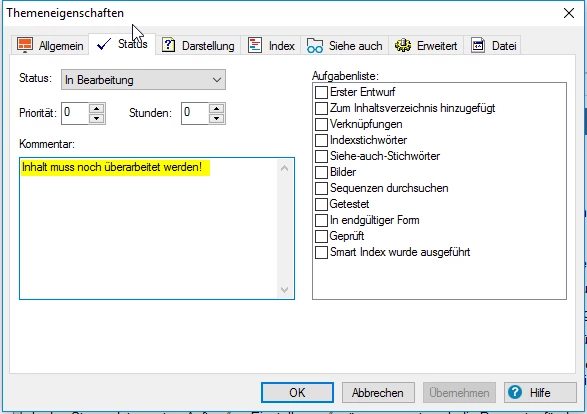
my search results show internal comments from topic properties.
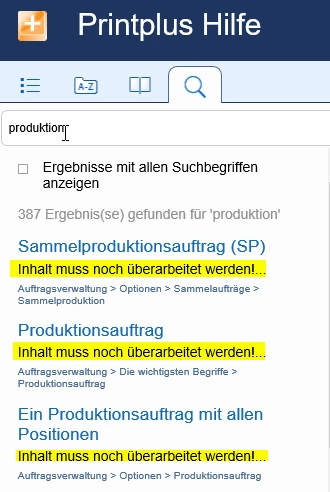
How can I prevent this?

I'm working with RoboHelp 2015 (12.0.4.460)

and Windows Version 10.0.14393 Build 14393

Thanks!

This topic has been closed for replies.
Correct answer wernerb25388568

Hi Peter,

I just thought it was too easy, but you're right! So here we go.
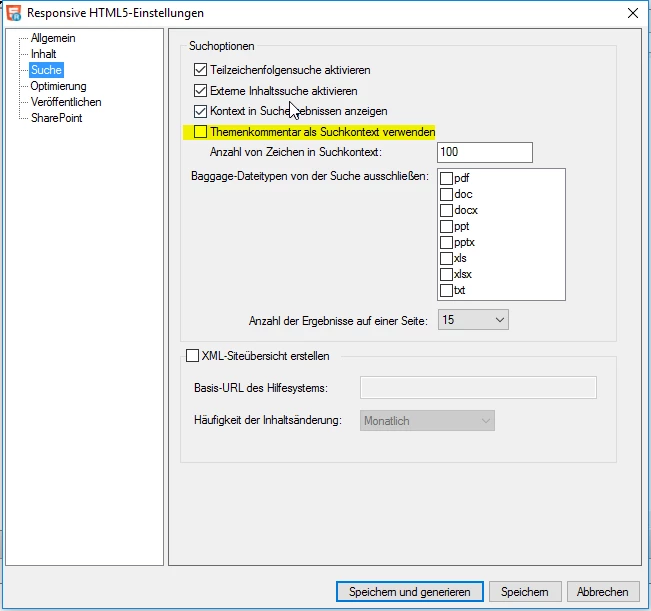
I just unchecked the marked option in the publishing preferences for search. 

1 reply

wernerb25388568
Inspiring
July 28, 2017

I just found it by myself. OMG! that was to easy: :-)

If that's the solution, I'd like my problem back.
Peter Grainge
Community Expert
Community Expert
July 28, 2017

I have unmarked your own reply as Correct Answer as it isn't an answer. Please add what you did and then that can be marked as your correct answer.

It helps the next person who has the same problem and finds this thread, currently without the solution.


See www.grainge.org for RoboHelp and Authoring information

@petergrainge

Use the menu (bottom right) to mark the Best Answer or Highlight particularly useful replies. Found the answer elsewhere? Share it here.
wernerb25388568
wernerb25388568AuthorCorrect answer
Inspiring
July 28, 2017

Hi Peter,

I just thought it was too easy, but you're right! So here we go.

I just unchecked the marked option in the publishing preferences for search. 

If that's the solution, I'd like my problem back.