


LMS_90
Inspiring
May 9, 2023
Answered

Search speed differs on landing vs. topic pages - RH 2022.2.22

  • May 9, 2023
  • 7 replies
  • 568 views

Hi,

Running RH 2022.2.22 on a windows PC. I generate frameless output and view output. When I search on the landing page, it's super slow as I type. But once I go to a topic and search, the speed is normal as expected. After I go to a topic page, and go back to the landing page, landing page is still slow to search. See attached video for demo. Any ideas how to get the landing page search speed to be faster like the topic pages are?

https://drive.google.com/file/d/1yb8XMNVrPDXA8lgMLptGMBeCo71DVrYQ/view?usp=share_link


Thanks!

 Lori


    This topic has been closed for replies.
    Correct answer LMS_90

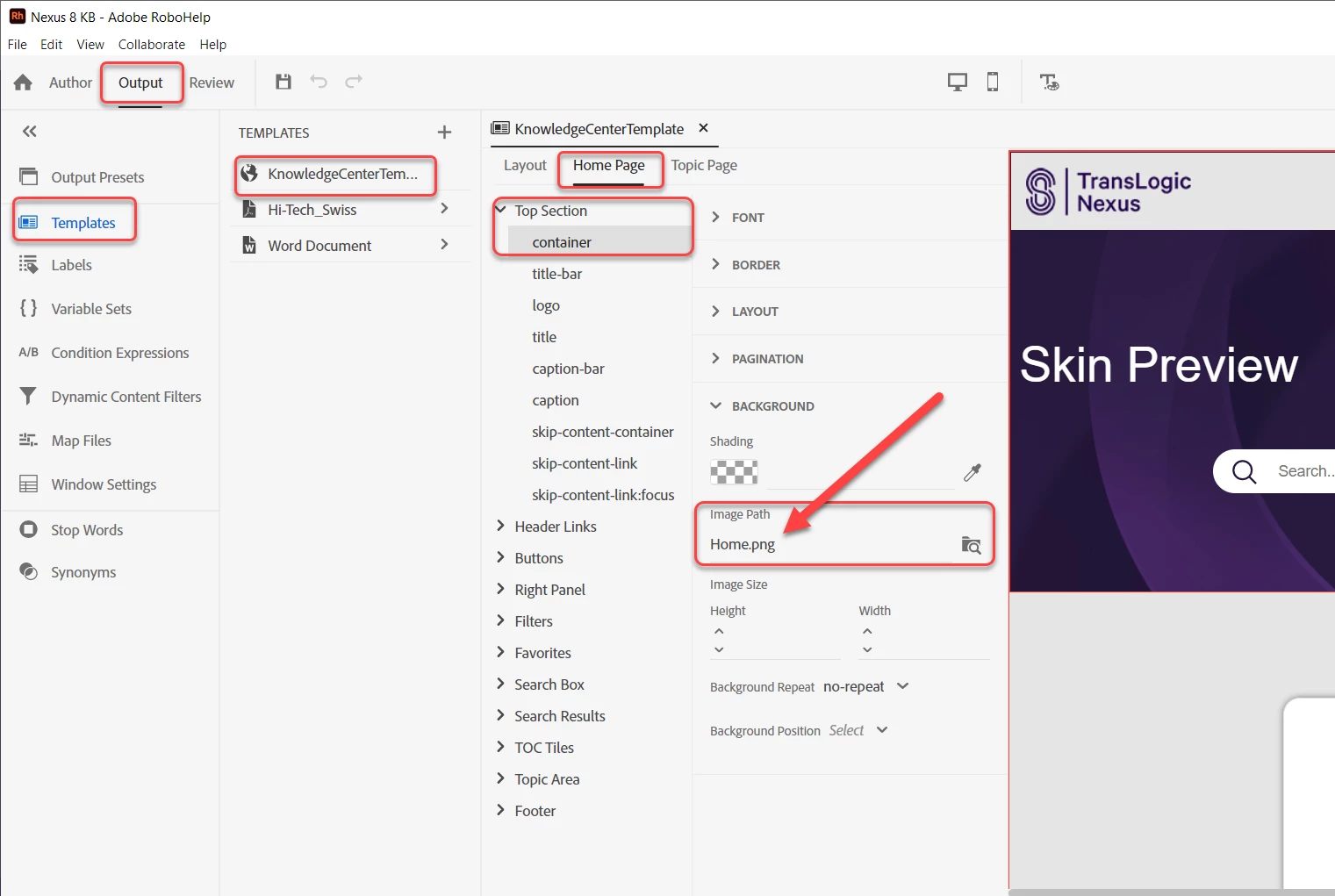
    I fixed the issue and I still don't understand how this was the problem, but it's fixed. The issue was the image I was using on the homepage background was a jpg. I changed it to a png and now the search speed is top notch. I know that jpg takes longer to render than png, but once the home page is loaded and rendered, it makes no sense why the search would be slow. Nonetheless, it's fixed now 🙂 

    Here's where I made the change for anyone facing a similar issue in the future:


    7 replies

    Peter Grainge
    Community Expert
    Community Expert
    May 17, 2023

    Excellent catch! 

    ________________________________________________________

    My site www.grainge.org includes many free Authoring and RoboHelp resources that may be of help.


    Use menu (bottom right) to mark as Best Answer or to Highlight particularly useful replies. Found the answer elsewhere? Share it here.
    LMS_90
    LMS_90AuthorCorrect answer
    Inspiring
    May 17, 2023

    I fixed the issue and I still don't understand how this was the problem, but it's fixed. The issue was the image I was using on the homepage background was a jpg. I changed it to a png and now the search speed is top notch. I know that jpg takes longer to render than png, but once the home page is loaded and rendered, it makes no sense why the search would be slow. Nonetheless, it's fixed now 🙂 

    Here's where I made the change for anyone facing a similar issue in the future:


    Community Expert
    May 15, 2023

    One other thought. Do you get the same slowness when you upload the output to a web server? There are some things that work differently on a local PC vs a web server (for security reasons I think?), and maybe this is one of them. 

    Peter Grainge
    Community Expert
    Community Expert
    May 16, 2023

    I think the main issue with local as opposed to webserver is the speed of response to clicking the TOC links. Nonetheless, it's a good call.

    ________________________________________________________

    My site www.grainge.org includes many free Authoring and RoboHelp resources that may be of help.


    Use menu (bottom right) to mark as Best Answer or to Highlight particularly useful replies. Found the answer elsewhere? Share it here.
    Peter Grainge
    Community Expert
    Community Expert
    May 15, 2023

    Could be the same cause but the problem I am thinking of was in Classic and many moons ago.

    ________________________________________________________

    My site www.grainge.org includes many free Authoring and RoboHelp resources that may be of help.


    Use menu (bottom right) to mark as Best Answer or to Highlight particularly useful replies. Found the answer elsewhere? Share it here.
    Peter Grainge
    Community Expert
    Community Expert
    May 14, 2023

    A few years back there was an issue with a skin as they were known then. I think the fix was you had to download a fresh copy of the skin. What I can't remember was the underlying bug but I'm wondering if it was the search. Maybe someone else can remember?


    I guess you are now busy looking for the closest template to customise as required.

    ________________________________________________________

    My site www.grainge.org includes many free Authoring and RoboHelp resources that may be of help.


    Use menu (bottom right) to mark as Best Answer or to Highlight particularly useful replies. Found the answer elsewhere? Share it here.
    Community Expert
    May 14, 2023

    The only thing I can think of recently is this but I think it's a different issue and didn't require downloading a new skin:

    https://community.adobe.com/t5/robohelp-discussions/is-search-broken-in-rh2020-for-frameless/m-p/13336062

    Peter Grainge
    Community Expert
    Community Expert
    May 10, 2023

    Copy the contents folder from the rogue project and replace the contents folder with it in the new project.


    Autocreate a TOC and generate that. Does the problem reappear?


    Let us know and we can take it from there.

    ________________________________________________________

    My site www.grainge.org includes many free Authoring and RoboHelp resources that may be of help.


    Use menu (bottom right) to mark as Best Answer or to Highlight particularly useful replies. Found the answer elsewhere? Share it here.
    LMS_90
    LMS_90Author
    Inspiring
    May 14, 2023

    Tried all that. I discovered that it's something to do with my template. When I generate my project with the default template it's fine. I'm using something called KnowledgeCenterTemplate which I'm guessing is some custom thing from my customer. It's a legacy project so I have no idea what original template it was based on. 

    Peter Grainge
    Community Expert
    Community Expert
    May 9, 2023

    I don't have an answer but this may help the troubleshooting.


    Generate the About Help sample project adding a home page to it. Does that have the same issue?


    Was it OK before you upgraded to 2022.2?

    ________________________________________________________

    My site www.grainge.org includes many free Authoring and RoboHelp resources that may be of help.


    Use menu (bottom right) to mark as Best Answer or to Highlight particularly useful replies. Found the answer elsewhere? Share it here.
    LMS_90
    LMS_90Author
    Inspiring
    May 9, 2023

    I created a quick test project. Search issue does not happen.


    I believe my project was having the issue prior to 2022.2.22 upgrade