Inspiring
April 6, 2021
Answered

Search URL/Breadcrumbs are not displaying the same way for all files

  • April 6, 2021
  • 12 replies
  • 657 views

Maybe this has been discussed, but I could not find an answer after searching.  Some of the Search URL/Breadcrumb paths are not displaying all the same way in my project. 


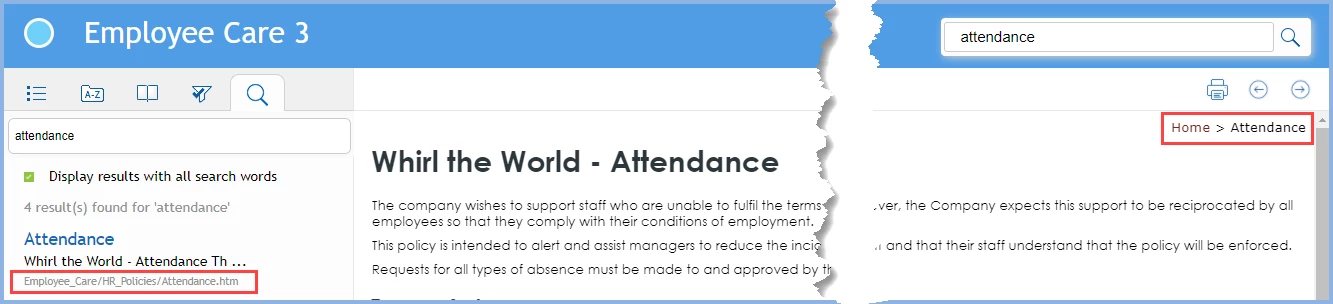
I would like all the search result URL to display as breadcrumbs, but some are not.  I'm pretty sure this has to do with the TOC structure, but is there some kind of a workaround? I have confirmed that the files which display the filenames only are indeed in the TOC. 


For all the files which display the breadcrumbs on the content page as:

Home > Section 

The search results URL  displays the filename and folder, NOT the breadcrumb path. For example,

++++++++++++++++++++

Getting Started
Requirements, Administrator Tasks...

getstarted/overview.htm

+++++++++++++++++++++++

In the case above, it would be great of the search displays the breadcrumb:

Home > Getting Started


For all the files which display the breadcrumbs on the content page as:

Home > Section > Subsection 

The search results URL  display the breadcrumbs in the search results.  For example,

+++++++++++++++++++

Prerequisites

System and software requirements...

Home > Installation > Prerequisites

+++++++++++++++++++++


RoboHelp 2017 (13.0.0.257)

Responsive HTML

Azure layout


Thank you!  Stay safe everybody!

    This topic has been closed for replies.
    Correct answer Peter Grainge

    I have been looking at the breadcrumbs in the topic, not the search. My apologies as you were clear.


    I get your point that the two are different, at least I do now, but that is the way it is. What you want is how it works in 2020. Take a look at the RoboHelp Tour on my site.

    ________________________________________________________
    See www.grainge.org for free Authoring and RoboHelp Information

    12 replies

    Peter Grainge
    Community Expert
    Community Expert
    April 7, 2021

    I just generated the supplied Employee Care sample project with a topic in the TOC and a topic accessed only through a link.


    If the topic is in the TOC I get the book name followed by the Topic Title, not the file name. If not in the TOC I get Home > Topic Title.


    How have you set up the breadcrumbs? 

    ________________________________________________________
    See www.grainge.org for free Authoring and RoboHelp Information

    Use the menu (bottom right) to mark the Best Answer or Highlight particularly useful replies. Found the answer elsewhere? Share it here.
    Inspiring
    April 7, 2021

    I have set up breadcrumbs through the master page, using a placeholder.  The breadcrumbs appear correctly on the pages in question.  


    Well, I think I have just solved my issue.  Having the folder/filename.htm appear as the search URL is correct behavior. (although I do NOT think it's correct, or wise!)  I can replicate this using RoboHelp Help!


    See the TOC. Notice the section/book level topic, "Getting started"

    When I search on the term "Getting started"  you'll see the file path NOT the URL/breadcrumb path in the search results for the Getting started page.  It begins with book/rob_getting.....


    YUCK.


    Community Expert
    April 7, 2021

    I notice the second result shows the breadcrumbs you want, rather than the path.


    I feel like if the topic is at the root level (not top) of the toc (e.g. above the Getting started book, or between the Getting Started and Exploring the workspace books in your image, at the same level as those books) then it'll show the path. But sometimes it shows the path even when it's inside the book, like your Getting Started example. I haven't figured out what causes it though.


    And I think the ability to show the TOC path in search results has been removed completely in New UI, or at least I couldn't figure out how to display them - I could only get file paths to show.

    Community Expert
    April 7, 2021

    There aren't any settings that make it change as far as I'm aware. If the topic isn't in the TOC, I think it will display the file path. If it's in the toc, it'll display the toc breadcrumbs.


    However, in a few simple tests, if the topic is above the first book, it seems to also displays the file path. Does this scenario apply to the topics not displaying the toc breadcrumbs?

    Inspiring
    April 7, 2021

    I confirmed the files in question  are in the TOC.  So, they should display breadcrumbs. But, they only display the folder/filename.htm.


    I'm not sure what you mean by "if the topic is above the first book". 


    I have many books and single files in the TOC.   It seems like every "new section homepage" or single file in the TOC displays like this.  In other words, all files linked to a TOC book and single TOC files display the folder/filename.htm, rather than the location in the TOC or the file title.   


    The breadcrumbs correctly display on the page in the Content Pane.


    It has probably been this way for years, but we hadn't noticed!  


    Is there a way to get all the files to display the breadcrumbs in the search results?  They should all start with the TOC location, not the actual folder name and file name.  It's really important to give users a sense a context about a file when they are searching for information.