


Inspiring
July 13, 2021
Answered

Security warning when compiling to Word

  • July 13, 2021
  • 10 replies
  • 577 views

I'm using RH Classic 2019 and am getting the following warning for many, many files within certain projects when choosing the Print option and generating to MS Word. (Other projects generated successfully, about 10 days ago.)
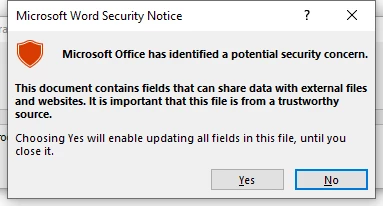
I cannot work out why this would be the case as there are no suspect links or fields. I've looked in the code and have tried generating just one file, and removing parts of the topic until the error appeared - it seemed to possibly be a bullet that was causing it - but why would this be the case? The bullets are the same as in projects which did generate successfully.

If I click Yes to this every time it appears, the project does generate successfully but it may mean clicking yes 70+ times. 

I have tried disabling the warnings but have also had no success with that.

If anyone has any ideas, please let me know! 

Many thanks

Laura

    This topic has been closed for replies.
    Correct answer fifelaura

    It seems Microsoft have fixed this - I just compiled without any errors.

    Thanks for all the help.

    Laura

    10 replies

    Peter Grainge
    Community Expert
    Community Expert
    July 16, 2021

    Same here. Thanks for updating the thread.

    ________________________________________________________
    See www.grainge.org for free Authoring and RoboHelp Information

    Use the menu (bottom right) to mark the Best Answer or Highlight particularly useful replies. Found the answer elsewhere? Share it here.
    fifelauraAuthorCorrect answer
    Inspiring
    July 16, 2021

    It seems Microsoft have fixed this - I just compiled without any errors.

    Thanks for all the help.

    Laura

    Community Manager
    July 13, 2021

    Hi There,


    Can you please check if there is any recent windows updates installed for Office?  Some office updates might have caused this as mentioned in the below link:


    https://answers.microsoft.com/en-us/msoffice/forum/all/how-do-i-disable-microsoft-word-security-notice/3714060c-bf5b-431e-a03f-6a339b72d4c5


    Regards,

    Mayank

    Peter Grainge
    Community Expert
    Community Expert
    July 13, 2021

    I have tried what I could find on the web to no avail. Not surprised as it is several years old so not related to this problem which is new.


    Now waiting on Adobe.

    ________________________________________________________
    See www.grainge.org for free Authoring and RoboHelp Information

    Use the menu (bottom right) to mark the Best Answer or Highlight particularly useful replies. Found the answer elsewhere? Share it here.
    Peter Grainge
    Community Expert
    Community Expert
    July 13, 2021

    It is definitely something related to Windows or Office as I am now seeing this. I will see what I can find and if necessary liaise with Adobe.


    Back when I know more.

    ________________________________________________________
    See www.grainge.org for free Authoring and RoboHelp Information

    Use the menu (bottom right) to mark the Best Answer or Highlight particularly useful replies. Found the answer elsewhere? Share it here.
    Jeff_Coatsworth
    Community Expert
    Community Expert
    July 13, 2021

    Do you have an IT crew that controls this? If not, then google is probably the answer to figure out what setting is responsible.

    fifelauraAuthor
    Inspiring
    July 13, 2021

    The sample project also misbehaves, as do projects that I successfully generated 10 days ago. Nothing is generating to Word without errors.

    Looks like it's a Windows setting, or an update that has caused this perhaps? 

    Have no idea how to find out which!


    Peter Grainge
    Community Expert
    Community Expert
    July 13, 2021

    ... that's after following @Jeff_Coatsworth's suggestion and finding the sample project generates OK.

    ________________________________________________________
    See www.grainge.org for free Authoring and RoboHelp Information

    Use the menu (bottom right) to mark the Best Answer or Highlight particularly useful replies. Found the answer elsewhere? Share it here.
    Peter Grainge
    Community Expert
    Community Expert
    July 13, 2021

    I am sure this is something in your document on the basis I have been using RoboHelp for twenty odd years and supporting these forums all that time but have never seen this posted.


    I've looked in the code and have tried generating just one file, and removing parts of the topic until the error appeared. I assume you mean disappeared.


    I think where I would start is to import just one topic that gives this problem into a new project. Initially leave your CSS attached and see what happens. If you still get the error, then link your topic to the default CSS instead.


    Let us know what happens.

    ________________________________________________________
    See www.grainge.org for free Authoring and RoboHelp Information


    Use the menu (bottom right) to mark the Best Answer or Highlight particularly useful replies. Found the answer elsewhere? Share it here.
    Jeff_Coatsworth
    Community Expert
    Community Expert
    July 13, 2021

    Is the sample project misbehaving too? That might give you an indication if it's something in RH or something in your Office settings that are the culprit.