
Participating Frequently
March 10, 2015
Answered

Seeing "File has been changed outside of RoboHelp... discard changes?"

  • March 10, 2015
  • 5 replies
  • 619 views

I'm using: RoboHelp HTML, Version 10.0.1.292

I'm seeing the following message when I make changes within the RoboHelp project and then choose to close my project without saving the changes. It's not consistent behavior - it happens for some help files in the project but not all help files. If I save changes then it doesn't appear.
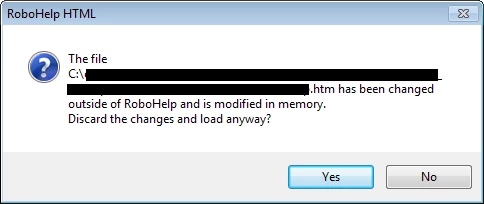
My steps:

1 - Open RoboHelp (I'm using RoboHelp 10) and make a simple text change to a help topic.

2 - Choose File > Close Project.

3 - Click No when the "Save changes to the following files?" confirmation appears.

This is when I see the message above. The message is confusing for several reasons: 1) I didn't edit the file outside the project, 2) I'm not sure what changes are being discarded if I click Yes, and 3) what's being loaded when I am closing the project.

Full disclosure - The only file I ever edit outside the project is the CSS and I am guilty of editing the CSS with the project open (to instantly see the results of my changes). Could this be the cause even though I haven't touched the CSS in well over a year? Is there old crud stuck in memory for certain help topics? I've never seen this message before and I've worked on this help project for many years.

Further testing - This message is popping up for a help topic added recently so I can't think it's related to any CSS changes made before the file was added. No other files have been edited outside the project that I can think of.

Message was edited by: Tricia Trujillo

This topic has been closed for replies.
Correct answer Peter Grainge

Maybe with a copy of the project, try deleting the CPD file and then seeing if the offending topic still shows in Project Manager.

Go with Jeff's answer first though.


See www.grainge.org for RoboHelp and Authoring tips

@petergrainge

5 replies

ttrujilloAuthor
Participating Frequently
March 11, 2015

Cool, thanks again. I'll give it a shot.

- Tricia

ttrujilloAuthor
Participating Frequently
March 11, 2015

I'm curious - I see the option "Clear project cache (.cpd file) before opening any project" in the General settings in RH. It's off by default but perhaps I should turn this on? Are there any concerns with having this enabled? Thanks again!

Jeff_Coatsworth
Community Expert
Community Expert
March 11, 2015

It can add a bit of time to the launch of a project if there are a lot of topics; other than that – no.

ttrujilloAuthor
Participating Frequently
March 11, 2015

Deleting the CPD file seems to have solved the problem. I'm not seeing this pesky message anymore. Thank you all for the comments!

- Tricia

Captiv8r
Legend
March 11, 2015

Hi there

Just an FYI on this. I see this a fair amount. If memory serves, it can happen if you have one or more topics open in the editor, then you perform some action such as a find and replace across files or maybe selecting all the topics in the Topic list pod and assigning a different CSS. Basically, any action that RoboHelp might perform across a multitude of files.

That's why I often admonish class participants that it's generally a good idea to close all topics open in the editor before attempting these changes. As you seem to be acknowledging here, it's a very confusing message!

Cheers... Rick

Peter Grainge
Community Expert
Peter GraingeCommunity ExpertCorrect answer
Community Expert
March 11, 2015

Maybe with a copy of the project, try deleting the CPD file and then seeing if the offending topic still shows in Project Manager.

Go with Jeff's answer first though.


See www.grainge.org for RoboHelp and Authoring tips

@petergrainge

Use the menu (bottom right) to mark the Best Answer or Highlight particularly useful replies. Found the answer elsewhere? Share it here.
Jeff_Coatsworth
Community Expert
Community Expert
March 11, 2015

I had an answer for this one? You been reading my mind Peter? I was thinking – “Just ignore it if you hadn’t made any changes”

Peter Grainge
Community Expert
Community Expert
March 11, 2015

I must have been looking at another thread where you posted about shortening the path, which could also apply here.

Poster has made changes.


See www.grainge.org for RoboHelp and Authoring tips

@petergrainge

Use the menu (bottom right) to mark the Best Answer or Highlight particularly useful replies. Found the answer elsewhere? Share it here.