
July 23, 2015
Question

Self-adjusting/aligning Footer in RoboHelp 11

  • July 23, 2015
  • 3 replies
  • 645 views

Hi,

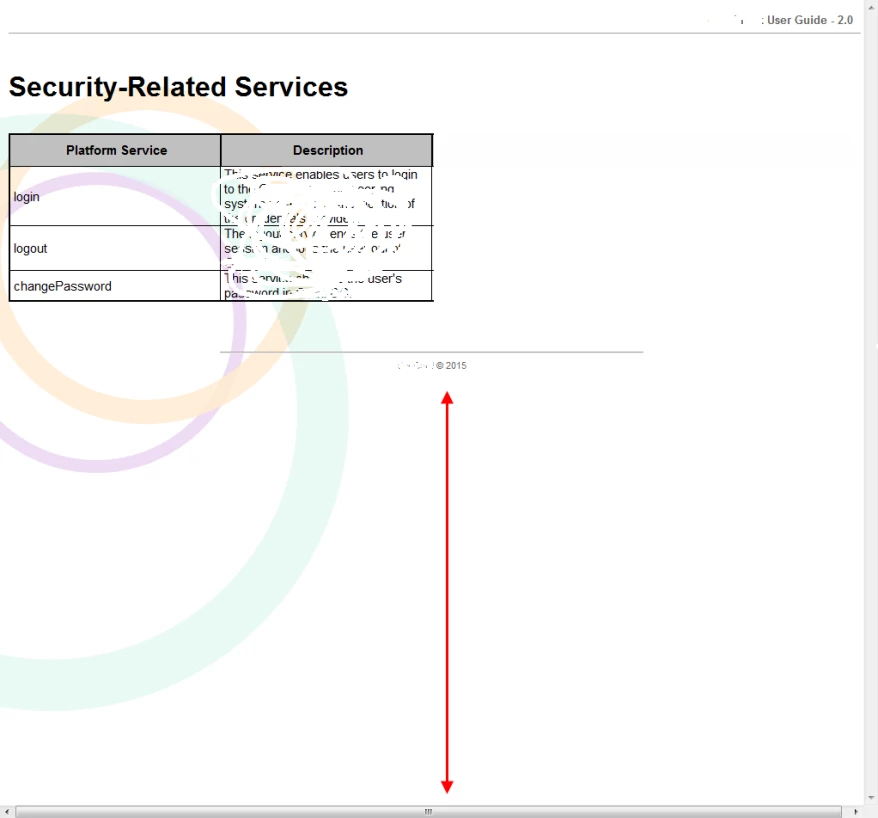
I am building a project in RoboHelp which includes a master slide that has a header and footer. The Header component is working fine. However, the footer tends to stick to the bottom of the text on each page. The project comprises of several hundred HTML pages, each with varying amounts of content. When I take the output in CHM (which is going to be the final format for this project), the footer tends to move around a lot. On pages where there is very limited content, when viewed in full screen mode, the footer appears a couple of lines below the text with the rest of the page below it all blank. Some steps I found online end up making matters worse when I inserted the html/css code snippets into my current project.

It would be of great help if someone can provide steps on how the footer can be configured so that there is no blank space at the bottom of the page in the default view mode. Attaching an image where the red arrow illustrate the blank space that should not be appearing. Blurred out bits of the image since this is the actual work document. The footer should ideally be at the bottom of the page.
This topic has been closed for replies.

3 replies

July 30, 2015

Thank you all for your inputs. I suppose this is something that doesn't have a quick fix at this stage. Will resort to a manual edit of the pages where necessary.

July 24, 2015

The links I had referred to were as below:

How To Keep The Footer At The Bottom of the Page with CSS

Get down! How to keep footers at the bottom of the page

I am assuming that this fix works only if you are in a pure HTML file without the jazz that RoboHelp adds. Also, it might be better suited to a WebHelp output instead of CHM.

Based on the comments and experiences shared by you folks, I suppose this is a limitation of the CHM output via RoboHelp that probably has no plausible solution.

Captiv8r
Legend
July 23, 2015

Hi Tanmay

Welcome to the wacky wonderful world of HTML!

Sounds like you may be coming from the world of printed output and migrating to the world of HTML. And in this world, certain things just simply dissolve and vanish. For example, footers. On paper, it makes sense that you would have information at the bottom of each page. But in our virtual world of HTML the bottom of each page is different and will never be consistent from page to page. That's what you are experiencing here. The only way a browser knows where the bottom of the page is, is by seeing the last of the characters that were typed as part of the page. The best you can likely hope for is to have a bit of added space or possibly a line across the page that designates the page end.

Cheers... Rick

July 23, 2015

Thanks for the reply on this Rick!

We've actually been using HTML outputs (WebHelp or CHM most of the time) for all our projects. With the recent implementation of a new corporate template, we decided to look into this matter and fix it. Previously, i did use that method of adding a few <br> tags in the html to place the footer at a proper location on pages with very limited content. However, the manual effort is frustrating in larger projects.

As I said, there is a solution for this in the world of pure HTML. Found several websites and forums providing feasible solutions that people have implemented. However, our life is complicated by the fact that RoboHelp has a mind of its own in formulating the HTML code. When I tried implementing the online solutions into my file, the results were hilarious to say the least

Will see if any more tinkering with this helps else will use the approach you mentioned of adding blank lines manually

Regards,

Tanmay

Captiv8r
Legend
July 23, 2015

Hello again

Perhaps it would be helpful if you could share what the other solutions were? There are some pretty smart folks that hang out here and maybe one of them would have an idea to accomplish the goal in RoboHelp.

I do know what you mean with RoboHelp seeming to have a "mind of its own" with formatting HTML. I think it's simply the price we pay for a tool that allows us to focus on content and have it do all the heavy lifting by writing the code.

Cheers... Rick