
Participant
February 15, 2011
Question

Serious and Unique problem!! Bullets getting disturbed!!

  • February 15, 2011
  • 2 replies
  • 538 views

Hello Everyone.

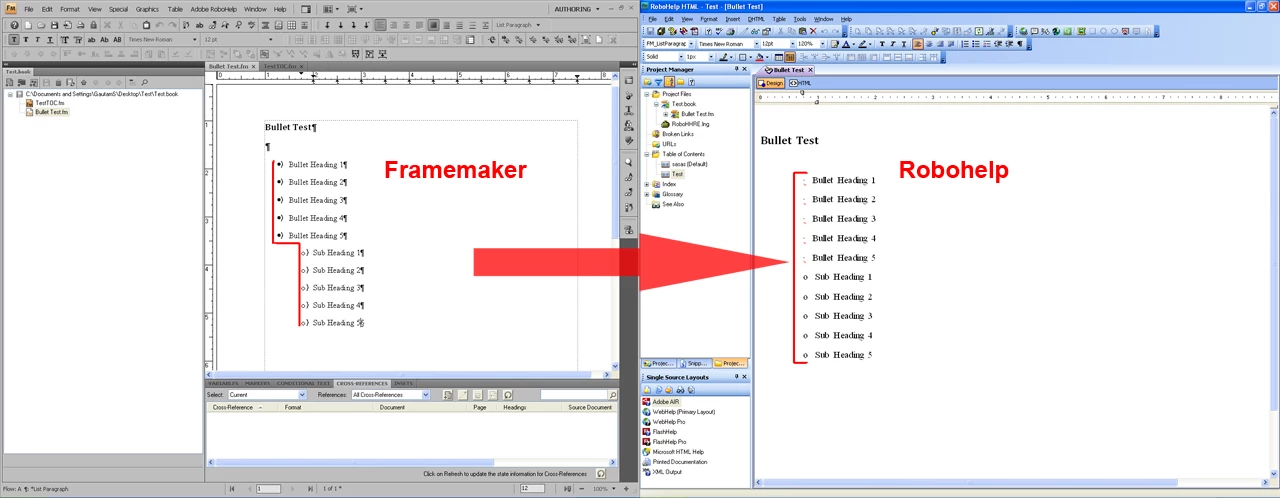
Here once again I am stuck in some unusual problem. There are some bullet points (with sub bullets below them) in framemaker (.fm) files. Now when I link the framemaker book in robohelp and finally generate the webhelp pro, the ENTIRE spacing of the bullet points and the sub bullet points gets disturbed.

To illustrate this in a better form, please see the image. If anyone could give me a solution to this problem, it would be great. (I know the bullets can be manually corrected in RoboHelp, but thats certainly not a concrete solution if the files are tooo many).
This topic has been closed for replies.

2 replies

Mayank_Agrawal
Participating Frequently
February 16, 2011

Please try using the "Convert Autonumber to RoboHelp List" option available in RoboHelp. This option can be accessed as follows.

  1. Go to File->Project Settings to open "Project Settings" Dialog.
  2. Go to "Import" tab in the dialog.
  3. Click "Edit" for FrameMaker document conversion settings.
  4. Expand "Paragraph" styles list on the left.
  5. Select the bullet paragraph style used in FrameMaker.
  6. Select "Convert Autonumber to" radio button on the right.
  7. Select "RoboHelp List" option from the drop down list.
  8. Make these settings for all the bullet styles used.

In case, it does not achieve the desired results, you can try out different autonumber conversion settings in the dialog. Or you can send a sample FrameMaker document containing bulleted lists for recommendations of the best setting for your document. You can mail to me at magrawalATadobeDOTcom

Mayank

Jeff_Coatsworth
Community Expert
Community Expert
February 15, 2011

How are you telling RH to bring them in from FM?