
Inspiring
December 28, 2020
Answered

Setting when the navigation pane responds in RH 2020 (Responsive HTML)

  • December 28, 2020
  • 1 reply
  • 265 views

I'm not sure if this is a RH, HTML or browser setting, but is there some way to dictate when the navigation pane switches form (from, say, showing all the topics to just a sub-set)? It seems that you only have to reduce the window's width by a pixel for the navigation bar to change to a form more suited to a small window. Is there a minimum width settting (MW) that triggers this change only if the window width is less than MW? (This is annoying for users with big screens. The OLH opens at 100% and, as soon as they reduce the width—however small—the OLH goes into small-screem mode, which hides most of the ToC.)
    This topic has been closed for replies.
    Correct answer Peter Grainge

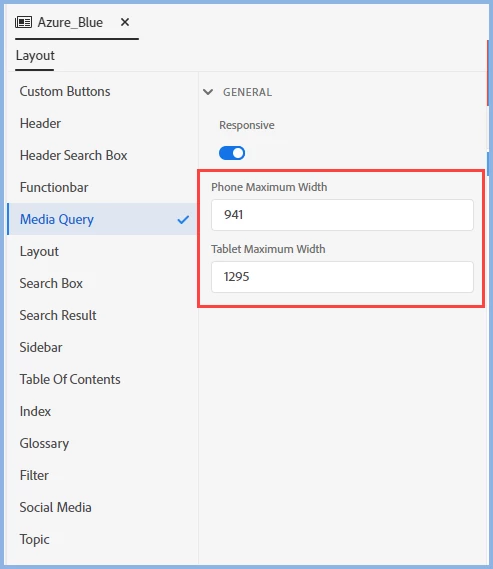
    It looks like someone has set the changeover settings too high. Edit your skin settings.


    ________________________________________________________
    See www.grainge.org for free Authoring and RoboHelp Information

    1 reply

    Peter Grainge
    Community Expert
    Peter GraingeCommunity ExpertCorrect answer
    Community Expert
    December 28, 2020

    It looks like someone has set the changeover settings too high. Edit your skin settings.


    ________________________________________________________
    See www.grainge.org for free Authoring and RoboHelp Information

    Use the menu (bottom right) to mark the Best Answer or Highlight particularly useful replies. Found the answer elsewhere? Share it here.
    Inspiring
    December 28, 2020

    Thnaks again Peter. That was indeed the trick! I had forgotten about media queries.