


Inspiring
February 8, 2021
Answered

SHIFT+ENTER in list results in extra space in Word output

  • February 8, 2021
  • 2 replies
  • 464 views

When in a bulleted/numbered list, I use SHIFT+ENTER to create a new line under the same bullet/number like this:
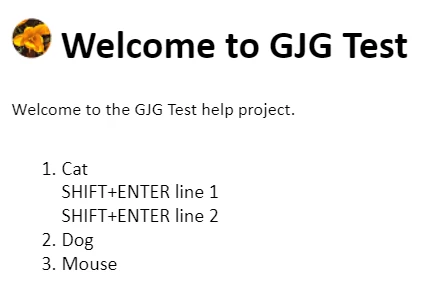
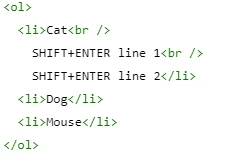
The source looks like this:
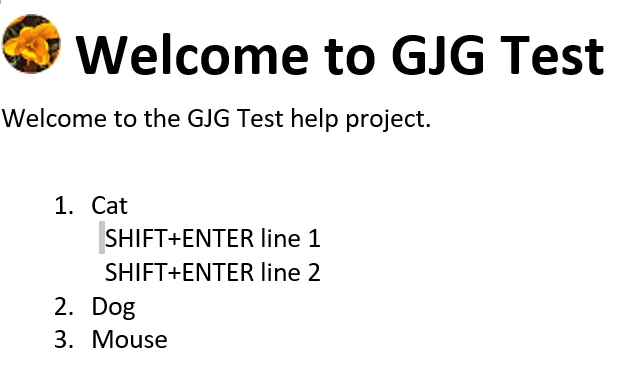
When I generate a Word output, the lines created by SHIFT+ENTER have an extra space at the beginning, like this:
Am I supposed to do something differently from what I'm doing? Or is this a minor bug?


This is in RH 2020.3.32.

This topic has been closed for replies.
Correct answer Peter Grainge

The code is correct and I see the same. Whether or not it is a bug and whether it is from RoboHelp or caused by the way Word handles the strict HTML5 and CSS3 is another matter. Report it and see what comes back.


Please follow this link to report bugs. https://tracker.adobe.com


Post the link to your bug report in this thread and others can vote for it. The more people who do so, the higher it gets prioritised.


What you could try is a multilevel list where instead of using the line break you create a level two without any numbering and indented to where you want.

________________________________________________________
See www.grainge.org for free Authoring and RoboHelp Information

2 replies

gjg097Author
Inspiring
February 9, 2021

Thanks for your suggestions. I have reported this behavior here:

https://tracker.adobe.com/#/view/RH-8629

Peter Grainge
Community Expert
Peter GraingeCommunity ExpertCorrect answer
Community Expert
February 9, 2021

The code is correct and I see the same. Whether or not it is a bug and whether it is from RoboHelp or caused by the way Word handles the strict HTML5 and CSS3 is another matter. Report it and see what comes back.


Please follow this link to report bugs. https://tracker.adobe.com


Post the link to your bug report in this thread and others can vote for it. The more people who do so, the higher it gets prioritised.


What you could try is a multilevel list where instead of using the line break you create a level two without any numbering and indented to where you want.

________________________________________________________
See www.grainge.org for free Authoring and RoboHelp Information

Use the menu (bottom right) to mark the Best Answer or Highlight particularly useful replies. Found the answer elsewhere? Share it here.