

Participating Frequently
June 29, 2022
Question

Side screen not loading in chrome but working in IE

  • June 29, 2022
  • 5 replies
  • 275 views

Hi,


Can you tell me how to resolve the issue:

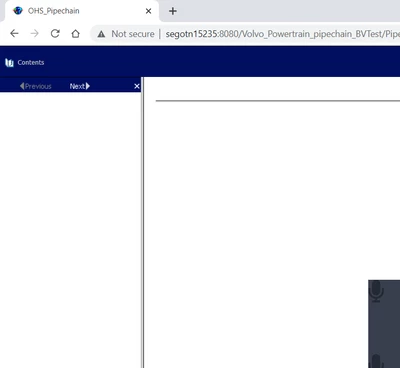
In chrome,


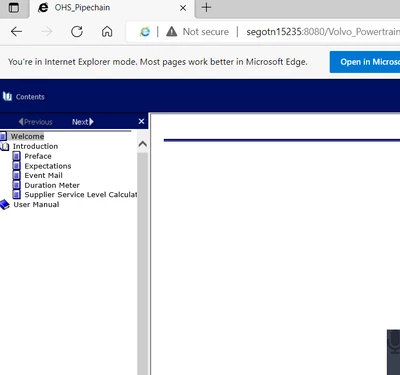
In IE,


Please could you tell what changes to be done to make it compatible.

    This topic has been closed for replies.

    5 replies

    Peter Grainge
    Community Expert
    Community Expert
    June 30, 2022

    @Amebr Good catch. I had forgotten that old reference to WebHelp 5.50.


    @vandana250568416l1t Please see this link on Adobe's site. RoboHelp 11 release and earlier Quite simply your version is only compatible with older operating systems. Would I be right in thinking you have a later OS? Even if not, the output will not be compatible with modern browsers.


    IE is an old browser and that probably explains why it works there.

    ________________________________________________________

    My site www.grainge.org includes many free Authoring and RoboHelp resources that may be of help.


    Use the menu (bottom right) to mark the Best Answer or Highlight particularly useful replies. Found the answer elsewhere? Share it here.
    Community Expert
    June 30, 2022

    It may be Chrome blocking javascript. If you click the Not Secure text and check the site settings you can check. Do note that if you enable it, you are only enabling it for your browser, not for anyone else accessing the site. 

    Community Expert
    June 30, 2022

    @vandana250568416l1t I believe you are clicking on the "Powered by Robohelp" button  in the output - the webhelp number relates only to the webhelp output files, not the Robohelp version. Please instead use the menus in Robohelp  to find the Robohelp version number. The location will depend on which version of Robohelp you are using, either Help or File > Help.

    Participating Frequently
    June 30, 2022

    Hello,

    <meta name="generator" content="Adobe RoboHelp 8">
    <meta name="description" content="WebHelp 5.50">


    I see this in the online help application.

    My concern is it opens in IE with all side menu, but in chrome it is not loading.

    What I see is in DIV content it looks empty in chrome.


    I can shre the snap of the html.


    Thanks,

    Participating Frequently
    June 30, 2022

    javascript content s are not loading in chrome. I have given the compatibility also.

    Peter Grainge
    Community Expert
    Community Expert
    June 29, 2022

    I suggest you ask your question at webhelp.com. This forum is for Adobe's RoboHelp product.

    ________________________________________________________

    My site www.grainge.org includes many free Authoring and RoboHelp resources that may be of help.


    Use the menu (bottom right) to mark the Best Answer or Highlight particularly useful replies. Found the answer elsewhere? Share it here.
    Peter Grainge
    Community Expert
    Community Expert
    June 29, 2022

    You have just asked this question in another thread. Give us a chance to answer. 🙂


    What version of RoboHelp and is the browser up to date.

    ________________________________________________________

    My site www.grainge.org includes many free Authoring and RoboHelp resources that may be of help.


    Use the menu (bottom right) to mark the Best Answer or Highlight particularly useful replies. Found the answer elsewhere? Share it here.
    Participating Frequently
    June 29, 2022

    Hi again,

    Browsers are up to date.

    I'm using WebHelp 5.50.., Can you tell me what is the latest version.

    whver,js file needs to be changed? for the compatiblity with the chrome.