Inspiring
December 7, 2016
Answered

Since recent 4.01 update, opening page in a new window displays page and Show link, rather than page and TOC as before

  • December 7, 2016
  • 4 replies
  • 2172 views

Hi,

I'm using merged responsive HTML5 Robohelp 2015. Before installing the recent 4.01 update, opening a page in a new window displayed the page and TOC.

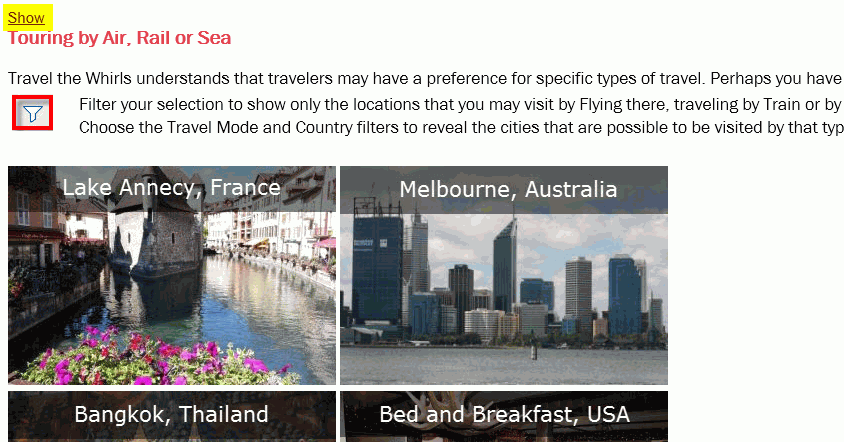
It now displays just a page with a Show link, as in the example project below:

I raise this as my email page link button used to show the page and TOC, but now just shows a page like the above and a user must click the Show button to display the TOC. Previously it used to add the index.htm#t=mergedprojects addition, now you have to click the Show link to add this.

My code for the email button is shown below:

Is there anyway to display the page and TOC without having to click the Show link?

Thanks

This topic has been closed for replies.
Correct answer Willam van Weelden

Sorry. I accidentally sent my previous message before I was finished.

In any case, I can see why Adobe might have changed this behavior, so perhaps it is not a bug as I originally thought. I think for me the workaround is to add the index.htm#t= to the URL, before the project's root folder. I have tried this against both versions 12.0.3.428 and 12.0.4.460  and it seems to work fine. I'll be doing some more testing before I commit to it.

Again, thanks for all the responses.


I have noticed this as well and I have seen that there is a change in the CSH JavaScript that changes the behaviour from previous versions. There are two ways around this that I know of:

  1. Open URL's using index.htm#<relative path>

    This works like a charm but you need to know the relative path and URL encode it. So no upgrade path if you are using CSH through ID's.
  2. By adding a small script in your topics, you can force the skin to be shown. Nothing needs to change and your users will never see the 'show' link. It basically returns to the behaviour of RH2015. The downside is that this particular script doesn't discriminate between CSH calls and regular links where you may want to just open the topic. Though the script can be amended.

    Simply add the script below to the bottom of your topics. You can use a master page footer or manually add the code before the </body> tag. Don't add the script in the <head> as that won't work.

<script type="text/javascript">

function checkHelpWindow() {

if(window.self === window.top) {

rh._.redirectToLayout();

}

}

(function(){

rh.model.subscribe(rh.consts('EVT_PROJECT_LOADED'), checkHelpWindow);

}.call(this));

</script>

4 replies

Adobe Employee
March 16, 2017

Hi,

This change was done in order to fix the issue related to search ability of content on Google.

More details available here:

Responsive HTML5 output not searchable in Google

rh1234rh1234
Participating Frequently
March 16, 2017

Thank you, abhi!

Inspiring
March 15, 2017

Hi,

we're using the trial-version of RH_2017.

We 're also searching for a workaround to this problem. (No 'toc' and no 'title' visible using CSH)

With the RH_2017 you also lost the 'show' possibilty.

Which means you don't have access to navigate to an other topic.

My company is testing the functionality of Robohelp.

This issue is a major setback, comparing with RH_2015. (also investigated in trial-version).

With RH_2015 we could show a demo, that convinced the board. With RH_2017 we can't do the same.

I sincerely hope this can work in RH_2017.

Jeff_Coatsworth
Community Expert
Community Expert
March 15, 2017

@easypay - Since I didn't have RH2015 or 2017 at hand, I did a little peek at RH11's Responsive layout - I don't see a Navigation option there at all - how did you turn on the "Show" link before in your RH2015 version?

Inspiring
March 15, 2017

Jeff,

I once had the possibility with the link 'show'. By that I could return

from :  only topic

to :  full frame with header and title around the topic.

I think this was while I was still using the script 'RoboHelp_CSH.js' and was working with RH_2015 and no patch installed.

(We 're new in this RH-story and didn't know there where patches to install, at that time)

If the link 'show' was an option to choose, I can 't tell.

We didn't stand still with that sollution, because it wasn't efficient enough for us.

Now we don't use the script 'RoboHelp_CSH.js' because it causes trouble with scripting errors.

Now we call our own script that builds the needed url according the choosen mapno (CSH).

That worked fine in RH_2015 (patch 4), showing chosen topic, chosen menu-point of topic and title with 'search' .

Now it only shows the chosen topic in RH_2017.

Example URL <root>/projectName/index.htm?rhcsh=1&rhnewwnd=0&rhmapno=1

info: we use linux to deploy htm-pages that call the url build as above.

rh1234rh1234
Participating Frequently
March 15, 2017

Have you ever figured out a work-around for this? I have a similar issue. I link to specific help topics from another application. Before updating RoboHelp 2015, the link would open the TOC and full help. Now I get only the topic text and Show link, like you. If I manually insert #t= or index.htm#t= before the root folder in the URL, that makes it work. Any new developments or thoughts on this?

Thanks.

gc31Author
Inspiring
March 15, 2017

Hi,

No work around for this that I am aware of apart from manually adding the index.htm#t= as you mention. The behaviour has changed since the update though. Maybe the behaviour before was incorrect and has since been fixed - I used to use Webhelp and that used to have the Show link as well to display the TOC in these instances. I preferred it when it did show the TOC and full help though

Sorry not much help - i'm upgrading to Robohelp 2017 soon. Seems to have a lot of good new features.

Jeff_Coatsworth
Community Expert
Community Expert
March 15, 2017

Yes, I think it was busted & the update fixed it - CSH help has always displayed "skinless" & "TOC-less" as Rick mentioned earlier.

Captiv8r
Legend
December 7, 2016

Hi there

Can you share with us exactly how you are creating the link that opens in a new window?

For example, are you linking from the TOC, or a Topic, or exactly how?

Cheers... Rick

gc31Author
Inspiring
December 8, 2016

Hi,

Yes just right clicking on a page in the TOC and selecting 'open in new window' option.

Thanks

Captiv8r
Legend
December 8, 2016

Hmmm, the behavior you are describing where opening a topic presented the full navigation frame seems very odd to me. The behavior you are describing since the update where you see the Show link actually sounds to me exactly as what I would expect.

Note that I'm not saying that you are wrong, only that to me, the existing behavior makes sense and seems only logical. It seems logical because you are simply opening an HTML page directly in this case. So I would expect to see the Show link (assuming that option has been enabled). Normally, to present a specific topic with the full frameset and the navigation frame loaded, you need a link that looks something like this: PathLeadingToTheHelp.Index.htm#MaybeAFolder/TopicName.htm

Unfortunately, I don't really have any ideas as to why it may have been different before and what to do about it now.

Hopefully someone else may have an idea. And you may want to report it to adobe by clicking this handy link.

Cheers... Rick