


Known Participant
November 8, 2010
Question

Skin not displayed in the project

Hi,

I have a prject that is upgraded from RH 6 to 8. After the upgrade, though I have the skin in the project Skin folder, the skin is not listed in the project. I have to update the skin toolbar and cannot find the skin. When I try to add the skin, it says the project already has the skin. The skin is correctly applied when I generate the output.
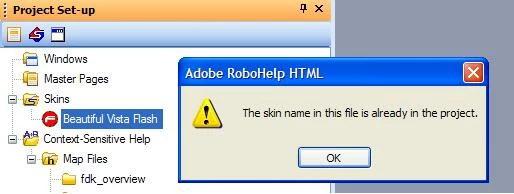
My skin is not displayed, but the project has the reference... Why wouldn't it display the skin?

Thanks in advance, Hemtya

This topic is closed to new replies. Start a new post to keep the conversation going.

7 replies

Peter Grainge
Community Expert
Community Expert
November 16, 2010

If not already resolved, try deleting the CPD.


See www.grainge.org for RoboHelp and Authoring tips

@petergrainge

Translate
Use the menu (bottom right) to mark the Best Answer or Highlight particularly useful replies. Found the answer elsewhere? Share it here.
hemtyaAuthor
Known Participant
November 16, 2010

Peter,

Thanks. I have tried that, doesn’t work.

It applies the skin correctly, but does not show up in the Project Setup folder for editing.

The rhskins.apj file shows the default flash skin and nothing else. I tried editing this (in a copy of course) to add the skin the project actually applies while building, but did not work.

Any thoughts?

As always, appreciate your time and help, Hemtya

Translate
Peter Grainge
Community Expert
Community Expert
November 24, 2010

Have you resolved this now?


See www.grainge.org for RoboHelp and Authoring tips

@petergrainge

Translate
Use the menu (bottom right) to mark the Best Answer or Highlight particularly useful replies. Found the answer elsewhere? Share it here.