
Inspiring
April 23, 2024
Answered

Skins (Templates)for RH2022

  • April 23, 2024
  • 10 replies
  • 1390 views

My reference book, Adobe RoboHelp 2022: The Essentials, is a bit useless at times ... like now. In RH2012, the skin we used looked like this:
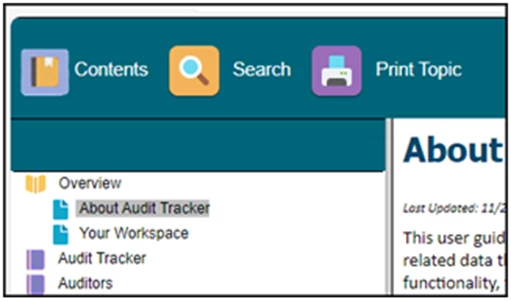
So, is there a similar option in RH2022? I can't seem to find it. Of course, it needn't be identical to this, but we'd like something...


Title amended by Moderator to improve searches

    This topic has been closed for replies.
    Correct answer Peter Grainge

    Your reply was OK, I just hadn't seen it when I replied. 


    You mean the home page rather than the TOC. Just as a test, try a different default template. I'll take a look in the morning.

    ________________________________________________________
    My site www.grainge.org includes many free Authoring and RoboHelp resources that may be of help.


    10 replies

    Peter Grainge
    Community Expert
    Peter GraingeCommunity ExpertCorrect answer
    Community Expert
    May 15, 2024

    Your reply was OK, I just hadn't seen it when I replied. 


    You mean the home page rather than the TOC. Just as a test, try a different default template. I'll take a look in the morning.

    ________________________________________________________
    My site www.grainge.org includes many free Authoring and RoboHelp resources that may be of help.


    Use menu (bottom right) to mark as Best Answer or to Highlight particularly useful replies. Found the answer elsewhere? Share it here.
    Inspiring
    May 15, 2024

    Good morning, Peter!

    I tried your suggestion and realized that (I don't know why) I had selected Manage Tiles from TOC; when I de-selected it, my images appeared.

    Thank you!

    Peter Grainge
    Community Expert
    Community Expert
    May 16, 2024

    Yeah that would screw it up. 🙂


    Perhaps somewhere in this thread there is now a correct answer or something that is worthy of an upvote? 🙂

    ________________________________________________________

    My site www.grainge.org includes many free Authoring and RoboHelp resources that may be of help.


    Use menu (bottom right) to mark as Best Answer or to Highlight particularly useful replies. Found the answer elsewhere? Share it here.
    Peter Grainge
    Community Expert
    Community Expert
    May 15, 2024

    ... and the answer to my question? 

    ________________________________________________________
    My site www.grainge.org includes many free Authoring and RoboHelp resources that may be of help.


    Use menu (bottom right) to mark as Best Answer or to Highlight particularly useful replies. Found the answer elsewhere? Share it here.
    Inspiring
    May 15, 2024

    My apologies for the lack of clarity in my previous post, when I mentioned "no, they do not appear when I generate..." I was referring to the tiles/images in the ToC

    Peter Grainge
    Community Expert
    Community Expert
    May 15, 2024

    Screenshot please. 


    Do they still appear when you generate? 

    ________________________________________________________
    My site www.grainge.org includes many free Authoring and RoboHelp resources that may be of help.


    Use menu (bottom right) to mark as Best Answer or to Highlight particularly useful replies. Found the answer elsewhere? Share it here.
    Inspiring
    May 15, 2024

    Here it is (Studio):


    Peter Grainge
    Community Expert
    Community Expert
    May 15, 2024

    What you are calling the TOC is correctly called the Home Page.

    I would guess you have deselected it here in the preset.


    I can't think of any other way for it not to appear. 

    ________________________________________________________

    My site www.grainge.org includes many free Authoring and RoboHelp resources that may be of help.


    Use menu (bottom right) to mark as Best Answer or to Highlight particularly useful replies. Found the answer elsewhere? Share it here.
    Inspiring
    May 15, 2024

    Hi, Peter!

    Actually, I did have Use Template Home Page checked; however, I also had a page specified in the Home Page box. I cleared that, but still not getting the ToC tiles that I once had...

    Peter Grainge
    Community Expert
    Community Expert
    May 8, 2024

    If it has answered your question, it is the correct answer. Adding another question does not affect that. You can mark more than one post as correct if you add answers or more than one person gives you the correct answer.


    With your latest post, a screenshot always helps and include the template name. I think this is what you mean.


    You need to go here.


    If you use a home page, you also need to go here.


    In both cases expand the Background section and you will see where to change the image.

    ________________________________________________________

    My site www.grainge.org includes many free Authoring and RoboHelp resources that may be of help.


    Use menu (bottom right) to mark as Best Answer or to Highlight particularly useful replies. Found the answer elsewhere? Share it here.
    Inspiring
    May 14, 2024

    Thanks again, Peter, for your continued support, not to mention patience.

    I did have tiles for a while there; they looked pretty good, too... but somehow in the changing logo process, they disappeared. Now, when I publish and view my project, it starts on my Introduction page ... and that's all; no Table of Contents at all.

    Rather than keep clicking on various items, I thought I'd better seek your advice once again.


    Thank you,

    Lon

    Peter Grainge
    Community Expert
    Community Expert
    May 5, 2024

    See Item 22 in RoboHelp Gems (grainge.org) for editing the tiles.

    ________________________________________________________

    My site www.grainge.org includes many free Authoring and RoboHelp resources that may be of help.


    Use menu (bottom right) to mark as Best Answer or to Highlight particularly useful replies. Found the answer elsewhere? Share it here.
    Inspiring
    May 7, 2024

    Hi, Peter, and thanks so much for your assistance. I was tempted to select this as a Correct Answer, but I have an additional question.

    I was able to change the color of the band at the top and to change the photos in the tiles -- worked perfectly!

    However, I would also like to change the logo (looks like the tuning pegs of a guitar with sound waves) to our company logo, but can't find where I can do this. Is it possible?

    Thanks again,

    Lon

    Peter Grainge
    Community Expert
    Community Expert
    May 5, 2024

    They are templates now. The background image is defined in the template editor as are the tiles.

    ________________________________________________________

    My site www.grainge.org includes many free Authoring and RoboHelp resources that may be of help.


    Use menu (bottom right) to mark as Best Answer or to Highlight particularly useful replies. Found the answer elsewhere? Share it here.
    Peter Grainge
    Community Expert
    Community Expert
    April 24, 2024

    Skins for CHMs were introduced in Classic versions and used methods that the strict adherence to HTML5 and CSS3 rules prevent. They are not part of the CHM output in the new UI versions and cannot be.


    As @Amebr has said, WebHelp is also defunct. That is for the same reasons. The options are responsive and frameless templates, as skins are now called. Frameless is the way to go as that is where Adobe are focussing development and they are much easier to customise.


    There is no CHM subsitute anywhere that I have seen.

    ________________________________________________________

    My site www.grainge.org includes many free Authoring and RoboHelp resources that may be of help.


    Use menu (bottom right) to mark as Best Answer or to Highlight particularly useful replies. Found the answer elsewhere? Share it here.
    Inspiring
    May 3, 2024

    Hello ... search function seems to be working, so on with the skins game:

    We're considering using the Frameless option, but would like to modify the appearance (skin?) to more accurately reflect our company's style -- specifically the colors, but if we could replace the images on the Home page with something more appropriate to our image, that ... would ... be ... great. 

    Community Expert
    April 23, 2024

    In my very vague memory from the age of dinosaurs ( 😉 ) I think chm skins were actually RH webhelp skins somehow incorporated into the chm viewer. They are definitely not a default feature of Microsoft HTML Help. I suspect they did not make it in to New UI, given RH webhelp is defunct.

    Inspiring
    April 23, 2024

    BTW: I'm using Microsoft HTML Help