
Participant
September 20, 2017
Answered

Smart Index Wizard Crashes RoboHelp

  • September 20, 2017
  • 1 reply
  • 423 views

Hi,

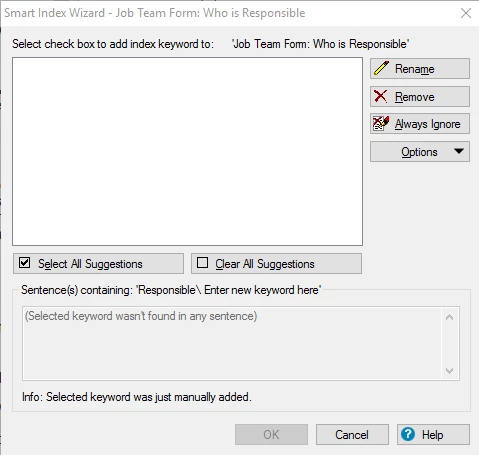
Went to add index keywords to a topic via Smart Index Wizard. Selected the keywords, when select OK it crashes RoboHelp. The only way to get RoboHelp working is to End Task in the Task Manager. Have tried different topics in case the topic I was selected was corrupted, without success; selected from displayed suggestions as well as creating new; restarted my computer - Robo just stops working.

I have RoboHelp15 installed - any help will be GREATLY appreciated!

I have never encountered this problem in the past.

See attached dialogue I cannot escape/get out of.

Thanks,

Sharyn
    This topic has been closed for replies.
    Correct answer sharynr52389049

    Hi,

    No that did not resolve - still froze.

    I eventually resolved myself and found it is how you access the Smart Index. If I go through 'Properties' then into the Smart Index it does not freeze and allows me to Index the topic.

    I believe this is a glitch with the 'Smart Index Wizard' link.

    Thanks for trying to help!

    1 reply

    Community Expert
    September 20, 2017

    There's a confirmation dialog box that pops up after RH finishes adding keywords. It might have fallen off your screen.

    Perform the same actions and when RH "freezes" try pressing Window key + LeftArrow key a couple of times to see if that forces it back onto your screen.

    sharynr52389049AuthorCorrect answer
    Participant
    September 20, 2017

    Hi,

    No that did not resolve - still froze.

    I eventually resolved myself and found it is how you access the Smart Index. If I go through 'Properties' then into the Smart Index it does not freeze and allows me to Index the topic.

    I believe this is a glitch with the 'Smart Index Wizard' link.

    Thanks for trying to help!