



Cara Bereck Levy
Known Participant
August 3, 2022
Question

Snippets hts#p gone-crazy-tags 8-{

  • August 3, 2022
  • 14 replies
  • 1039 views

Hello lovely people! I upgraded a large, snippet-rich project created in RH 2017 to RH 2020, all updated and patched.

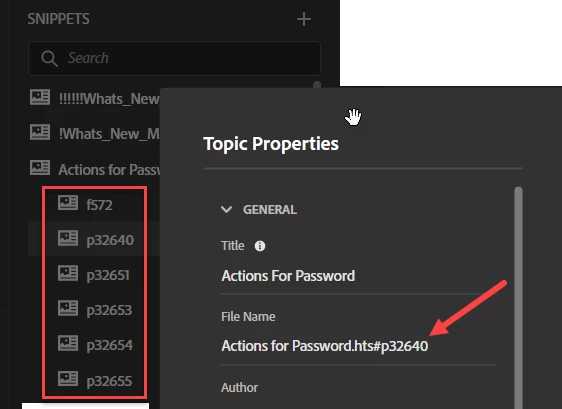
My snippets now have dozens of added tags, as shown in the capture below. What are these weird entities? Will my project disintegrate if I delete them? They are incredibly annoying and deserve deletion.

Thank you for any light you can shine on this mysterious issue 🙂
 

    This topic has been closed for replies.

    14 replies

    Peter Grainge
    Community Expert
    Community Expert
    August 3, 2022

    I think I see what's going on. In Classic you could apply Categories for snippets. I'm guessing Actions for Passwords was a category and the #part was the snippet.


    What the upgrade seems to have done is indent the snippets within the category.


    Assuming I am right, removing the numbering would do nothing more than wreck the snippets. 🙂


    Given the names applied mean nothing without the main heading, I think I would leave them alone. Alternatively you can rename them. Create a backup first in case that has unforseen circumstances.

    ________________________________________________________

    My site www.grainge.org includes many free Authoring and RoboHelp resources that may be of help.


    Use the menu (bottom right) to mark the Best Answer or Highlight particularly useful replies. Found the answer elsewhere? Share it here.
    Cara Bereck Levy
    Known Participant
    August 3, 2022

    @Peter Grainge 

    \>In Classic you could apply Categories for snippets. I'm guessing Actions for Passwords was a category and the #part was the snippet.<

    No--although I did use categories at times, I did not for Actions for Passwords.

    Now--here is Actions for Passwords in RH2017, preview, along with the source code. What the haeck are all those 'fragment IDs'. 
    Apparerently those were transformed into my mystery tags at import--why???

    Jeff_Coatsworth
    Community Expert
    Community Expert
    August 3, 2022

    Ok, so the issue is that in your RH2017 source you've got those id="stuff" fragmentid="morestuff" elements - the question is where did they come from. How was the content created in RH2017? Or did it come in from some other system?

    Jeff_Coatsworth
    Community Expert
    Community Expert
    August 3, 2022

    They almost look like bookmark references - if you look at the code view of that snippet are you seeing anything "bookmark-ish"?

    Peter Grainge
    Community Expert
    Community Expert
    August 3, 2022

    @Jeff_Coatsworth Me neither. The background image is from Snippets but you cannot indent snippets. The top image is Topic Properties whereas if you right click a Snippet and select Properties you get a dialog with Snippet Properties.


    What were the filenames of the Snippets in RoboHelp 2017? Any sort of indenting there?

    ________________________________________________________

    My site www.grainge.org includes many free Authoring and RoboHelp resources that may be of help.


    Use the menu (bottom right) to mark the Best Answer or Highlight particularly useful replies. Found the answer elsewhere? Share it here.
    Cara Bereck Levy
    Known Participant
    August 3, 2022

    Hi guys--thanks for answering.

    Here is the same topic in 2017 and in 2020--both patched with lates patches, I checked before crying fpr help 🙂

    Cara Bereck Levy
    Known Participant
    August 3, 2022

    Just to note--the tags simply appeared, I did nothing to indent anything...

    Jeff_Coatsworth
    Community Expert
    Community Expert
    August 3, 2022

    Not heard of that one before - you're all patched up with Patch 8? Is it happening with snippets in the sample project?