


Participant
September 6, 2022
Question

Some Books from TOC are missing when generate to Microsoft HTML Help

  • September 6, 2022
  • 5 replies
  • 291 views

Hi,

I have a problem when generating My Project to Microsoft HTML Help with Robohelp 2020. All of the Book drop-down lists are displayed on the Tables of Contents in My project.
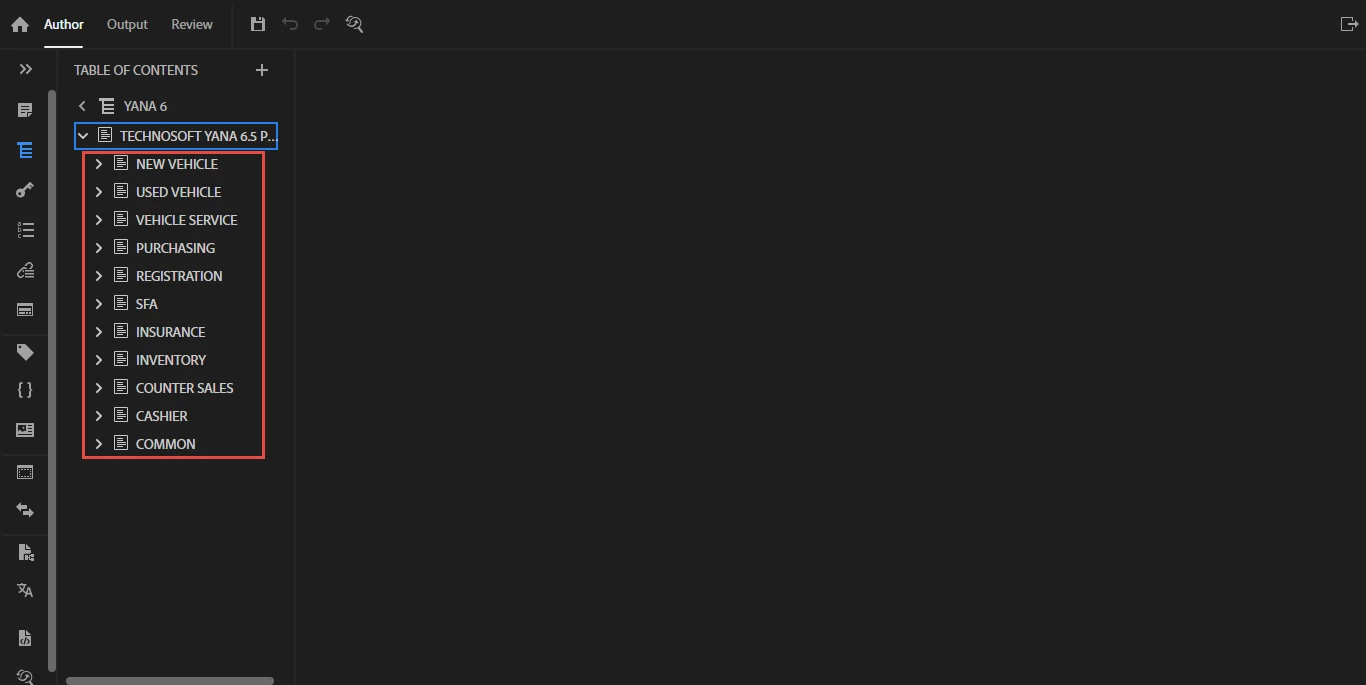
 

But when I generated to Microsoft HTML Help its only displayed 1 book list. 
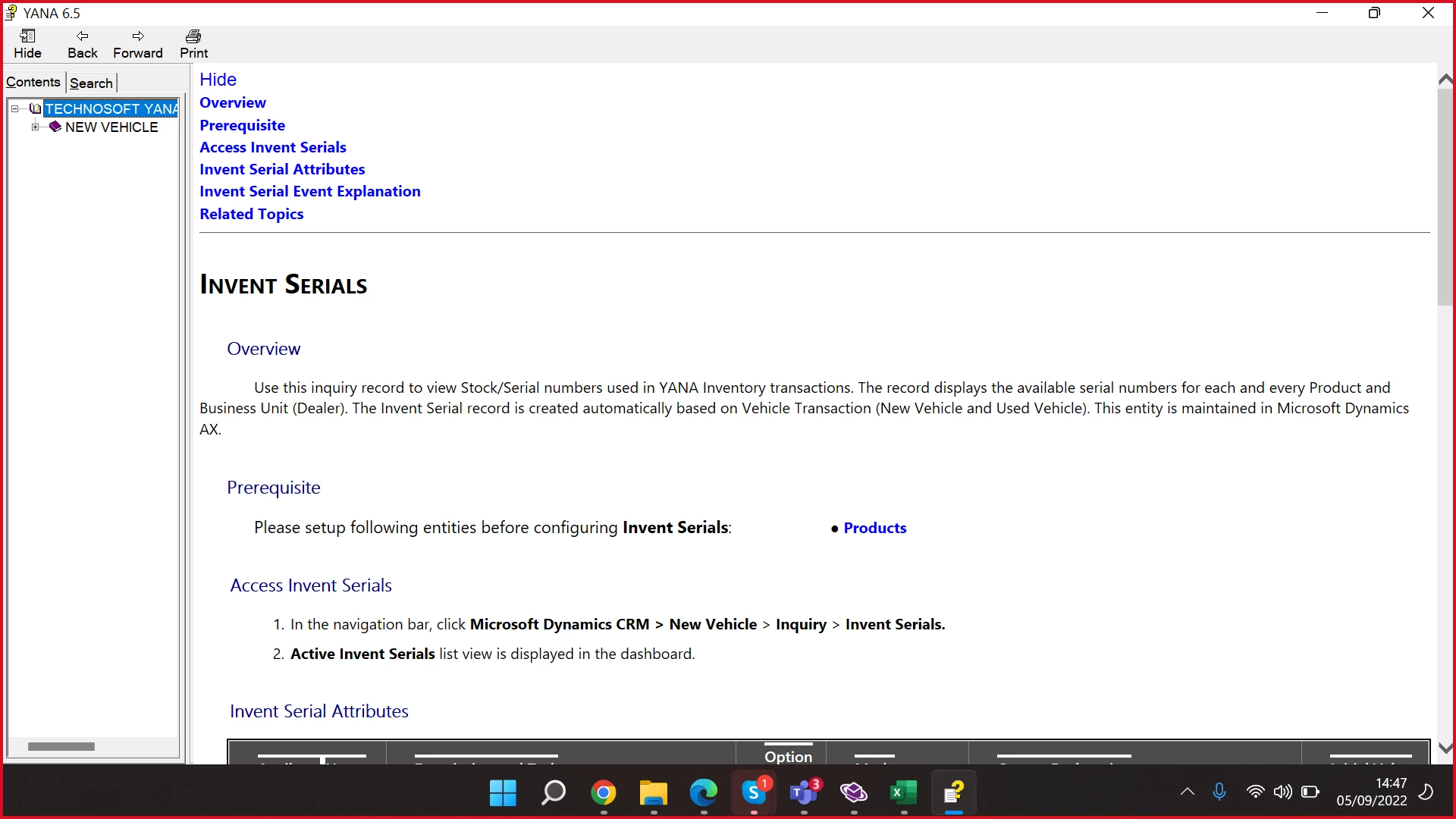
If anyone can give me some direction on what I need to do, I'd really appreciate it.

Thank u!

    This topic has been closed for replies.

    5 replies

    Peter Grainge
    Community Expert
    Community Expert
    September 6, 2022

    Which update of 2020 are you using? 2020.8 is the latest. See Update 8 is now available - Adobe Support Community - 12693168


    Is the correct TOC selected in the preset.


    Also is a condition expression applied in the CHM preset?


    Beyond that I can't readily think of a reason but I'm happy to take a look at the project. Can you share the project? If you can, then see the Contact page on my site and send the project as instructed there. Do make sure you include a link to this thread and please do not email the project direct.

    ________________________________________________________

    My site www.grainge.org includes many free Authoring and RoboHelp resources that may be of help.


    Use the menu (bottom right) to mark the Best Answer or Highlight particularly useful replies. Found the answer elsewhere? Share it here.
    Community Expert
    September 6, 2022

    Well, there doesn't appear to be a topic attached to that page in the toc (the Source field is blank). If you link it to the correct topic then that page should appear in the output correctly.  


    If you haven't made many changes since you upgraded, can you try the upgrade process again? Perhaps another attempt will upgrade the toc correctly. 


    If you can't try to upgrade again then I think you'll have to redo your TOC.

    Community Expert
    September 6, 2022

    Can you expand a couple of the books? Are the topics attached correctly? Are there any symbols on the topic references?

    Participant
    September 6, 2022

    I think the topics are attached correctly and there are no symbols (like "X red" symbols) on the topics. The Hide in Outputs checkbox on the topic is unchecked too. 


    Community Expert
    September 6, 2022

    Did you import or upgrade? You should have used the option to Upgrade Project rather than importing topics. If you imported and have only just made the switch and haven't really changed any content, you could try the upgrade process to a new folder and see if that works correctly.


    If you imported and have made content changes since the switch, don't worry, we can see if we can figure out the problem.


    To the specific missing folders, if you click on one of the missing books in the table of contents, check the properties panel to see if "Hide in output" is selected.  This setting ensures content is included in the output, but does not display in the table of contents. If it's set, then unselect it and repeat for all books and topics. Theoretically you would have had to specifically set it, but stranger things have happened.


    Beyond that, I'll have to have more of a think about what else to check.

    Participant
    September 6, 2022

    Sorry I mean I'm upgrading to RoboHelp 2020. I have already check the properties panel, the "Hide in Output" checkbox is not checked on all missing books in the table of contents. 


    Participant
    September 6, 2022

    Actually, I have multiple projects on Robohelp, when I try to generate the other project to the Microsoft HTML Help there's no problem the Books on TOC are displayed. 

    Community Expert
    September 6, 2022

    Do you have condition tags defined and a condition expression selected in the output? That could be excluding topics with particular tags from your output.

    Participant
    September 6, 2022

    Previously I changed my RoboHelp version from version 11 to 2020. when I imported data from version 11 to version 2020, there were no problems. In the previous version (RoboHelp version 11) I did use condition tags & condition expression but after importing to the 2020 version the conditionals disappeared/became empty.