
Inspiring
May 12, 2020
Answered

Some topics in TOC not showing in output

  • May 12, 2020
  • 5 replies
  • 638 views

Hi, Everyone.


When I generate output of my TOC, the first 2 tiles reflect the TOC. But then Tile 3 skips ahead in the TOC by 12 topics (and 2 books), to Topic 15.  


This TOC seems completely messed up in other ways, too. Most strange of all is that, I initially deleted topics 3 - 15 in an unrelated effort to find a "bad" topic that was preventing me from generating output. After finding the offending topic, I wanted to go back to reintroduce the topics I deleted. Those deleted topics each had a red "x" next to it. I intended to reintroduce each topic that had a red X. But after reintroducing the first of these and pressing ctrl + S,  all the red x's disappeared.


Okay...  Those topic titles remained in the TOC, but now with no red X. (See screenshot.)
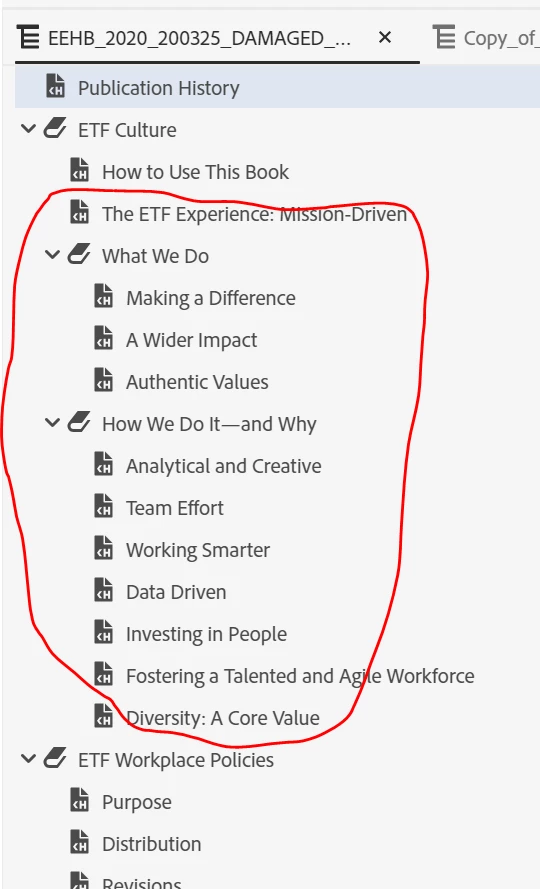


Maybe their presence is just an empty "shell"; maybe they're not really "there." I generate the output, and, sure enough, the output does not display those topics. Fine. 


However, I reintroduce several of the actual topics to the TOC and delete the corresponding "shells." And the output still skips over the newly replaced topics.


Thank you.

    This topic has been closed for replies.
    Correct answer Peter Grainge

    Tiles are top level books only. When you click ETF Culture, you will then get a second home page unless you use one of the techniques I have already covered.


    5 replies

    Peter Grainge
    Community Expert
    Community Expert
    May 13, 2020

    Threads don't close. They remain for others who have much the same problem but can't resolve it.


    Use the menu (bottom right) to mark the Best Answer or Highlight particularly useful replies. Found the answer elsewhere? Share it here.
    Inspiring
    May 13, 2020

    Got it. Thank you, Peter.


    We can close this thread.

    Peter Grainge
    Community Expert
    Peter GraingeCommunity ExpertCorrect answer
    Community Expert
    May 12, 2020

    Tiles are top level books only. When you click ETF Culture, you will then get a second home page unless you use one of the techniques I have already covered.


    Use the menu (bottom right) to mark the Best Answer or Highlight particularly useful replies. Found the answer elsewhere? Share it here.
    Inspiring
    May 12, 2020

    Hi, Peter.


    I'm glad you asked me to elaborate. In writing this up, I've realized my error. I now realize the output is set up to only represent top-level books on the home page. 


    Is it possible to have 2nd-level books to also appear in tiles on the home page?  In my screenshot below, the 2nd-level books are "What We Do" and "How We Do It..."


    Thank you!


    Martin


    Peter Grainge
    Community Expert
    Community Expert
    May 12, 2020

    You mean the first home page has tiles for ETF Culture and then ETF Workplace Policies?


    Can you somehow make it clearer using screenshots what differences there are between the source TOC and what the user sees?


    Use the menu (bottom right) to mark the Best Answer or Highlight particularly useful replies. Found the answer elsewhere? Share it here.