Inspiring
April 4, 2017
Answered

Span-tags disapear when empty between tags

  • April 4, 2017
  • 4 replies
  • 1135 views

Using Robohelp 2017 (trial version)

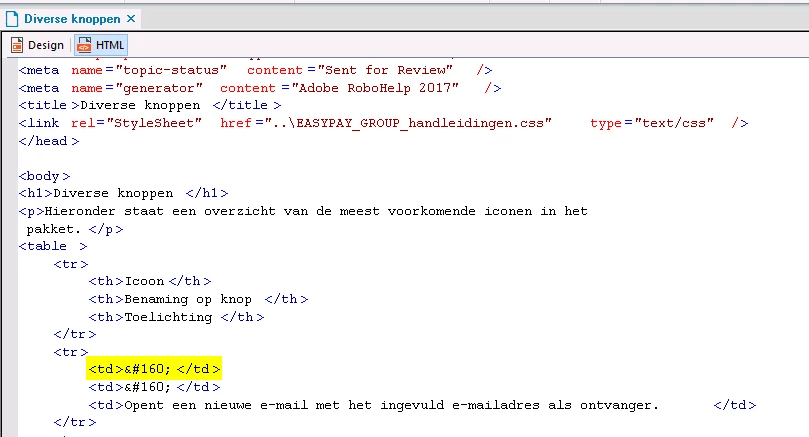
In Html-mode we place a span which contains a class.

The class calls a font with the help of a css-file.

The result of 'glyphicon-search' is the image of a magnifying glass.
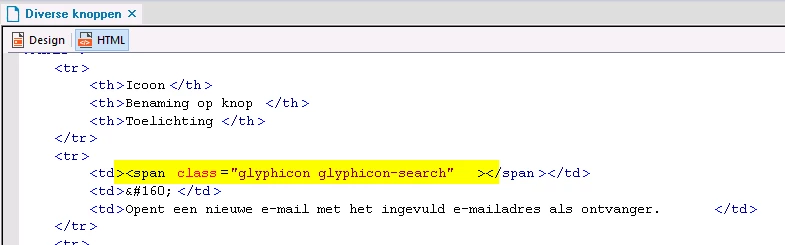
pic 1

Result in the output:

pic 2

If we click the Design-mode (pic 3) and return back to html-mode (pic 4) we lost the span.
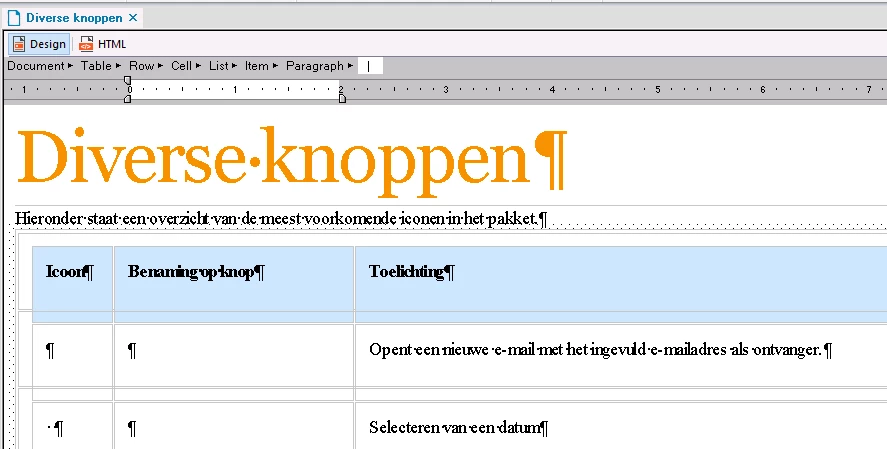
pic 3

pic 4

I assume we lose it because there is nothing placed between the tags.

Is there a way to keep the span in the code?

A particular setting perhaps?

This topic has been closed for replies.
Correct answer Stefan Gentz

The approach easypay_mdb is taking here, totally makes sense to me. Using an icon font is fine and best practice today in web design as well. It has many advantages (like automatically looking fine and sharp on any display and automatic scaling with the font size of the paragraph and while zooming).

RoboHelp only strips out empty elements when they are the sole element in a paragraph element. It does not happen when it's used inside a paragraph with text (like in <p>Follow us on <span class"iconfont youtube"></span> YouTube.</p>

Therefore, simply adding a non-breaking space after the icon does the trick here.

We will look into that and check if we can make stripping out empty tags an option in RoboHelp. It has many advantages to do this currently (especially for copy & paste content from e.g. Word to RoboHelp to clean up the code).

4 replies

Inspiring
April 5, 2017

@Peter

Yes, this is the way our company has set a structure to implement icons (mostly set in buttons).

All is implemented in a css-file.

for example:

<span class="glyphicon glyphicon-asterisk"></span>

In the bold/underlined part we chose the name of the wanted icon.

The names are fixed.

greetings

Peter Grainge
Community Expert
Community Expert
April 5, 2017

Thanks to Stefan, I see I had misunderstood the basic problem. I had not come across Icon Fonts and for the benefit of anyone else following this thread, here's an explanation.

Based on that, then the suggested solution is the way to go for now.

@Stefan: I think one of the oldest requests on these forums is an option "Don't mess with my code". RoboHelp is, of course, very good at fixing errors for people but sometimes a particular user with expert knowledge may have reason for not wanting that helping hand. My argument has always been that if someone uses that, they can hardly complain if things then go belly up.


See www.grainge.org for RoboHelp and Authoring information

@petergrainge

Use the menu (bottom right) to mark the Best Answer or Highlight particularly useful replies. Found the answer elsewhere? Share it here.
Inspiring
April 5, 2017

It 's to create a tips and tricks document for our programmers.

We have over a 200 icons in an eot-file, we can use in our programs.

To take of each an image is too much work to create one page.

What do you mean by 'manipulating one of the table styles'?

greetings.

Peter Grainge
Community Expert
Community Expert
April 5, 2017

Am I right in thinking the sole purpose of adding the span tag is to generate the same image over and over wherever you insert the span tag. Thus you have to manually insert the span tag manually in every place it is required?


See www.grainge.org for RoboHelp and Authoring information

@petergrainge

Use the menu (bottom right) to mark the Best Answer or Highlight particularly useful replies. Found the answer elsewhere? Share it here.
Stefan GentzCommunity ManagerCorrect answer
Community Manager
April 5, 2017

The approach easypay_mdb is taking here, totally makes sense to me. Using an icon font is fine and best practice today in web design as well. It has many advantages (like automatically looking fine and sharp on any display and automatic scaling with the font size of the paragraph and while zooming).

RoboHelp only strips out empty elements when they are the sole element in a paragraph element. It does not happen when it's used inside a paragraph with text (like in <p>Follow us on <span class"iconfont youtube"></span> YouTube.</p>

Therefore, simply adding a non-breaking space after the icon does the trick here.

We will look into that and check if we can make stripping out empty tags an option in RoboHelp. It has many advantages to do this currently (especially for copy & paste content from e.g. Word to RoboHelp to clean up the code).

Inspiring
April 4, 2017

Already tried,

that worked.

I wondered if there was a better sollution.

Captiv8r
Legend
April 4, 2017

Out of curiosity, is the goal just to have that search icon in that table cell?

Assuming the answer to that is yes, why wouldn't an image work there?

Wondering too if perhaps you have considered manipulating one of the table styles to incorporate the image or icon?

Cheers... Rick

Captiv8r
Legend
April 4, 2017

Hi there

No setting I'm aware of. And I believe you are spot on. When RoboHelp sees these tags with nothing inside, it deems they are superfluous and strips them away.

I'm wondering if perhaps you might manage to trick RoboHelp into keeping them by inserting just a space there with &#160;?

If that fails, perhaps use a non-printing character such as a Zero Width Joiner?

Cheers... Rick