Inspiring
October 14, 2024
Question

Special characters no longer outputted in PDF output and PDF templates still have whitespace problem

  • October 14, 2024
  • 9 replies
  • 613 views

RH 2022.5


Starting to doubt our upgrade to RH 2022.5 as the number of bugs seem to be larger than expected.

Just a quick check before I make yet another batch of bug reports, but I've encountered the following 2 issues:


Table continuation marker

Table continuation markers no longer seem to accept 'special' characters such as é or à.

In 2022.3.93, the following message was successfully rendered:
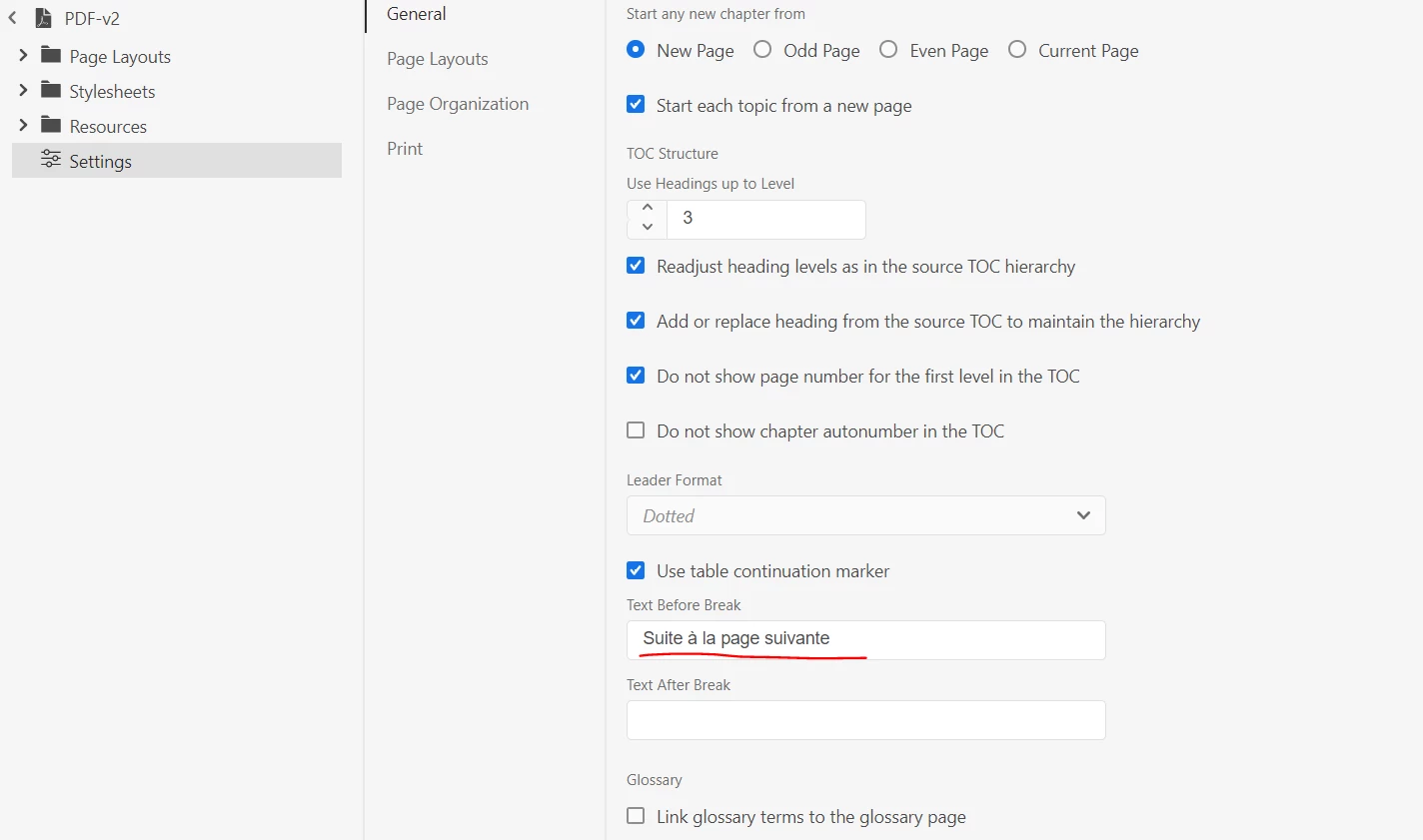
In 2022.5 no longer:

Whitespace problem

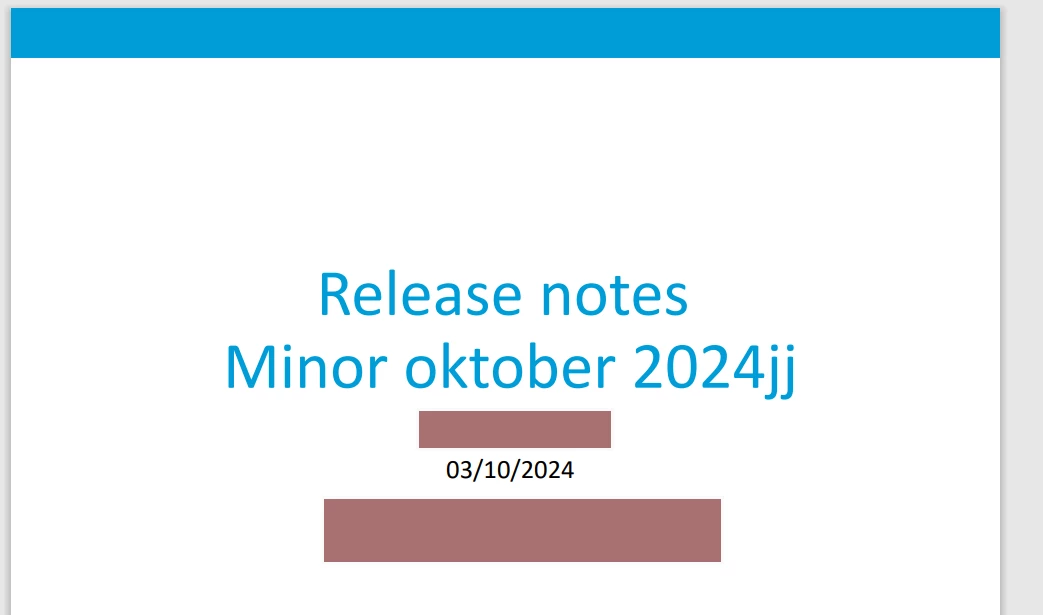
In 2022.5, empty <p> tags are no longer outputted in frontCover page layout.
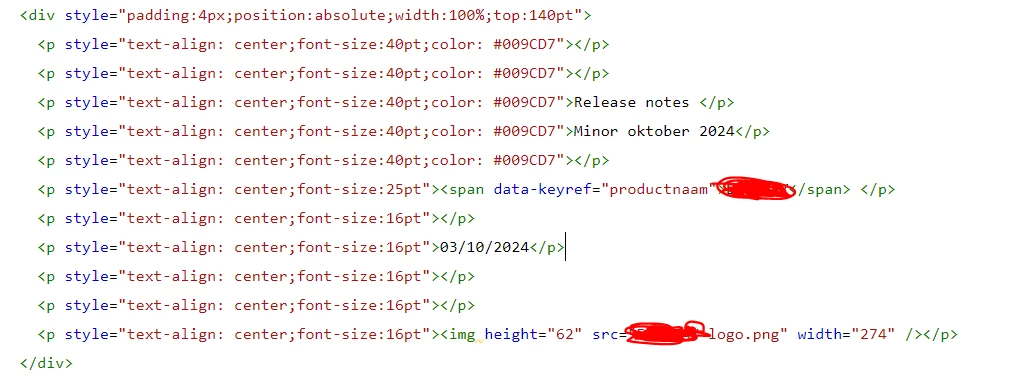
 

Hilariously, pre-existing PDF templates do not have this bug. As soon as you change a letter in the title, though, it seems to be recognised as belonging to 2022.5 and this bug appears.


This topic has been closed for replies.

9 replies

Peter Grainge
Community Expert
Community Expert
October 17, 2024

If you email me via my site, I will send a project where blank lines are working. Maybe you can then find the difference. 

________________________________________________________
My site www.grainge.org includes many free Authoring and RoboHelp resources that may be of help.


Use menu (bottom right) to mark as Best Answer or to Highlight particularly useful replies. Found the answer elsewhere? Share it here.
Inspiring
October 17, 2024

Unfortunately IT will tear me a new one if I were to attempt to download mailed files, but I can upload the test project to a public repo in Github when I have time.

Peter Grainge
Community Expert
Community Expert
October 17, 2024

Is it a small project that you can share?

________________________________________________________

My site www.grainge.org includes many free Authoring and RoboHelp resources that may be of help.


Use menu (bottom right) to mark as Best Answer or to Highlight particularly useful replies. Found the answer elsewhere? Share it here.
Inspiring
October 17, 2024

I tested it by creating a new project, not our company project. Is it not reproducable with a new project?

In the same vein, the front cover issue seems to be reproducable as well:


<body>
<div data-region="header"></div>
<div data-region="content">
<p>Sentence1</p>
<p></p>
<p><span style="font-weight:bold;font-size:50px">Title</span></p>
<p><br />

</p>
<p>Sentence2</p>
</div>
<div data-region="footer">
<p style="text-align: center;">Page <span data-field="page-number">1</span></p>
</div>
</body>


Legend
October 15, 2024

Good to know, thanks for the confirmation, Peter.

Peter Grainge
Community Expert
Community Expert
October 15, 2024

@Karin Albrecht I'm not seeing the blank line issue now in the PDF output. 

________________________________________________________

My site www.grainge.org includes many free Authoring and RoboHelp resources that may be of help.


Use menu (bottom right) to mark as Best Answer or to Highlight particularly useful replies. Found the answer elsewhere? Share it here.
Legend
October 15, 2024

Thank you, Peter. However, according to the release notes, this is only fixed for HTML5 output in update 5, not for PDF. Gonna test update 5 in the upcoming weeks. For the time beeing, I found the fix you provided for this issue: Gelöst: Line breaks automatically being deleted in RH2022.... - Adobe Community - 14624772

Thanks again 🙂

Peter Grainge
Community Expert
Community Expert
October 15, 2024

@Karin Albrecht Fixed in Update 5. I don't know why @WoutJacobs is still seeing the issue.


https://helpx.adobe.com/robohelp/kb/fixed-issues.html 

________________________________________________________

My site www.grainge.org includes many free Authoring and RoboHelp resources that may be of help.


Use menu (bottom right) to mark as Best Answer or to Highlight particularly useful replies. Found the answer elsewhere? Share it here.
Legend
October 15, 2024

I recognize this whitespace problem in PDF cover pages. I am using 2022.4.179. When setting up new projects and importing well working PDF templates, they had exactly that issue. I tried getting it to work by including <br /> into the empty <p> tags, which did the trick sometimes, but not always. 

Peter Grainge
Community Expert
Community Expert
October 14, 2024

In a new project I added two symbols and some blank lines. They output fine to PDF.

________________________________________________________

My site www.grainge.org includes many free Authoring and RoboHelp resources that may be of help.


Use menu (bottom right) to mark as Best Answer or to Highlight particularly useful replies. Found the answer elsewhere? Share it here.
Inspiring
October 17, 2024

I tested with a new project, the symbol problem definitely seems to persist.


Control group - no special symbols

Test with special characters


Jeff_Coatsworth
Community Expert
Community Expert
October 17, 2024

Fire off that bug report @WoutJacobs 😊

Peter Grainge
Community Expert
Community Expert
October 14, 2024

Can't help you on this. You know the link!


I suggest for this one you need to go to Adobe Support. See https://helpx.adobe.com/contact/enterprise-support.other.html#robohelp for your Adobe Support options. The email link tcssup@adobe.com is recommended as it reaches a team dedicated to Technical Communication Suite products including RoboHelp.

________________________________________________________

My site www.grainge.org includes many free Authoring and RoboHelp resources that may be of help.


Use menu (bottom right) to mark as Best Answer or to Highlight particularly useful replies. Found the answer elsewhere? Share it here.