


Inspiring
December 23, 2020
Answered

Spell check in upgraded project does not find mispelled words

  • December 23, 2020
  • 10 replies
  • 482 views

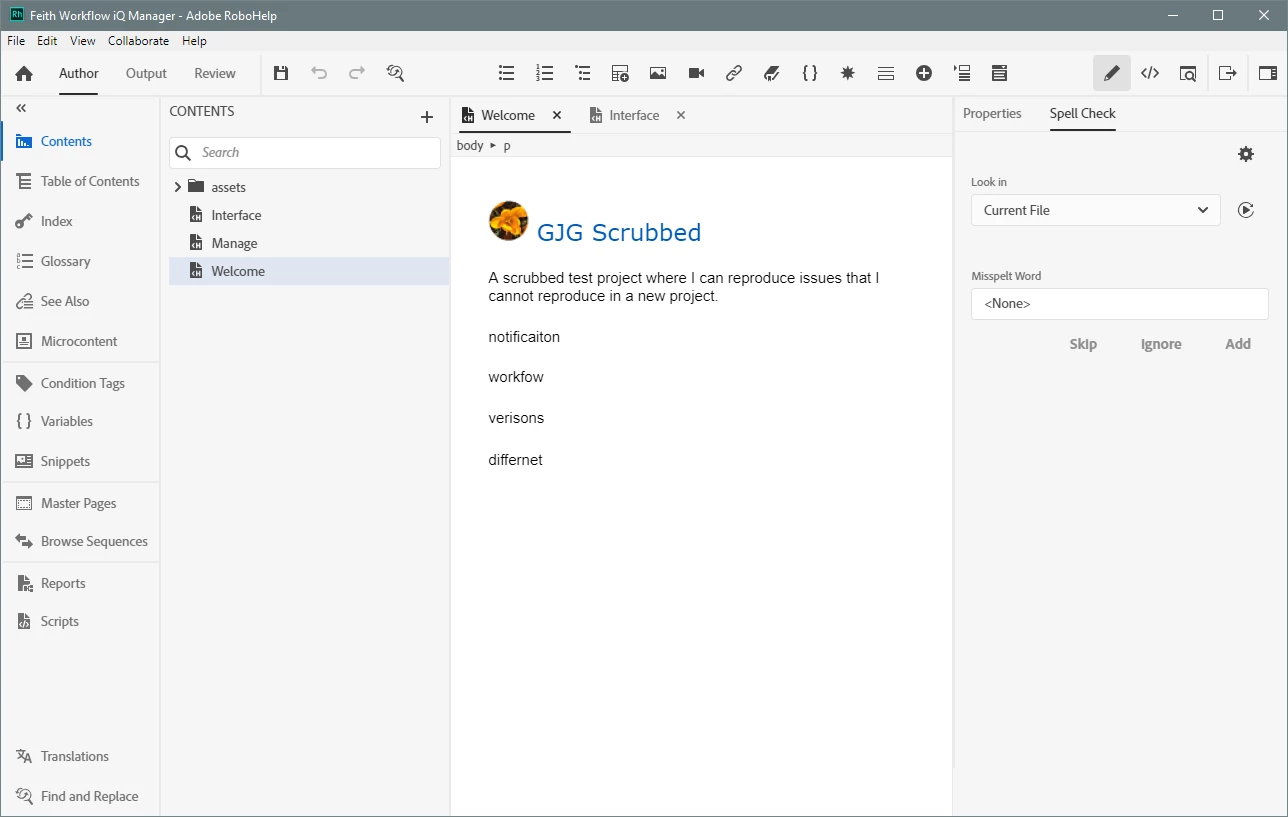
Upgraded an existing help project to RH 2020 and mispelled words are not underlined red nor are they found by Spell Check.

  • Preferences>"Run spell checking on opening a topic" is on.
  • Upgraded from Robohelp 11.0.4.291 to 2020.0.156.
  • Confirmed mispelled words are identified in RH 11.
  • Cannot duplicate when creating a new project in RH 2020, same words are found fine.
  • Workaround: Changing the Project Title in File>Project Settings causes mispelled words to be found by Spell Check and underlined red. I suspect changing the project title is causing the project to "rebuild" in such a way that spell check starts working. Kind of a hammer.

I'm wondering if there is a "lighter" workaround than renaming the project and whether this is a bug in RH 2020's classic-project upgrade.

    This topic has been closed for replies.
    Correct answer Peter Grainge

    Try applying Update 3. You cannot update from the initial release (2020.0) using Help > Check for Updates. See the Announcements on the forum to apply the latest update. You only need to apply the latest as it includes the incremental changes. Once you have a later update, Help > Check for Updates will work in the future.

    ________________________________________________________
    See www.grainge.org for free Authoring and RoboHelp Information

    10 replies

    Peter Grainge
    Community Expert
    Community Expert
    April 7, 2021

    @WiscoLori File a bug report. 🙂 Sorry but that's the way it works at the moment.

    Please follow this link to report bugs. https://tracker.adobe.com

    Post the link to your bug report in this thread and others can vote for it. The more people who do so, the higher it gets prioritised.

    ________________________________________________________
    See www.grainge.org for free Authoring and RoboHelp Information

    Use the menu (bottom right) to mark the Best Answer or Highlight particularly useful replies. Found the answer elsewhere? Share it here.
    Inspiring
    September 15, 2021

    I found ticket # RH-10018 regarding Spell Check functionality, added a comment and voted for it.  Spell Check needs to work in real time.

    WiscoLori
    Known Participant
    April 7, 2021

    Hi, I have a similar issue/question.

    I'm using RoboHelp 2020.4.173.  The project was upgraded previously from RoboHelp 2015.

    I have Preferences > "Run spell checking on opening a topic" enabled.

    When I open a topic, any misspelled words are flagged, as expected.

    However, they are not flagged as they are typed.  I have to run the Spell Check to find them.  

    Is there a way to set up RoboHelp to automatically flag misspelled words as they are typed?

    Thanks,

    Lori

    Peter Grainge
    Community Expert
    Community Expert
    January 4, 2021

    Thank you for letting me know. 

    ________________________________________________________
    See www.grainge.org for free Authoring and RoboHelp Information

    Use the menu (bottom right) to mark the Best Answer or Highlight particularly useful replies. Found the answer elsewhere? Share it here.
    gjg097Author
    Inspiring
    January 4, 2021

    Help>Check for Updates upgraded me to 2020.3.32. So I should be on the latest now. Thanks!

    Peter Grainge
    Community Expert
    Community Expert
    January 4, 2021

    A further check pretty much confirms Update 3 is in fact Update 2. Try updating by going to the Help menu and using Check for Updates.


    Please let me know that works and fixes the issue.

    ________________________________________________________
    See www.grainge.org for free Authoring and RoboHelp Information

    Use the menu (bottom right) to mark the Best Answer or Highlight particularly useful replies. Found the answer elsewhere? Share it here.
    Peter Grainge
    Community Expert
    Community Expert
    January 4, 2021

    I just downloaded both updates and did a file comparision. On the face of it both downloads are the same. I have taken this up with Adobe. I should have a response tomorrow.

    ________________________________________________________
    See www.grainge.org for free Authoring and RoboHelp Information

    Use the menu (bottom right) to mark the Best Answer or Highlight particularly useful replies. Found the answer elsewhere? Share it here.
    gjg097Author
    Inspiring
    January 4, 2021

    Unsure why that is the version number I got.

    1. Went to https://www.adobe.com/support/robohelp/downloads.html
    2. Clicked link " RoboHelp 2020.3 update (Win) (766 MB)"
    3. Extracted "RoboHelp_15_LREFDJ.zip"
    4. Ran "Set-up.exe"
    5. Installer welcome screen says "Version 2020.2.0"
    6. After install, launched Robohelp. Help>About says "Version 2020.2.29"
    Peter Grainge
    Community Expert
    Community Expert
    January 4, 2021

    Why not 2020.3?

    ________________________________________________________
    See www.grainge.org for free Authoring and RoboHelp Information

    Use the menu (bottom right) to mark the Best Answer or Highlight particularly useful replies. Found the answer elsewhere? Share it here.
    gjg097Author
    Inspiring
    January 4, 2021

    Thanks, I upgraded to Version 2020.2.29 and the mispelled words are now underlined and the spell check finds them too.

    Peter Grainge
    Community Expert
    Peter GraingeCommunity ExpertCorrect answer
    Community Expert
    December 23, 2020

    Try applying Update 3. You cannot update from the initial release (2020.0) using Help > Check for Updates. See the Announcements on the forum to apply the latest update. You only need to apply the latest as it includes the incremental changes. Once you have a later update, Help > Check for Updates will work in the future.

    ________________________________________________________
    See www.grainge.org for free Authoring and RoboHelp Information

    Use the menu (bottom right) to mark the Best Answer or Highlight particularly useful replies. Found the answer elsewhere? Share it here.