
Known Participant
March 11, 2014
Question

Standalone RH10 has no Windows 7 taskbar functionality

  • March 11, 2014
  • 1 reply
  • 669 views

I just got a slightly rude awakening today. I had to give up my license for TechComm suite and just have RoboHelp 10. Now I can't pin the RH icon to the taskbar, nor do I have the usual options when right-clicking the window indicator that does appear on the taskbar when a project is open. All I can do is close the window:
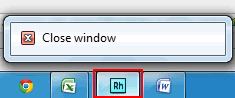
Is there a way to get the taskbar functionalities back for the standalone RH 10?

    This topic has been closed for replies.

    1 reply

    Peter Grainge
    Community Expert
    Community Expert
    March 12, 2014

    You say you cannot pin it but then show you have, albeit not with full functionality. It works as expected on the machines I have looked at so it might be worth deleting this icon and trying again.

    If you right click the icon in the start menu, there should be a Pin to Taskbar option. Try that.


    See www.grainge.org for RoboHelp and Authoring tips

    @petergrainge

    Use the menu (bottom right) to mark the Best Answer or Highlight particularly useful replies. Found the answer elsewhere? Share it here.
    Willam van Weelden
    Inspiring
    March 12, 2014

    It's a Windows thing: you're not allowed by default to pin items with

    Help in the name to the taskbar.

    There are two solutions:

    • Change your shortcut name. See

    http://iconlogic.blogs.com/weblog/2012/09/adobe-robohelp-pining-to-pin.html

    • Change your registry to remove this limitation altogether. See

    http://weblog.west-wind.com/posts/2009/Oct/08/Application-that-wont-Pin-to-Taskbar-in-Windows-7

    Kind regards,

    Willam

    DMilkesAuthor
    Known Participant
    March 12, 2014

    Thanks, William. I renamed the shortcut and I was able to pin it. And I can open more than one window from it.

    That restricted list for pinning has to be the most ridiculous Windows quirk in a long time.