
Known Participant
September 22, 2017
Question

Standardizing desktop screen layout across all computers (RoboHelp 2015)

  • September 22, 2017
  • 1 reply
  • 347 views

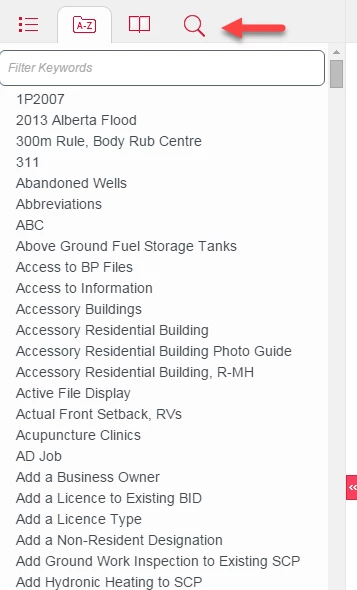
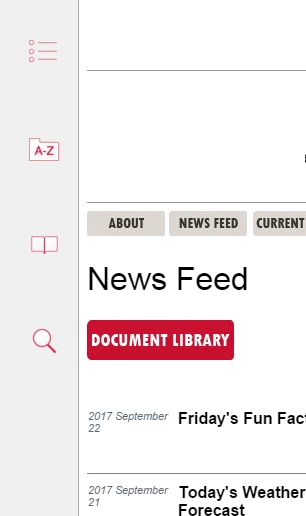
I have run into an issue with my RoboHelp 2015, responsive html5 layout on desktop computers. On some computers the layout shows, as I want it to, with the navigation pane located in the top header area. On other computers, however, the navigation pane shows up as it would on a tablet, with the buttons pushed to the left side of the screen and minimized.This happens even if the person has their internet broswer at Maximized window. I have two screen shots below of the issue.

How can I change the settings so that on ALL desktops, the navigation pane shows up in the top toolbar, with the smaller icons?
 

This topic has been closed for replies.

1 reply

Peter Grainge
Community Expert
Community Expert
September 22, 2017

It's not about whether it is a desktop or a tablet but about screen size. You can change the cut off point in the layout settings.


See www.grainge.org for RoboHelp and Authoring information

@petergrainge

Use the menu (bottom right) to mark the Best Answer or Highlight particularly useful replies. Found the answer elsewhere? Share it here.
Known Participant
September 22, 2017

In this window?

Peter Grainge
Community Expert
Community Expert
September 22, 2017

Yes but be aware some tablet users will end up seeing the desktop layout.

Use the menu (bottom right) to mark the Best Answer or Highlight particularly useful replies. Found the answer elsewhere? Share it here.