
Inspiring
February 26, 2016
Question

State of MS HtmlHelp window when started (topic tree opened already)

  • February 26, 2016
  • 1 reply
  • 342 views

I had an english project the generated a.CHM file on output. When opening that CHM it looked likeI had an english project the generated a.CHM file on output. When opening that CHM it looked like
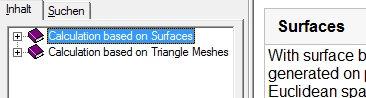
Now after generating the german version the help chm starts with an opened contents tree already.

Where in the course of building the CHM in Robohelp can I influence how this tree opens at start?

--

Christoph

This topic has been closed for replies.

1 reply

Captiv8r
Legend
February 26, 2016

Hi there

I'm not 100% sure of this, but my gut is telling me that perhaps TOC Synchronization may be at play here. For those settings, you have to look at the Window definition being used.

Unfortunately my crystal ball is broken and my psychic skills are below par, so I'm unable to divine what version of RoboHelp you may be using.

If you are using RoboHelp 2015, open the Output Setup pod. I think earlier versions called this the Project Setup pod. I don't have earlier available at the moment to confirm. But in that pod you want to locate the CHM Window being used and open it. (CHM Windows don't have the little globe in the middle as shown below)

Once you have identified the window, double-click it and it should open in the editor.

The option for synchronizing the TOC is found in the dialog.

KrischuAuthor
Inspiring
February 28, 2016

Thanks. I'm using the RH2015 (trial, coming from RH9). I had already ticked that "Auto-synchronize TOC". It doesn't  lead to collapsing all TOC branches.

Or do I have to define a new window? BTW, when I define a new window, it always carries the name "Neues Fenster" (New Window). How can I rename this to something different? It always appears a "Neues Fenster" in the item list box.

--

Christoph

Captiv8r
Legend
February 29, 2016

Hello again

Sorry for the delay.

See if the page linked below helps you resolve it.

Click here to view

Cheers... Rick