
Inspiring
February 9, 2024
Answered

Strange duplication of related topics and linked topics

  • February 9, 2024
  • 5 replies
  • 662 views

Hi

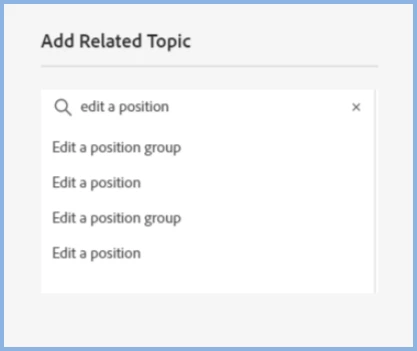
Something strange has just happened to a RoboHelp project I have been working on and off for some years. When I go to select a related topic, or a topic to link to, topics that match my search entry are duplicated (i.e. they appear twice). Looking at the preview offered, I can see that one topic is up to date and the other is an earlier version. However, when I look in the project Contents folder there is only one topic file.  Somehow or other RH seems to be holding on to an earlier version of files I've updated (where?) despite there being only one HTM file for the topic in the Contents folder .

This is especially annoying as I can see myself wrongly selecting an out-of-date version.

A screenshot of the duplication is attached.

Any ideas?

[Version: 2020.4.173]
 

TIA

Geoffrey

    This topic has been closed for replies.
    Correct answer GeoffreyMarnell

    Hi Peter


    I installed the latest version and the problem disappeared (along with that other problem: frozen expanded thumbnails.


    Thnaks for your help along the way.

    5 replies

    Community Expert
    February 11, 2024

    If you hover over each topic title you should see a popup displaying the file path. That would tell you if it's the same file or different files.

    Inspiring
    February 13, 2024

    Thanks Amebr.  I wasn't aware of that (just quickly clicking on the name — in a mad hurry, as always). Anway, installing the latest version got rid of the problem.

    Cheers

    G.

    Peter Grainge
    Community Expert
    Community Expert
    February 10, 2024

    I have also sent you a Private Message.

    ________________________________________________________

    My site www.grainge.org includes many free Authoring and RoboHelp resources that may be of help.


    Use menu (bottom right) to mark as Best Answer or to Highlight particularly useful replies. Found the answer elsewhere? Share it here.
    Peter Grainge
    Community Expert
    Community Expert
    February 10, 2024

    If you still get this after upgrading, I would definitely be poking around the project a bit more.

    ________________________________________________________

    My site www.grainge.org includes many free Authoring and RoboHelp resources that may be of help.


    Use menu (bottom right) to mark as Best Answer or to Highlight particularly useful replies. Found the answer elsewhere? Share it here.
    Peter Grainge
    Community Expert
    Community Expert
    February 10, 2024

    Are you sure it is a bug? I ask as no one else has reported this. Have you tried an external search tool to make sure there isn't something amiss? 

    ________________________________________________________

    My site www.grainge.org includes many free Authoring and RoboHelp resources that may be of help.


    Use menu (bottom right) to mark as Best Answer or to Highlight particularly useful replies. Found the answer elsewhere? Share it here.
    GeoffreyMarnellAuthorCorrect answer
    Inspiring
    February 13, 2024

    Hi Peter


    I installed the latest version and the problem disappeared (along with that other problem: frozen expanded thumbnails.


    Thnaks for your help along the way.

    Peter Grainge
    Community Expert
    Community Expert
    February 9, 2024

    I have inserted your image inline with the text makes it easier for anyone answering or viewing the post.


    I can't find a way of getting to that dialog. What you should be seeing is this.


    There were four more updates to 2020 so you could try applying the updates. Also you could try an uninstall, reboot and install 2022. It's part of the subscription.

    ________________________________________________________

    My site www.grainge.org includes many free Authoring and RoboHelp resources that may be of help.


    Use menu (bottom right) to mark as Best Answer or to Highlight particularly useful replies. Found the answer elsewhere? Share it here.
    Matt-Tech Comm Tools
    Community Expert
    Community Expert
    February 9, 2024

    Additionally, since the latest version is part of your subscription, is there a reason you don't want to update to Rh 2022, which is now on its 3rd update?

    -Matt SullivanFrameMaker Course Creator, Author, Trainer, Consultant
    Inspiring
    February 10, 2024

    Thanks Matt. It would be good if Adobe notified users of the updates. Anyway, the latest version I can get through Help > Check for Updates is 2020.8.34. Presumably this means if I want to fo to 2023 I need to do a complate reinstal of a new package.