


Style integrity when upgrading from RoboHelp Classic to RoboHelp 2020
We have a massive Online Help project that we maintain in RoboHelp Classic. We've been wanting to upgrade to RoboHelp 2020 for a few years, but we tried at various times and the upgrade would always fail. Now trying again with the latest update, the upgrade seems to complete successfully, but then some of the styles in the project seem to be corrupt. Bulleted and numbered lists seem to be the most obvious areas where the styling is off, with bullets and numbers either not being present or way out of alignment. Here is an example of a numered list in RoboHelp Classic and the same list in RoboHelp 2020:
RoboHelp Classic: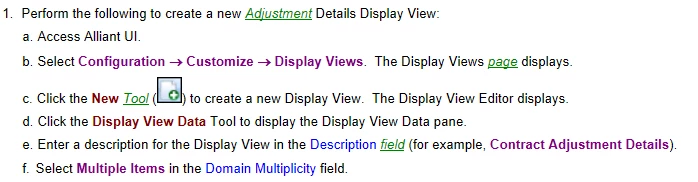
RoboHelp 2020:

Looking the the html for a single item, we have the following:
RoboHelp Classic:
<?rh-list_start level="1" class="ML_List" style="list-style: rh-list; list-style: rh-list;" ?><p class="List_Number">Perform the following to create a new <?rh-glo_start class="glossterm"?>Adjustment<?rh-glo_end ?> Details Display View:</p><?rh-list_end ?>
RoboHelp 2020:
<p class="ML_List">Perform the following to create a new <a class="glossterm" data-glossterm="Adjustment">Adjustment</a> Details Display View:</p>
In RoboHelp Classic, we have defined a muilti-level list style called ML_List:
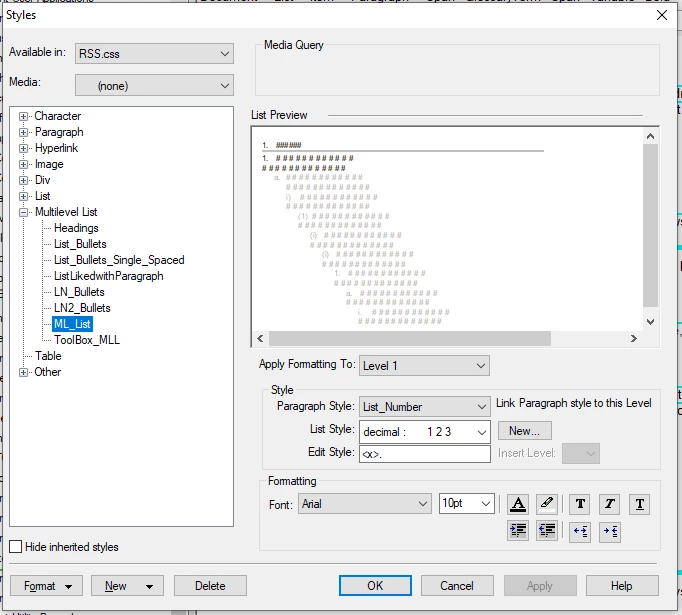
In RoboHelp 2020, ML_List is under "Other styles" and doesn't seem to be recognized as a list style. It seems like the conversion is corrupting the styles, either in the CSS file, the HTML, or both. Is there a way to avoid this? Our styles work well in RoboHelp Classic, but converting the project seems to break a lot of stuff.
 AdChoices