


Participant
February 3, 2023
Question

Style panel not working

  • February 3, 2023
  • 4 replies
  • 368 views

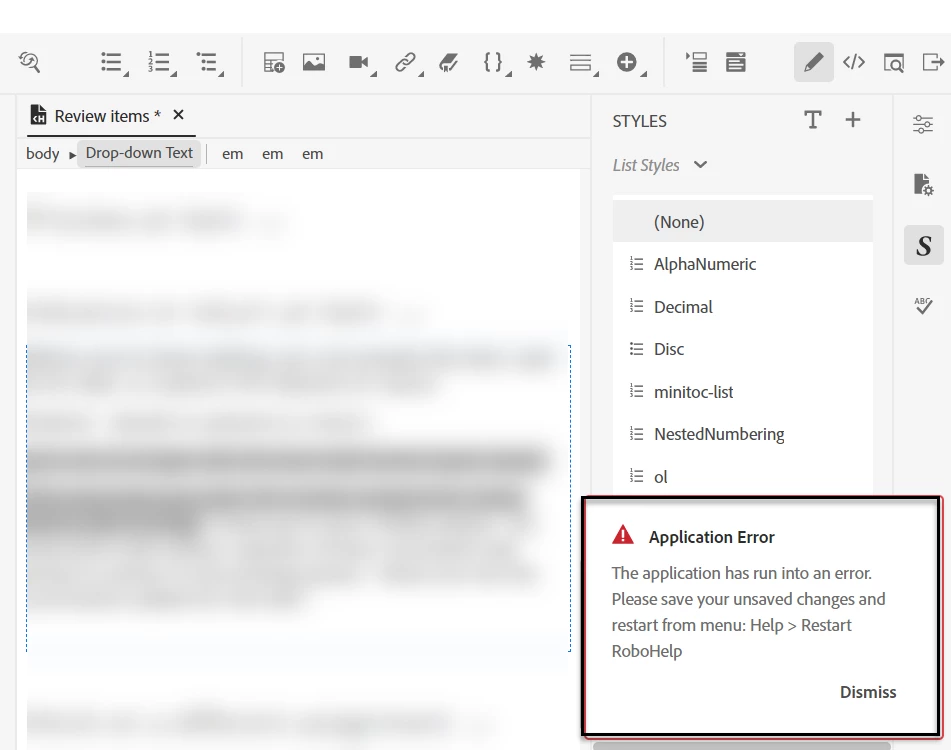
I'm suddenly unable to apply styles using the Styles pane in RH 2020. When I select text and click on a style, it throws an error telling me to restart RoboHelp. I've tried this, along with signing out and back in to my account and still not working. Any ideas on how to fix this or is anyone else experiencing this? 
This topic has been closed for replies.

4 replies

Peter Grainge
Community Expert
Community Expert
March 23, 2023

I'll also note there was not enough time for me to create a new project and import all of the topics to see if it was a corruption issue at the project level. 

That's not what I said and that would not prove anything as it could bring the corruption with it. What I said was create a one topic project. That would just have the default topic, CSS etc.


However, it has turned out to be the network and it could simply be that your colleagues connection is better for some reason. Working locally is always the preferred option.

________________________________________________________

My site www.grainge.org includes many free Authoring and RoboHelp resources that may be of help.


Use menu (bottom right) to mark as Best Answer or to Highlight particularly useful replies. Found the answer elsewhere? Share it here.
Participant
March 23, 2023

That's not what I said and that would not prove anything as it could bring the corruption with it. What I said was create a one topic project. That would just have the default topic, CSS etc.

I was not referring to your response reagrding Janet5FB3's issue, just my own; when I originally reported the issue in this thread. Sorry for not clarifying that in my post. Thanks for the insight, it is likely the connection issue so I can probably consider my issues resolved. 

Participant
March 23, 2023

I recently had an Adobe rep follow up with me to troubleshoot. He concluded that it was because of where the proejct was hosted (within my company's Bitbucket network). However, my colleague is working out of the same folder and does not have thtese issues with her projects. I can say that since working on a different project hosted locally on my computer I am not noticing the style panel issue. If the culprit is in fact the hosting location, it is strange that only the performance of the style panel is impacted. 

I'll also note there was not enough time for me to create a new project and import all of the topics to see if it was a corruption issue at the project level. I will be wokring on the project again soon and will report if the issue occurs again despite being hosted in a new location. 

Peter Grainge
Community Expert
Community Expert
March 23, 2023

@Janet5FB3 All you need to do is select the text and apply the style. That error message is caused by something else.


First step is to close the project. Always if you get that message, it should not be ignored. If it happens again. Create a new one topic project and test there. That will establish whether or not the problem is your project.


Let us know.

________________________________________________________

My site www.grainge.org includes many free Authoring and RoboHelp resources that may be of help.


Use menu (bottom right) to mark as Best Answer or to Highlight particularly useful replies. Found the answer elsewhere? Share it here.
Participating Frequently
March 23, 2023

I did close and reopen the project. I have tested doing the same things I was doing before and I no longer get the error message. I do notice the following behaviour, however. My objective is to insert comments and questions for reviewers in a contrasting colour (bold red) using a character style and then mark it with conditional text (comment) so I can suppress them from output if I wish.
1. Success: Apply the style for the contrasting colour to new text.
2. Success: Apply the style for the contrasting colour to new text and then apply the condition to the same text.
3. Success: Type new text, apply the condition and then apply the character format to selected text within the conditional text sentence.

4. Unexpected: On text added before the error message appeared yesterday, the character style did not appear to be applied (still looked like default style). I could apply the condition to the text. (I can't remember if this was exactly when the error message appeared.)

5. Unexpected: For text added yesterday marked with the character style and the condition, where the character style did not appear, I am able to apply the character style today without getting an error, however, only some of the style is applied (bold instead of bold + red). Only when I remove the condition from the selected text does the text show the full character style (bold + red).


It is a relief to not get a message saying there has been an error that requires me to save changes and restart RoboHelp. I can do fine with the quirk I have described, but it is still unexpected behaviour when using both a character style and a condition.

Jeff_Coatsworth
Community Expert
Community Expert
March 23, 2023

@Janet5FB3  In one of the recent versions (can't recall which) you could colour the conditional text with ones of your own choosing - maybe that's what you're running into in point 5? 

Jeff_Coatsworth
Community Expert
Community Expert
February 3, 2023

Is it happening in the sample project? If so, then it sounds like something has changed in your environment. If not, then it's your project you need to dig into.

Participant
February 3, 2023

It is not a sample project. Right now it seems to be an issue with certain topics, perhaps not the style sheet itself. Digging deeper and will report if I find the cause. 

Participating Frequently
March 22, 2023

I recently upgraded a RoboHelp 2019 Classic project to jRoboHelp 2020 and I am experiencing this problem. I have limited experience with RH2020 so far, but in this case I tried to apply a character style to text and there was no visible change to the text and I saw that error message.