

Styles not being applied consistently within project topics
I have a RH2019 merged project and I have made absolutely sure that the same style sheet is being applied to all the child projects that are contained in the overall merged project.
When I apply specific styles to text, however, these styles are not being applied consistently within topics for a single project or across projects. I have attached two screenshots showing this. In the first screenshot titled "Correct Indentation," I show a style named Listing and a style named list-result- bullet. They are being applied at the same level of identation as the numbered list steps in the procedure. In the second screenshot titled "Incorrect Indentation," I show the same styles, but they are NOT being applied at the same level of indentation.
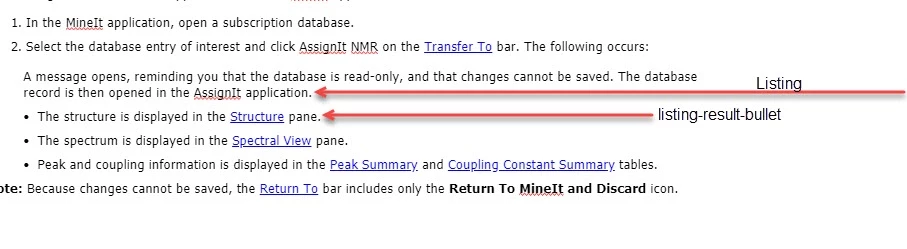

I have confirmed ad nauseum that I have the correct coding set up in the CSS for the numbered steps, etc. in each project and there is no difference in the paragraph tag that is assigned to the numbered steps in each topic. Here is an example:
<ol>
<li>
<p class="list-number">In the MineIt application, open a user database or hit list.</p>
</li>
<li>
<p class="list-number">Select the database or hit list entry of interest and click AssignIt NMR on the <a href="KnowItAll.chm::/transfer_to.htm">Transfer To</a> bar.</p>
<p class="Listing">The database record is opened in the AssignIt application:</p>
<p class="list_result_bullet">The structure is displayed in the <a data-rhwidget="HyperlinkPopover" href="Structure_Pane.htm">Structure</a> pane.</p>
<p class="list_result_bullet">The spectrum is displayed in the <a href="Spectral_Pane.htm">Spectral View</a> pane.</p>
<p class="list_result_bullet">For previously created records, peak and coupling information are displayed in the <a href="Peak_Summary_Table.htm">Peak Summary</a> and <a href="Coupling_Constant_Table.htm">Coupling Constant Summary</a> tables.</p>
<p class="list_result_bullet">For new records, the peak table contains a peak list that is ready to be assigned.</p>
</li>
Please don't comment about the use of <p class="list-number"> - I inherited quite a ham-handed CSS that I am having to work with the best that I can in terms of cleanup, but my client does not have the $$ for a total overhaul.
I simply do not understand why I am seeing what I want sometimes in one topic, but not another when I have made the changes to the paragraph styles at the CSS level - not as overrides, one-offs, etc.
Thank you.


 AdChoices