


Inspiring
February 11, 2021
Answered

Sub sections missing in Word output

  • February 11, 2021
  • 9 replies
  • 415 views

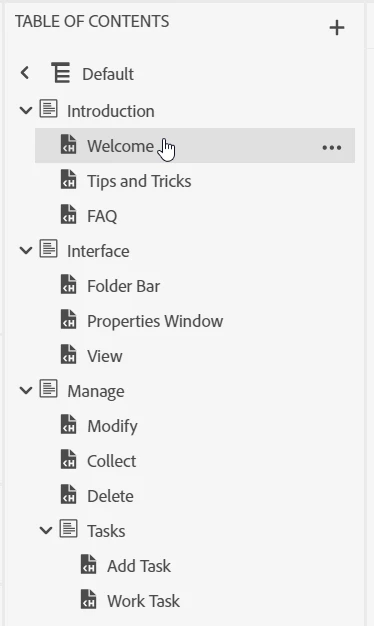
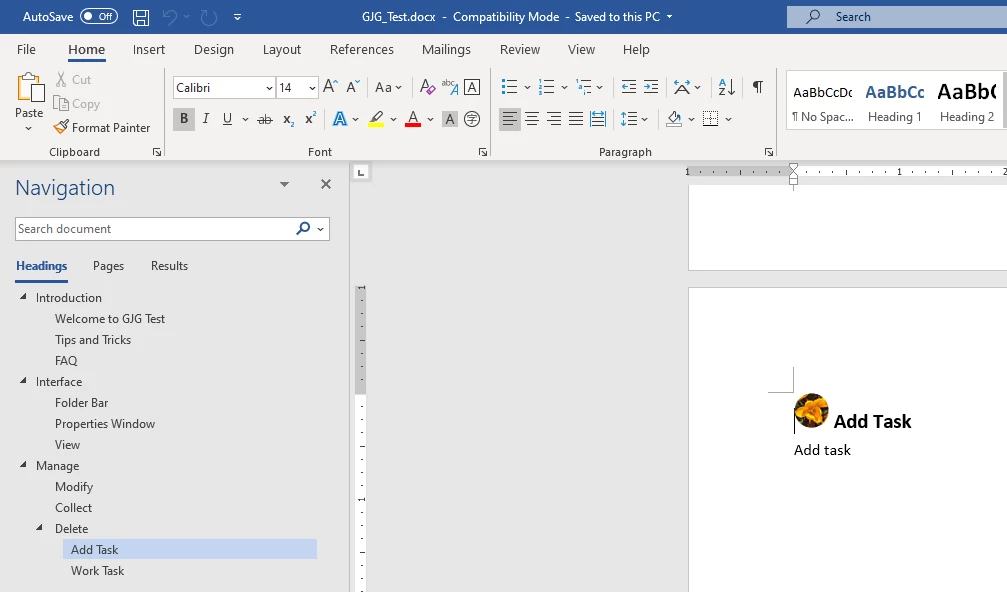
I created an Online type TOC with Sections and "sub" sections. When I output a Word file with that TOC, the top-level sections come through as Heading 1s as I'd expect, however the sub-section "Tasks" is not in the Word file at all. Am I missing something? Robohelp 2020, build 2020.3.32.

Robohelp TOC:
Word nav and page where I thought the sub-section heading would be:
This topic has been closed for replies.
Correct answer Peter Grainge

It simply means that the Tasks section name in the first image will not appear in the TOC. The topics below (Add Task and Work Task) will appear in the TOC immediately below Delete.


The heading levels of the topics are nothing to do with that. They will appear in the document as designed.


Including all section names regardless of level will be considered as a feature change for a future update.

________________________________________________________
See www.grainge.org for free Authoring and RoboHelp Information

9 replies

Community Expert
March 1, 2021

Thanks for clarifying.

Peter Grainge
Community Expert
Peter GraingeCommunity ExpertCorrect answer
Community Expert
March 1, 2021

It simply means that the Tasks section name in the first image will not appear in the TOC. The topics below (Add Task and Work Task) will appear in the TOC immediately below Delete.


The heading levels of the topics are nothing to do with that. They will appear in the document as designed.


Including all section names regardless of level will be considered as a feature change for a future update.

________________________________________________________
See www.grainge.org for free Authoring and RoboHelp Information

Use the menu (bottom right) to mark the Best Answer or Highlight particularly useful replies. Found the answer elsewhere? Share it here.
Community Expert
February 28, 2021

Peter, does this mean currently Word output can only have H1 and H2 levels based on topics? Anything lower must be content within a topic?

Peter Grainge
Community Expert
Community Expert
February 28, 2021

Whilst this issue is not regarded as a bug, that does not mean it will not be considered as a feature request in future updates.

________________________________________________________
See www.grainge.org for free Authoring and RoboHelp Information

Use the menu (bottom right) to mark the Best Answer or Highlight particularly useful replies. Found the answer elsewhere? Share it here.
Peter Grainge
Community Expert
Community Expert
February 26, 2021

I'm sorry to say that Adobe do not regard this as a bug. For the Word output nested sections will not display and your only option for Word is to move all sections to one level.


What you can do is enter what you see as top level sections in upper case and what would have been lower levels in mixed case. That indicates some sort of hierarchy.

________________________________________________________
See www.grainge.org for free Authoring and RoboHelp Information

Use the menu (bottom right) to mark the Best Answer or Highlight particularly useful replies. Found the answer elsewhere? Share it here.
gjg097Author
Inspiring
February 22, 2021

Peter Grainge looked at my project and confirmed this appears to be a bug. He reported it to Adobe, so I'm going to mark this as done.

Peter Grainge
Community Expert
Community Expert
February 17, 2021

There's a page on my site about the new TOCs but as far as I can see, you have things set up correctly. The Table of Contents (grainge.org)


Can you share the project? If you can, then see the Contact page on my site and send the project as instructed there. Do make sure you include a link to this thread and please do not email the project direct.

________________________________________________________
See www.grainge.org for free Authoring and RoboHelp Information

Use the menu (bottom right) to mark the Best Answer or Highlight particularly useful replies. Found the answer elsewhere? Share it here.
gjg097Author
Inspiring
February 17, 2021

I have everything checked on in the Layout section. Here's what it looks like:

Peter Grainge
Community Expert
Community Expert
February 13, 2021

Look in the Layout section of the preset. There is an option to include section headings. Is that selected?

________________________________________________________
See www.grainge.org for free Authoring and RoboHelp Information

Use the menu (bottom right) to mark the Best Answer or Highlight particularly useful replies. Found the answer elsewhere? Share it here.
