
Inspiring
February 23, 2015
Question

Suddenly getting script error on button javascript

  • February 23, 2015
  • 2 replies
  • 447 views

For a couple of years we have had a button object in our skin, linked to our support page with the following javascript command:

top.open('http://www.ourwebsite.com/support');

Until recently, the button has worked fine in every OS we support (Win 7, Win 8, Server 2k8, Server 2k12).

All of a sudden, however, we're seeing a strange script error when clicking the help skin button on the two server OS's (2k8 and 2k12). Both OS's are the latest, fully patched versions.
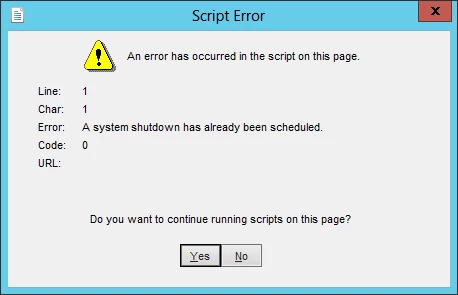
Any thoughts on why Windows 2k8 and 2k12 would suddenly start throwing this error?

This topic has been closed for replies.

2 replies

KimberlyO
Inspiring
February 27, 2015

I found some info about this error message here: Unknown Error!! - Support - AutoHotkey Community  (Although it is not directly related to RoboHelp.)

According to that forum, my "translation" is that this error message has to do with Internet Explorer still running in the background but trying to shut down. (It's all in English, I just mean translating from geek-speak.)

Willam van Weelden
Inspiring
February 23, 2015

Does this only occur on IE or also on other browsers?

Since JS can't start a system shutdown, I'm quite puzzled...

Kind regards,

Willam

Inspiring
February 23, 2015

Our help is presented in a custom help shell that opens automatically in IE, so testing in other browsers isn't straightforward. Plus, the script error is a bit intermittent. I'll attempt to redirect the browser call to a different browser, by some means, and see what happens.