

Syncing Between the Project Manager and Resource Manager: Best Practices?
Hello-
A colleague and I have just started creating product documentation for our company via RoboHelp 11. We have created a set of topics on a network location and have connected to that location via our Resource Manager. We are making edits to topics located on our own C: drives via the Project Manager and attempting to keep our topics up to date via the syncing function by sending our topic edits to the Resource Manager topics and downloading newly edited topics from the Resource Manager to our local drives. However, we do have a couple of questions.
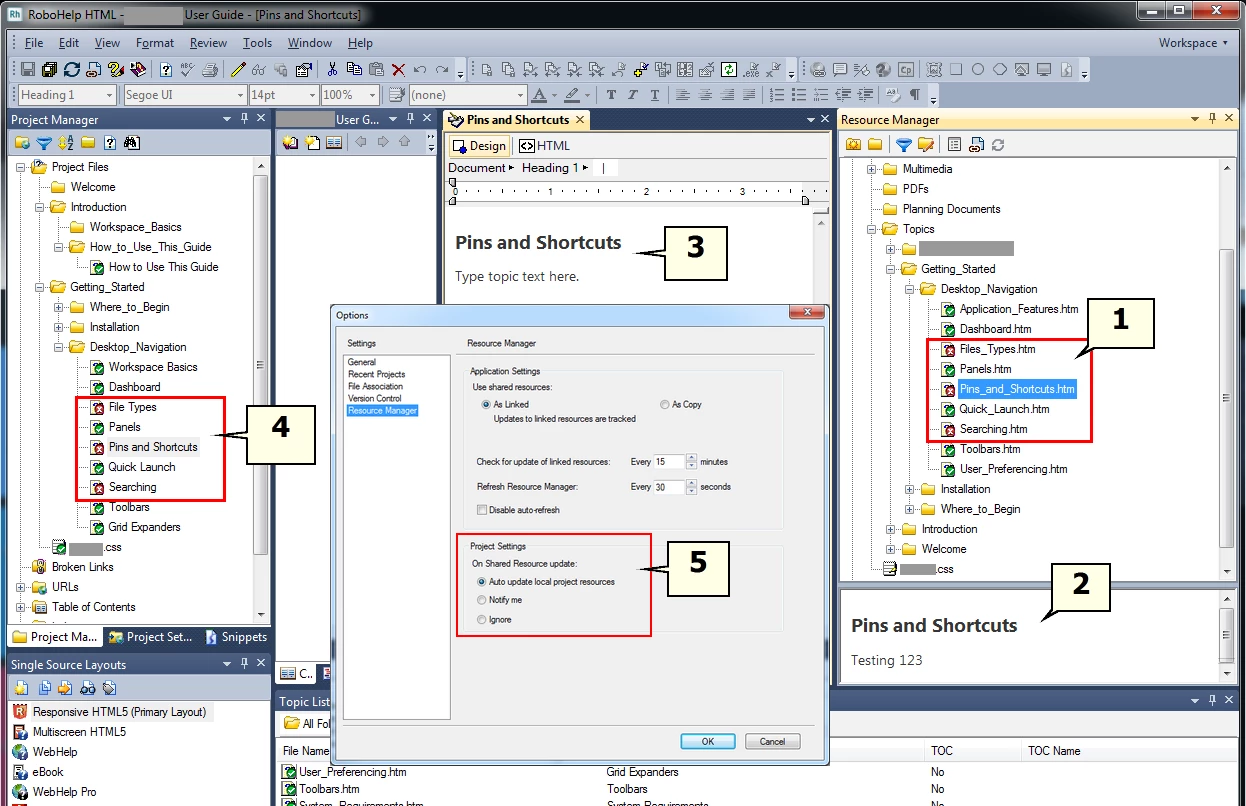
For example, in the diagram, if my colleague edits a few topics locally and then syncs with the Resource Manager, I see those topics with the red "x" icon (1) indicating my topics in my Project Manager (4) are out of sync. I can see the changes my colleague has made to the topic she synced with the Resource Manager (2) and I can open my own copy of the topic on my C: drive with the now out of sync text (3) but the only way we can see to sync my own Project Manager topics with the Resource Manager topics is to right-click on each individual changed topic in the Resource Manager and select the Sync option one at a time.
Question A: Is there any way to mass sync all of the out of sync topics in my Project Manager with the newly edited topics in the Resource Manager with one action so that my own local topics will be updated and in sync with our shared topics in the Resource Manager?
Question B: What does the "Auto update local project resources" setting (5) do? Is this the solution I am looking for in my Question A? We are not sure what it does at this point and could use a pointer or two.
Thank you-
Michael


 AdChoices