
Diggi76
Participant
March 15, 2019
Question

Tab stops at Word import to Robohelp 2017

  • March 15, 2019
  • 1 reply
  • 400 views

Hi,

I imported a word document into Robohelp 2017.

The docx contains tab stops. These are interpreted by Robohelp as follows:

<span style="font-size: 9.0pt; line-height: 115%; font-family: Arial, sans-serif;">Defaultwert</span><span

     style="font-size: 10.0pt; line-height: 115%;">&#160;&#160;&#160;&#160;&#160;&#160;&#160;&#160;&#160;&#160;&#160;&#160;&#160;&#160;&#160;&#160;&#160;&#160;&#160;&#160;&#160;&#160;&#160;&#160;&#160;&#160;&#160;&#160;&#160;&#160;&#160;&#160;&#160;&#160;&#160;&#160;</span>&#160;<span

     style="font-size: 9.0pt; line-height: 115%; font-family: Arial, sans-serif;">nicht aktiv</span></p>

<p style="line-height: 1.0pt;">&#160;</p>

<p><span style="font-size: 9.0pt; line-height: 115%; font-family: Arial, sans-serif;">Konfigurierbare

Werte</span><span style="font-size: 10.0pt; line-height: 115%;">&#160;&#160;&#160;&#160;&#160;&#160;&#160;&#160;&#160;&#160;&#160;&#160;&#160;&#160;&#160;&#160;&#160;</span>&#160;<span

     style="font-size: 8.0pt; line-height: 115%; font-family: Arial, sans-serif;">aktiv oder nicht aktiv</span>

Unfortunately, this results partly in different distances.:
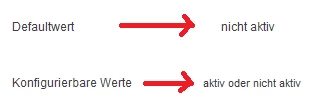
How can I fix or map this?

This topic has been closed for replies.

1 reply

Peter Grainge
Community Expert
Community Expert
March 15, 2019

I don't think you can. Tab stops are a concept not understood by HTML Even if you manually align things, using spaces for alignment in HTML may not work well if the user resizes the window. It can give odd results.

Putting the content into a table would give better results.


See www.grainge.org for free RoboHelp and Authoring information.

@petergrainge

Use the menu (bottom right) to mark the Best Answer or Highlight particularly useful replies. Found the answer elsewhere? Share it here.