
Participant
November 22, 2019
Question

Table Formatting - Inside Borders

  • November 22, 2019
  • 2 replies
  • 326 views

Hello!


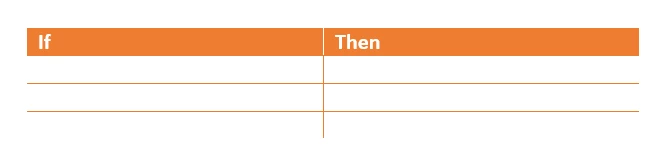
Is there anyway to create a table in Robohelp and remove all exterior borders so only the inside borders exist? I've attached an example of this performed in Word - I'm hoping there is functionality in RoboHelp to do this. Any input is greatly appreciated! 

Thanks!
This topic has been closed for replies.

2 replies

Vivek Kumar
Adobe Employee
Adobe Employee
November 23, 2019

Just out of curiosity i checked if it can be created in the RH 2019 new CSS editor. I could do it almost but one border in the last cell, i had to add last 3 lines manually. Please copy paste the following css code in your CSS file and you are good to go. Table style name is noborder, change it to what you like


table.noborder {
border-collapse: collapse;
}
table.noborder td {
border-width: 2px;
border-style: solid;
border-color: #ed7d31;
border-left: 0;
border-top: 0;
padding-top: 4px;
padding-right: 6px;
padding-bottom: 4px;
padding-left: 6px;
}
table.noborder tr:first-child td {
border-width: 2px;
border-style: solid;
border-color: #FFFFFF;
border-top: 0;
border-left: 0;
background-color: #ed7d31;
color: #FFFFFF;
border-bottom: 0;
}
table.noborder tr:last-child td {
border-width: 2px;
border-style: solid;
border-color: #ed7d31;
border-left: 0;
border-bottom: 0;
}
table.noborder tr td:last-child {
border-right: 0;
}


Peter Grainge
Community Expert
Community Expert
November 23, 2019

I'm not seeing why you have used the Documentation tag. What would have helped is using a tag to indicate which version of RoboHelp you are using. Need that to give you the right answer.


www.grainge.org

Use the menu (bottom right) to mark the Best Answer or Highlight particularly useful replies. Found the answer elsewhere? Share it here.