Inspiring
February 8, 2021
Answered

Table in list is not indented in Word output

  • February 8, 2021
  • 2 replies
  • 260 views

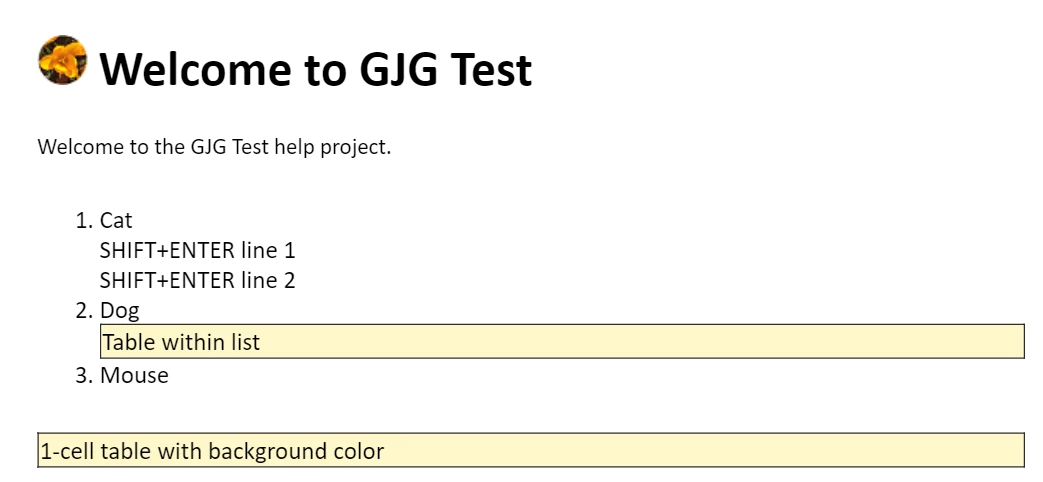
In a list I hit SHIFT+ENTER and inserted a table with text for a note I want to stand out in the instructions. In the Word output, the text in the table is indented as expected but the left border of the table is not - it goes all the way to the left side of the page. This is in Robohelp 2020, specifically 2020.3.32.

In Robohelp:
In Word:
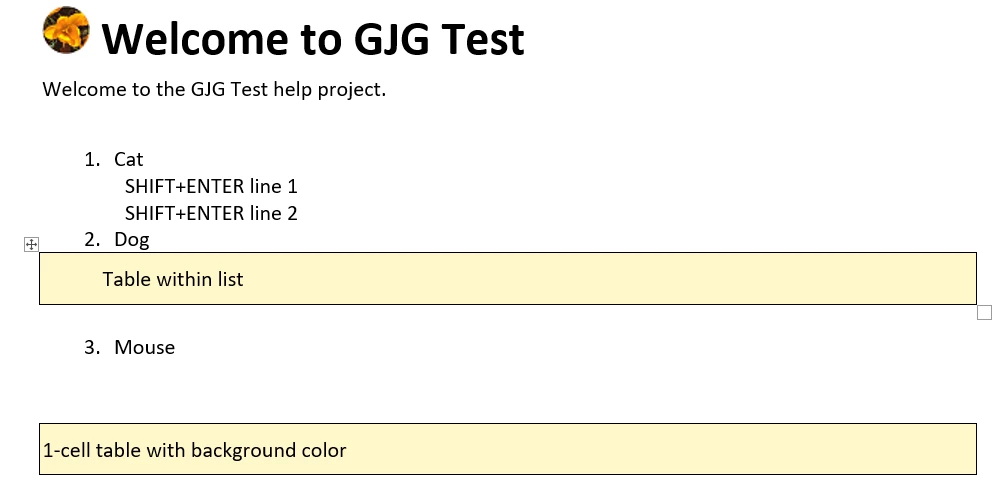
 

This did work in RH11, so I'm thinking it's a bug. Is there anything I should do differently?

This topic has been closed for replies.
Correct answer gjg097

Thanks again Peter. I went ahead and reported it anyway so we can confirm whether this is a limitation or fix-able:
https://tracker.adobe.com/#/view/RH-8630

2 replies

gjg097AuthorCorrect answer
Inspiring
February 9, 2021

Thanks again Peter. I went ahead and reported it anyway so we can confirm whether this is a limitation or fix-able:
https://tracker.adobe.com/#/view/RH-8630

Peter Grainge
Community Expert
Community Expert
February 9, 2021

Again you are hitting issues caused by RoboHelp now applying strict HTML5 and CSS3 standards. In this one I'm more inclined to think the old code allowed Adobe to make it work in ways the new standards do not.


I would create two table styles. One fully left aligned and the same table with an indent.


After two press Enter twice and then insert the indented table. Then restart the list with numbering set to 3.

________________________________________________________
See www.grainge.org for free Authoring and RoboHelp Information

Use the menu (bottom right) to mark the Best Answer or Highlight particularly useful replies. Found the answer elsewhere? Share it here.